
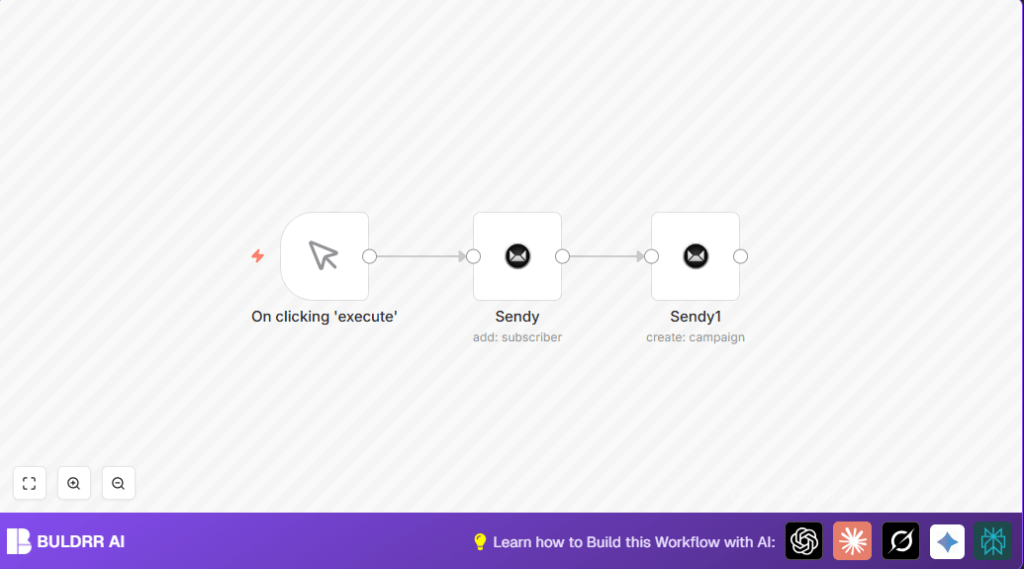

Automate Email Campaigns with Sendy and n8n

This workflow automates the process of adding a subscriber to a mailing list and immediately sending a welcome email campaign via Sendy. It solves the problem of manual email subscriber and campaign management, saving time and reducing errors.
manualTrigger
sendy
sendy
Workflow Identifier: 2391
NODES in Use: Manual Trigger, Sendy

Press CTRL+F5 if the workflow didn't load.

Learn how to Build this Workflow with AI:

Visit through Desktop for Best experience

Opening Problem Statement

Meet Harshil, a small business owner who manages an email newsletter for his tech community using Sendy. Every time a new subscriber signs up, Harshil manually adds their email to the subscriber list and then creates and sends a welcome campaign. This process is repetitive and prone to errors, consuming Harshil’s valuable time that could be better spent improving his product. The manual approach also risks forgetting to send a welcome email promptly, potentially losing engagement with new subscribers. Harshil needs a better way to streamline adding subscribers and sending campaigns efficiently.

What This Automation Does

This n8n workflow automates the entire subscriber onboarding and welcome email campaign process using Sendy. When executed, here’s what happens:

  • Automatically adds a new subscriber to a specific Sendy mailing list with personalized details (like name and email).
  • Immediately triggers a welcome campaign email to the added subscriber list without manual intervention.
  • Saves workflow steps by chaining subscriber addition and campaign sending seamlessly.
  • Eliminates human errors such as missed campaigns or incorrect subscriber info.
  • Speeds up communication, ensuring subscribers receive timely welcome messages.
  • Reduces repetitive tasks, freeing up time for Harshil to focus on strategic growth.

Overall, this automation can save hours each week and improve subscriber engagement rates.

Prerequisites ⚙️

  • Sendy account with API access configured (needed for subscribing email and sending campaigns).
  • n8n account – either on n8n cloud or self-hosted.
  • Sendy API credentials configured in n8n Credential Manager.
  • Basic familiarity with n8n workflow editor.

Step-by-Step Guide

Step 1: Start with the Manual Trigger

Navigate to your n8n editor. Click the + Add Node button and select Manual Trigger node. This node will start the workflow when you manually execute it.

You should see a node named On clicking ‘execute’ in the workspace.

Common mistake: Forgetting to add a trigger will prevent the workflow from running.

Step 2: Add the Sendy Subscriber Node

Add a new node of type Sendy. Set the parameters:

  • Email: [email protected] (replace with your subscriber’s email)
  • List ID: 2 (the ID of your mailing list in Sendy)
  • Additional Fields > Name: Harshil (or whichever subscriber name)

Attach this node so that it triggers after the manual trigger node.

Expected Result: This adds the subscriber to the list in Sendy when you run the workflow.

Common mistake: Using wrong List ID or improper email format.

Step 3: Add the Sendy Campaign Node

Add another Sendy node configured for campaigns:

  • Title: Welcome to n8n
  • Subject: Welcome to n8n
  • Reply To: [email protected]
  • From Name: n8n
  • From Email: [email protected]
  • HTML Text:

    Hey!

    Welcome to n8n!

  • List IDs: 2
  • Send Campaign: true (this sends the email immediately)

Connect this node to run after the subscriber node.

Expected Outcome: A campaign email will be instantly sent to the new subscriber list after adding them.

Common mistake: Forgetting to set “Send Campaign” to true means the email won’t be sent immediately.

Step 4: Set Your Sendy API Credentials

Go to the Credentials menu in n8n and add your Sendy API credentials (API URL and API key). Assign these credentials to both Sendy nodes.

This enables secure, authorized communication with your Sendy installation.

Step 5: Test Your Workflow

Click the Execute Workflow button to run the entire process. Watch your subscriber list in Sendy update and confirm the campaign email is sent.

This confirms your integration works flawlessly.

Customizations ✏️

  • Change subscriber details dynamically: Instead of hardcoding, use variables or parameters in the Sendy subscriber node’s email and name fields.
  • Customize campaign content: Edit the HTML Text field in the campaign node to fit your branding or add custom messaging.
  • Multiple lists: Add logic nodes or additional Sendy nodes to add subscribers to different lists based on criteria.
  • Schedule Campaigns: Change “Send Campaign” to false and add a delay node to schedule campaigns.
  • Use Webhook Trigger: Replace manual trigger with webhook to automate on real-time signup events.

Troubleshooting 🔧

Problem: “Failed to add subscriber” error

Cause: Invalid API credentials or incorrect list ID.

Solution: Verify Sendy API credentials in n8n and confirm the list ID matches your Sendy mailing list.

Problem: Campaign email not sent instantly

Cause: “Send Campaign” parameter is false or missing.

Solution: Open the campaign Sendy node and make sure “Send Campaign” is set to true.

Pre-Production Checklist ✅

  • Ensure Sendy API credentials are correctly entered and tested in n8n.
  • Confirm the mailing list ID exists and matches in both nodes.
  • Run manual test to add subscriber and send campaign.
  • Check the Sendy installation logs for subscriber addition and campaign send status.

Deployment Guide

Activate your workflow in n8n by toggling it live from the editor once tested successfully. Schedule execution if you replace the manual trigger with time or webhook triggers for continuous automation.

Monitor workflow runs from the n8n dashboard to ensure consistent email sending performance.

Conclusion

By following this guide, you’ve built a precise automation in n8n that adds subscribers to your Sendy list and immediately sends a welcome campaign email. This solution saves time, reduces errors, and improves subscriber onboarding experience. Imagine reclaiming hours each week from manual processes, allowing you to focus on growing your community.

Next, consider automating unsubscribe handling or integrating signup forms triggering this workflow via webhooks for a full-circle email marketing automation setup.

Promoted by BULDRR AI

Related Workflows

Automate Viral UGC Video Creation Using n8n + Degaus (Beginner-Friendly Guide)

Learn how to automate viral UGC video creation using n8n, AI prompts, and Degaus. This beginner-friendly guide shows how to import, configure, and run the workflow without technical complexity.
Form Trigger
Google Sheets
Gmail
+37
Free

AI SEO Blog Writer Automation in n8n

A complete beginner guide to building an AI-powered SEO blog writer automation using n8n.
AI Agent
Google Sheets
httpRequest
+5
Free

Automate CrowdStrike Alerts with VirusTotal, Jira & Slack

This workflow automates processing of CrowdStrike detections by enriching threat data via VirusTotal, creating Jira tickets for incident tracking, and notifying teams on Slack for quick response. Save hours daily by transforming complex threat data into actionable alerts effortlessly.
scheduleTrigger
httpRequest
jira
+5
Free

Automate Telegram Invoices to Notion with AI Summaries & Reports

Save hours on financial tracking by automating invoice extraction from Telegram photos to Notion using Google Gemini AI. This workflow extracts data, records transactions, and generates detailed spending reports with charts sent on schedule via Telegram.
lmChatGoogleGemini
telegramTrigger
notion
+9
Free

Automate Email Replies with n8n and AI-Powered Summarization

Save hours managing your inbox with this n8n workflow that uses IMAP email triggers, AI summarization, and vector search to draft concise replies requiring minimal review. Automate business email processing efficiently with AI guidance and Gmail integration.
emailReadImap
vectorStoreQdrant
emailSend
+12
Free

Automate Email Campaigns Using n8n with Gmail & Google Sheets

This n8n workflow automates personalized email outreach campaigns by integrating Gmail and Google Sheets, saving hours of manual follow-up work and reducing errors in email sequences. It ensures timely follow-ups based on previous email interactions, optimizing communication efficiency.
googleSheets
gmail
code
+5
Free