

Automate Monthly Package Cleanup with n8n and MySQL

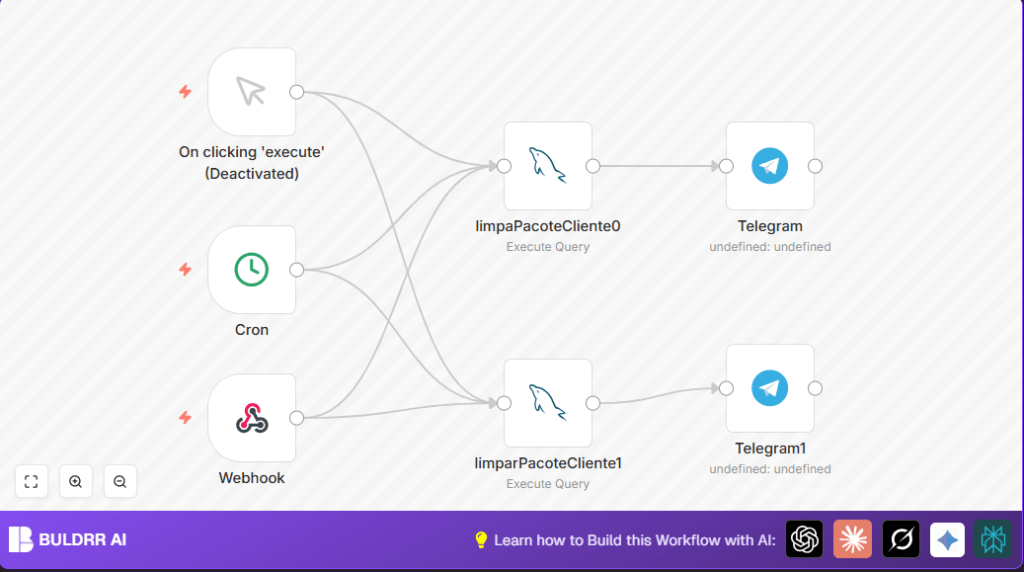
This workflow automates the monthly cleanup of outdated package records in two MySQL databases and sends Telegram notifications upon completion. It saves hours of manual database maintenance and ensures your shipment data stays accurate and up to date.
mySql
telegram
cron
+2
Workflow Identifier: 2382
NODES in Use: Manual Trigger, Cron, Telegram, Webhook, MySQL

Press CTRL+F5 if the workflow didn't load.

Learn how to Build this Workflow with AI:

Visit through Desktop for Best experience

1. The Frustration of Manual Package Cleanup

Meet João, the operations manager at a logistics company managing thousands of package records daily. Each month, João spends several painstaking hours manually identifying and deleting outdated shipment packages marked as “TRANSPORTE-RECEBIDO” older than a month. This repetitive task not only drains his productivity but also increases the risk of errors, such as accidentally deleting active package records or missing some obsolete ones. With two separate MySQL databases – one for PPM and another for OBJ – João needs a reliable way to automate package cleanup while keeping his team notified of the maintenance status. The lack of automation costs João’s company time and delays other critical logistics tasks.

2. What This Automation Does for You

This n8n workflow is designed specifically to tackle the monthly cleanup of outdated shipment packages in multiple MySQL databases, integrated with real-time Telegram notifications for transparency. When triggered by schedule or manually, it performs:

  • Automated identification and marking of packages over 1 month old and labeled as “TRANSPORTE-RECEBIDO” in both PPM and OBJ MySQL databases.
  • Execution of SQL update queries to set these old package records’ module field to “DELETE”, effectively flagging them for removal.
  • Sending customized Telegram messages to a specified chat group confirming the cleanup of packages in each database.
  • Dual trigger options via Cron scheduling (runs daily at 8 AM) or an HTTP webhook for on-demand cleaning.
  • Clear notifications help team members stay informed about maintenance without manual check-ins.
  • Reduces hours spent on manual database maintenance, cutting operational friction and error risks.

3. Prerequisites ⚙️

  • n8n account (Self-hosted or cloud) 🔌
  • Two MySQL database connections: PPM and OBJ with proper credentials 🔑
  • Telegram Bot with API credentials and a chat ID for notifications 📱
  • Basic understanding of SQL and n8n interface (recommended but not mandatory)

4. Step-by-Step Guide to Setting Up the Package Cleanup Automation

Step 1: Start with the Trigger Nodes

Open your n8n editor and add two triggers: a Cron node to schedule automated runs at 8 AM daily, and a Webhook node to allow manual HTTP-triggered execution.

  • Navigate: Click + Add Node > Trigger > Cron. Set the hour field to 8 and leave other fields as default.
  • Next, add a Webhook node (+ Add Node > Trigger > Webhook) and set its path to “limparPacotes” for URL endpoint access.
  • You will use this webhook URL for manual triggering later on.
  • Common mistake: Forgetting to save credential connections for these nodes causes runtime failures.

Step 2: Configure MySQL Cleanup Nodes

Add two MySQL nodes to handle cleanup for each database:

  • First node: name it limpaPacoteCliente0. Set credentials to your PPM database connection.
  • Second node: name it limparPacoteCliente1. Use credentials for the OBJ database.
  • In each node, paste the following SQL query:
  • -- LIMPAR ETIQUETAS ANTIGAS 
    WITH t AS (
      SELECT token FROM i_objeto 
      WHERE modulo = 'pacoteProduto' 
        AND situacao = 'TRANSPORTE-RECEBIDO' 
        AND data <= DATE_SUB(CURDATE(), INTERVAL 1 MONTH)
    )
    UPDATE i_objeto 
    SET modulo = 'DELETE' 
    WHERE modulo = 'pacoteProduto' 
      AND token IN (SELECT token FROM t);
    
  • This query finds all "TRANSPORTE-RECEBIDO" package tokens older than 1 month and flags them for deletion.
  • Common mistake: Using incorrect SQL syntax or missing database permissions will cause query failure.

Step 3: Connect Triggers to MySQL Nodes

Drag connections from both your Cron node and Webhook node outputs to both MySQL cleanup nodes. This way, either trigger activates the cleanup process in both databases simultaneously.

Step 4: Add Telegram Notification Nodes

Add two Telegram nodes to notify your team after each database cleanup:

  • First Telegram node sends the message: "LIMPOU PACOTES TRANSPORTE-RECEBIDO PONTO MIX" to the relevant chat ID. Connect this node right after limpaPacoteCliente0.
  • Second Telegram1 node sends: "LIMPOU PACOTES TRANSPORTE-RECEBIDO OBJETIVA", connected after limparPacoteCliente1.
  • Make sure your Telegram API credentials are correctly set in each Telegram node's credentials tab.
  • Common mistake: Wrong or expired bot tokens will prevent message delivery.

Step 5: Test Execution

  • Manually run the workflow by clicking Execute Workflow in n8n.
  • Check your Telegram group for the notification messages.
  • Verify your databases to confirm that old package tokens have their modulo field updated to "DELETE".
  • If errors occur, check node executions logs for troubleshooting.

5. Customizations ✏️

  • Change Cleanup Time Frame: In MySQL nodes, modify the SQL interval from "1 MONTH" to "2 MONTHS" if you want to extend or reduce how old packages must be before being deleted.
  • Adjust Trigger Times: In the Cron node, change the scheduled hour from 8 AM to any preferred time suitable for your operation.
  • Add Notification Recipients: Duplicate Telegram nodes and change chat IDs to notify additional teams or user groups.
  • Enhance Queries: Modify SQL to delete or archive the records instead of just marking with "DELETE" if required by your compliance rules.

6. Troubleshooting 🔧

  • Problem: "MySQL query failed with syntax error"
    Cause: The SQL query contains mistakes or uses functions not supported by your MySQL version.
    Solution: Validate query syntax in your database client and ensure compatibility. Adjust the query accordingly in n8n.
  • Problem: "Telegram message not sent"
    Cause: Invalid or expired Telegram bot API credentials.
    Solution: Re-enter correct Telegram API credentials in the node credentials settings.
  • Problem: "Webhook returns 404"
    Cause: Using incorrect webhook URL or workflow not activated.
    Solution: Copy the correct webhook URL from n8n, activate the workflow, and test again.

7. Pre-Production Checklist ✅

  • Verify MySQL credentials have write permissions for update operations.
  • Test SQL queries independently in database clients to ensure correctness.
  • Check Telegram Bot API credentials and bot permissions in the chat group.
  • Test both Cron and Webhook triggers to confirm workflow runs successfully.
  • Ensure n8n workflow is active and connected properly to all credentials.

8. Deployment Guide

Activate the workflow in n8n by turning the workflow toggle switch to "active." The scheduled Cron trigger will now run every day at 8 AM, cleaning up old packages automatically.

For on-demand cleanup, trigger the webhook URL via HTTP POST requests from external systems or manual browser/payload tools.

Monitor workflow executions in the n8n dashboard logs to track successful runs and identify any errors promptly.

9. FAQs

  • Q: Can I use this workflow with PostgreSQL instead of MySQL?
    A: Yes, but you will need to adjust SQL syntax accordingly and change the database credentials node in n8n.
  • Q: Does running this workflow consume Telegram API credits?
    A: Telegram Bot API usage is free with generous limits for typical use cases like notifications.
  • Q: How secure is my data when using this workflow?
    A: Data security depends on how securely you manage your MySQL and Telegram credentials within n8n and your network setup.

10. Conclusion

By following this guide, you've automated a tedious, monthly manual cleanup process of shipping package records across two MySQL databases using n8n and SQL queries. You have also implemented real-time Telegram notifications, keeping your team informed about system maintenance.

This automation frees up hours that João and his team can now redirect towards higher-value logistics tasks, reducing errors and improving operational efficiency.

Next steps could include extending this workflow to archive deleted package data, integrate with inventory systems, or build dashboards tracking cleanup history.

With this powerful n8n automation, complex database maintenance no longer needs to slow down your logistics operations.

Promoted by BULDRR AI

Related Workflows

Automate Viral UGC Video Creation Using n8n + Degaus (Beginner-Friendly Guide)

Learn how to automate viral UGC video creation using n8n, AI prompts, and Degaus. This beginner-friendly guide shows how to import, configure, and run the workflow without technical complexity.
Form Trigger
Google Sheets
Gmail
+37
Free

AI SEO Blog Writer Automation in n8n

A complete beginner guide to building an AI-powered SEO blog writer automation using n8n.
AI Agent
Google Sheets
httpRequest
+5
Free

Automate CrowdStrike Alerts with VirusTotal, Jira & Slack

This workflow automates processing of CrowdStrike detections by enriching threat data via VirusTotal, creating Jira tickets for incident tracking, and notifying teams on Slack for quick response. Save hours daily by transforming complex threat data into actionable alerts effortlessly.
scheduleTrigger
httpRequest
jira
+5
Free

Automate Telegram Invoices to Notion with AI Summaries & Reports

Save hours on financial tracking by automating invoice extraction from Telegram photos to Notion using Google Gemini AI. This workflow extracts data, records transactions, and generates detailed spending reports with charts sent on schedule via Telegram.
lmChatGoogleGemini
telegramTrigger
notion
+9
Free

Automate Email Replies with n8n and AI-Powered Summarization

Save hours managing your inbox with this n8n workflow that uses IMAP email triggers, AI summarization, and vector search to draft concise replies requiring minimal review. Automate business email processing efficiently with AI guidance and Gmail integration.
emailReadImap
vectorStoreQdrant
emailSend
+12
Free

Automate Email Campaigns Using n8n with Gmail & Google Sheets

This n8n workflow automates personalized email outreach campaigns by integrating Gmail and Google Sheets, saving hours of manual follow-up work and reducing errors in email sequences. It ensures timely follow-ups based on previous email interactions, optimizing communication efficiency.
googleSheets
gmail
code
+5
Free