
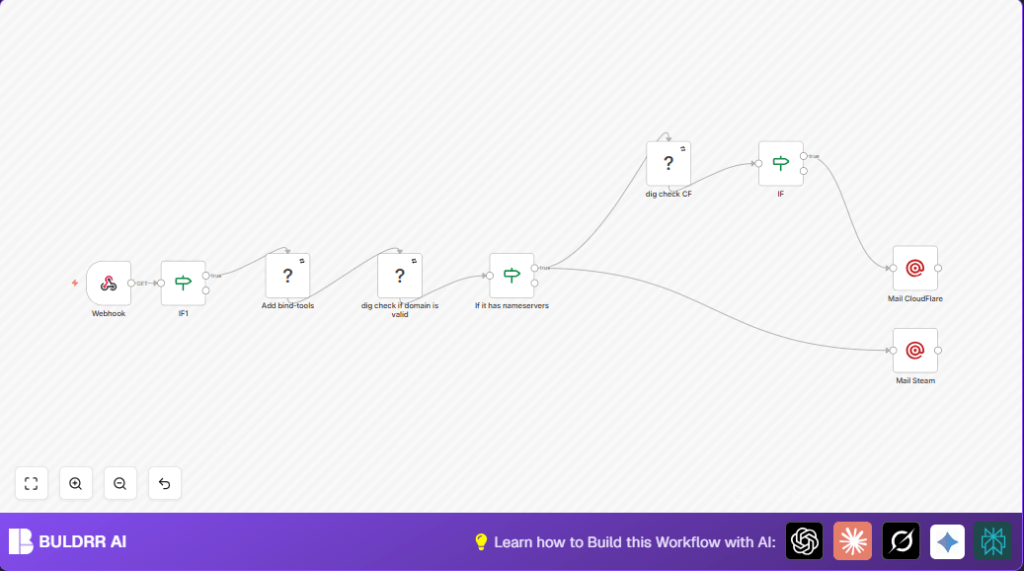

What This Workflow Does
This workflow helps check suspicious domains that might be phishing Steam users. It looks to see if the domain is real and if it uses Cloudflare name servers. Then, it sends emails to Cloudflare and Valve security teams automatically. This saves time and makes alerting faster and less error-prone.
Who Should Use This Workflow
Security analysts who watch for phishing websites targeting Steam users benefit from this workflow.
Anyone needing to automate manual checks of suspicious domains can use it.
Tools and Services Used
- n8n: Automation platform to build and run the workflow.
- Mailgun: Sends alert emails to security teams via API.
- Bind-tools: System tools installed on server providing
digcommand for DNS checks. - Webhook: Receives incoming submissions of suspicious domains.
Workflow Inputs, Processing, and Outputs
Inputs
- Domain names submitted via the Webhook node under the query parameter “q”.
- Authentication credentials for webhook access.
- Mailgun API key and email addresses for notifications.
Processing Steps
- Validate domain format using the IF node with regex to allow only proper domain strings.
- Check and install bind-tools if needed using Execute Command node to ensure
digis available. - Use dig command to count the domain’s NS records to confirm domain existence.
- Conditionally proceed only if NS records are found.
- Use dig and grep commands to verify if NS records belong to Cloudflare.
- Send emails with the Mailgun node: one to Cloudflare if domain uses Cloudflare NS, one to Valve always.
Outputs
- Email alerts sent to security teams.
- Workflow logs and failures (if configured).
Beginner Step-by-Step: How to Use This Workflow in n8n
Import Workflow
- Download the workflow file using the Download button on this page.
- Open your n8n editor.
- Choose “Import from File” and select the downloaded workflow.
Configure Credentials
- Add your Mailgun API credentials in the Mailgun nodes.
- Set your webhook basic authentication credentials in the Webhook node.
- Update recipient email addresses if needed for Cloudflare and Valve security teams.
Test and Activate
- Send a test request to the webhook with a sample suspicious domain in parameter “q”.
- Check the nodes’ execution to confirm they run without errors.
- Activate the workflow by toggling its status to active.
For full command support, self-host the n8n instance. Consider self-host n8n options if needed.
Edge Cases and Failures
If dig command is missing and bind-tools installation fails, the DNS check will fail.
Emails will not send if Mailgun API key or email addresses are incorrect.
Domains without valid NS records will stop the workflow early.
Incorrect regex in domain validation may let bad inputs through or block good ones.
Customization Ideas
- Change targeted email addresses in Mailgun nodes for notifications.
- Adjust dig command grep pattern to detect other DNS providers beyond Cloudflare.
- Add logging by writing data to files or sheets after sending emails.
- Secure the webhook more with IP whitelisting or enhanced authentication.
- Modify email text to add more detail or branding.
Summary of Benefits and Outcomes
✓ Saves analysts time by automating domain legitimacy checks.
✓ Automatically informs security teams fast when phishing is suspected.
✓ Improves accuracy with validation and DNS record checks.
✓ Keeps workflow running by ensuring necessary tools are installed automatically.
→ The user gets quicker phishing site detection and notification.
