
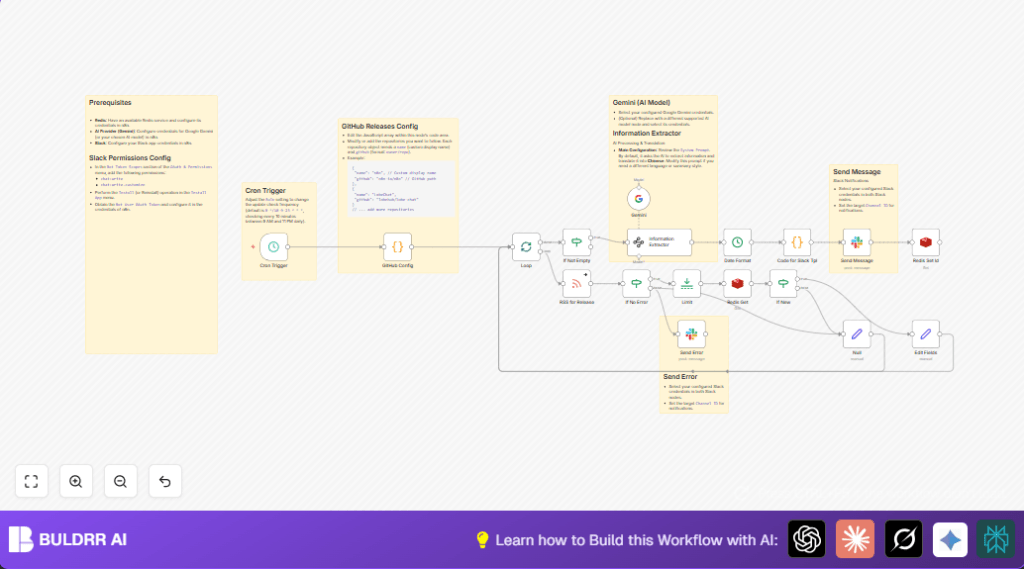

1. What This Workflow Does
This n8n workflow tracks new GitHub Releases from chosen repositories every 10 minutes during business hours.
It reads release data, extracts and translates changelogs with AI, then posts clear summary messages to Slack.
This stops missing updates and saves time on manual checks.
The workflow inputs are GitHub release RSS feeds.
Processing steps include looping repos, checking Redis cache, extracting info with Google Gemini AI, and formatting dates and messages.
The output is well-structured Slack notifications sent to a team channel.
2. Tools and Services Used
- n8n: To build and run automation workflows.
- GitHub RSS Feeds: To fetch latest release data.
- Google Gemini AI & Langchain: For automatic changelog extraction, categorizing, and translation to Chinese.
- Redis: To cache processed release IDs and prevent duplicates.
- Slack API: To send formatted release notifications and error alerts.
3. Inputs, Processing, and Outputs
Inputs
- GitHub repository list configured as a JavaScript array.
- GitHub release RSS feed URLs built from repository info.
Processing Steps
- A Cron Trigger runs workflow every 10 minutes from 9 AM to 11 PM.
- A Loop node processes each repository one by one.
- RSS for Release node fetches the release feed.
- Error checking via If No Error and error alerts through Slack if needed.
- Redis Get checks last release ID processed.
- If New node compares current release ID with cache to skip duplicates.
- Information Extractor Langchain AI node uses Google Gemini to extract and translate changelog features, fixes, and others.
- Date Format turns release date into readable local time.
- Code for Slack Tpl creates Slack message blocks summarizing release info.
- Send Message node posts notification to Slack channel.
- Redis Set Id updates cache with latest release ID.
Outputs
- Slack messages with translated, categorized changelog summaries and release info.
- Slack alerts on workflow or feed errors.
4. Beginner Step-by-Step: How to Use This Workflow in n8n
Download and Import Workflow
- Find the Download button on this page.
- Click to save the workflow JSON file.
- Open your n8n editor.
- Choose Import from File option.
- Select the downloaded JSON file.
Configure Credentials and Settings
- Add your Google Gemini AI API credentials in the Credentials section.
- Input Slack app credentials with necessary chat permissions.
- Set Redis instance credentials for cache usage.
- Open the GitHub Config Code node.
- Update the JavaScript array with GitHub repositories to monitor, using this format:
return [
  { "name": "n8n", "github": "n8n-io/n8n" },
  { "name": "Roo-Code", "github": "RooVetGit/Roo-Code" },
  // add more repositories here
];
Test the Workflow
- Run the workflow manually once from the n8n editor.
- Check Slack channel for the test release notifications.
- Verify no error alerts appear.
Activate for Production
- Switch the workflow toggle to enabled.
- Make sure the Cron Trigger node is active and scheduled to run regularly.
- Monitor Slack and n8n logs for correct runs.
- Adjust repository list or credentials as projects change.
If you need to run workflows on your own server, consider self-host n8n for full control.
5. Customizations
- Add more GitHub repositories by editing the GitHub Config Code node array.
- Change the frequency by updating the cron expression in the Cron Trigger node.
- Modify AI extraction language or style by adjusting the prompt in the Information Extractor node.
- Tweak the Slack message layout by editing the JavaScript code in the Code for Slack Tpl node.
- Send notifications to more Slack channels by duplicating or adding more Send Message nodes.
6. Troubleshooting
- Issue: Slack notifications not appearing.
Check: Slack bot token scopes include chat:write and chat:write.customize. Confirm channel ID is correct. - Issue: AI extraction returns empty or bad data.
Check: Google Gemini API key is valid and active. The prompt in Information Extractor matches expected input. - Issue: Redis cache keeps old release IDs.
Check: Redis connection is live. Keys used in Redis Get and Redis Set Id nodes match. - Issue: GitHub RSS feed fails or returns no data.
Check: Feed URLs are correctly formatted. No network block or access issue exists.
7. Pre-Production Checklist
- Verify the repository list is complete and accurate.
- Test Slack credentials by sending a direct test message.
- Run AI extraction on a sample release note to confirm Google Gemini integration.
- Check Redis connection with a test get/set operation.
- Trigger the workflow manually to simulate a feed check.
- Review execution logs for any errors or warnings.
8. Deployment Guide
Enable the workflow in n8n and ensure the Cron Trigger node is properly scheduled.
Keep Slack and Redis credentials updated.
Use n8n’s execution logs to watch the workflow performance.
Optionally, set up alert messages in Slack for any errors the workflow finds.
Regularly update repository configuration to keep monitoring aligned with your projects.
9. Summary and Result
✓ Saves time by automating GitHub release monitoring.
✓ Prevents missed important updates.
✓ Sends easy-to-read, translated changelog summaries to Slack.
✓ Reduces human errors in update processes.
✓ Provides real-time error notifications for problems.
✓ Easy to expand and customize to fit team needs.
