

What This Workflow Does
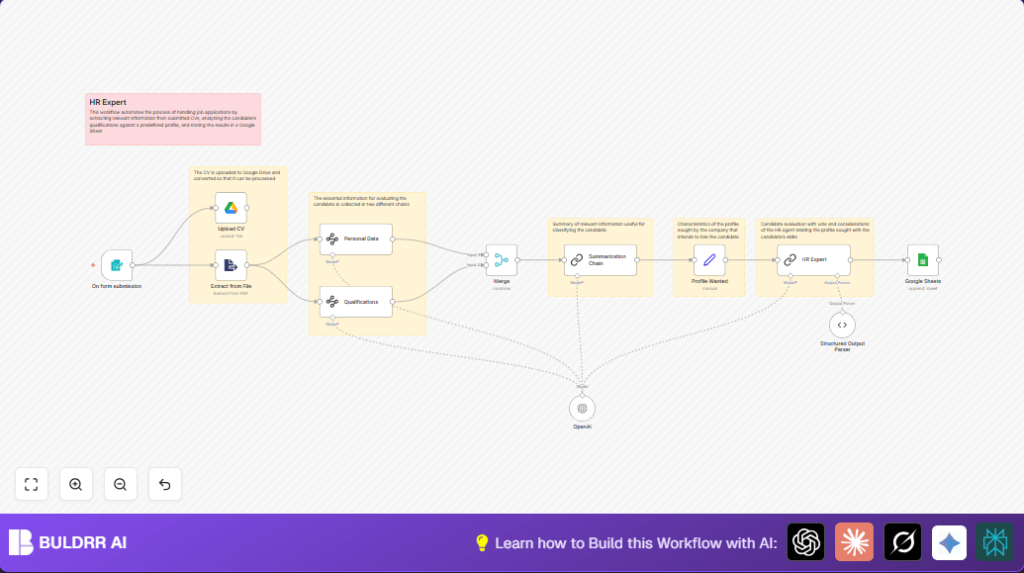
This workflow automates screening job applications sent as PDF CVs.
Candidates submit their CVs via a form.
The workflow extracts key info like education, job history, and skills.
An AI model scores each candidate on how well they fit a job profile.
Results are saved in Google Sheets for easier review.
This saves many hours of manual work and helps spot best candidates faster.
Who Should Use This Workflow
HR teams or recruiters who get many PDF resumes.
Anyone wanting to avoid manual CV reading.
Small to medium businesses aiming to speed up hiring.
The user should have basic n8n and Google account skills.
The workflow suits screening one CV at a time from form submissions.
Tools and Services Used
- n8n: Automation platform to build the workflow.
- Google Drive: Stores uploaded CV PDF files securely.
- Google Sheets: Logs candidate data and AI scores.
- OpenAI: GPT-3.5 or GPT-4 used for text extraction, summarization, and evaluation.
- n8n Form Trigger node: Collects candidate info and CV PDF upload.
Inputs, Processing Steps, and Output
Inputs
- Candidate submits name, email, and PDF CV via an online form.
- Form trigger node captures candidate data and file.
Processing Steps
- CV is uploaded to Google Drive.
- Extract text from PDF file.
- Use AI-based nodes to extract personal data (city, phone, birthdate).
- Extract qualifications, job history, and skills from text.
- Merge all extracted info into a unified JSON profile.
- Summarize candidate profile in a short, conversational format.
- Compare summary with desired candidate profile via AI scoring (1 to 10).
Output
- Save candidate name, contact, extracted info, summaries, score, and AI feedback to Google Sheets.
- This centralizes candidate records for easy HR review.
Beginner Step-by-Step: How to Use This Workflow in n8n
Import the Workflow
- Download the workflow JSON file using the Download button on this page.
- Open the n8n editor.
- Choose Import from File and upload the downloaded file.
Configure Credentials and Settings
- Add Google Drive and Google Sheets credentials with correct API Keys.
- Enter OpenAI API Key for AI nodes.
- In the Upload CV node, update the Drive folder ID where CVs will be stored.
- In the Google Sheets node, input the correct spreadsheet document ID and sheet name.
- Check the Profile Wanted node.
Update theprofile_wantedfield text to match your open role, such as desired skills, location, and experience.
Test and Activate
- Test the workflow by submitting a sample form entry with a PDF CV.
- Verify files upload to Drive and data extracts correctly.
- If tests pass, activate the workflow in n8n.
- Set the form trigger URL public so applicants can submit CVs.
- Monitor workflow runs for errors.
If self hosting n8n, consider self-host n8n for better control.
Customization Ideas
- Change the Profile Wanted node text to adjust target skills or location without rebuilding.
- Add extraction for languages or certifications by editing the AI extraction prompts.
- Make summaries more formal or longer in the Summarization Chain node prompt.
- Modify file naming pattern in the Upload CV node to include candidate names or dates.
- Add Slack notification nodes to alert HR when high scores are received.
Common Problems and Fixes
No text extracted from file
Check the binary property name in Extract from File node is exactly “CV”.
Make sure PDFs are text-based, not scanned images.
AI output parser failed to parse response
Adjust AI prompt to insist on strict JSON output.
Use Structured Output Parser node with exact schemas.
Google Sheets append fails
Verify the document ID and sheet names are correct.
Check OAuth permissions and data mappings match the sheet columns.
Pre-Production Checklist
- Submit a sample form entry with a PDF CV.
- Confirm file uploads appear in Google Drive.
- Verify the extracted text from PDFs is correct.
- Check AI extraction nodes return expected fields.
- Ensure summary and scoring outputs match JSON schema.
- Confirm Google Sheets appends data correctly.
- Backup Google Sheets and Drive folders before going live.
Deployment Guide
Activate the workflow in n8n after testing.
Make sure the form trigger URL is public for candidate access.
Watch workflow execution logs for errors.
Export logs or set up alerts for failures.
This automation can scale with hiring needs.
Adjust the Profile Wanted node for different jobs.
Summary of Benefits
✓ Saves at least 5 work hours weekly by automating CV screening.
✓ Reduces errors from manual data extraction.
✓ Ensures consistent candidate scoring with AI.
✓ Stores all candidate info centrally for easy HR access.
✓ Enables easy updates to hiring criteria without rebuilding.
→ The workflow makes candidate review faster and fairer.
→ Supports better hiring decisions with AI assistance.
