

Automate BBC News to Podcast Script Using n8n & Gemini LLM

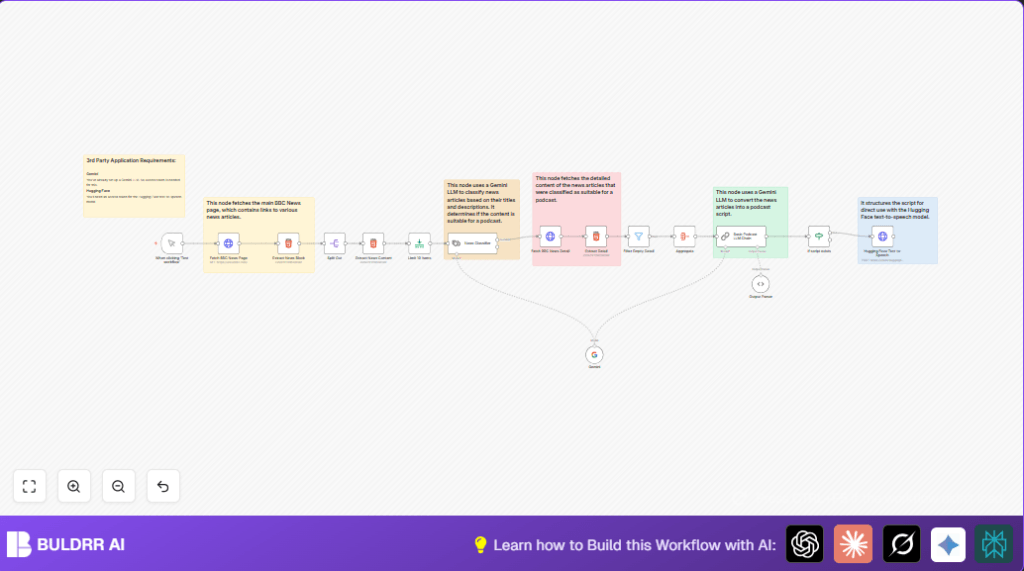
Save hours by automating BBC news scraping, filtering, and podcast script creation with n8n. This workflow uses Gemini LLM to classify news and generate conversational podcast scripts, then converts the script into speech with Hugging Face Text-to-Speech.
httpRequest
lmChatGoogleGemini
html
+9
Workflow Identifier: 2303
NODES in Use: Manual Trigger, HTTP Request, HTML, Split Out, Limit, LangChain Text Classifier, LangChain Chain LLM, Filter, If, LangChain LM Chat Google Gemini, LangChain Output Parser Structured, Sticky Note

Press CTRL+F5 if the workflow didn't load.

Learn how to Build this Workflow with AI:

Visit through Desktop for Best experience

1. Opening Problem Statement

Meet Sarah, a freelance content creator who runs a daily news podcast. Every morning, she spends at least two hours sifting through the BBC News website, selecting stories that engage her audience, writing scripts, and then recording them. This tedious process drains her energy and creativity, often causing delays that frustrate her listeners eagerly waiting for the day’s news update. Sarah wishes there was a way to automate the tedious parts of gathering, curating, and scripting news articles—saving her precious time for creative tasks like voiceovers and interviews.

Imagine losing nearly 14 hours a week repeatedly gathering news and manually scripting, plus risking overlooking key stories. Mistakes in manually scripting can also cost her credibility and listener satisfaction. This is the exact problem our n8n workflow tackles—a seamless pipeline that scrapes news, filters relevant stories, crafts engaging podcast scripts, and voices them using AI text-to-speech.

2. What This Automation Does

This n8n workflow automates transforming BBC News articles into ready-to-use podcast scripts and audio. Here’s what happens when you run it:

  • Automated Website Scraping: The workflow fetches the BBC News homepage HTML to access the latest headlines and article links.
  • Content Extraction & Parsing: It scrapes news blocks, breaks down story titles, links, and descriptions, then limits to the top 10 stories.
  • AI-Based News Classification: Uses Google Gemini LLM to filter stories suitable for an engaging podcast, focusing on positive, narrative-friendly news.
  • Detailed Content Fetch: For qualified articles, it retrieves full content from the BBC news article pages and extracts the main story text.
  • Podcast Script Generation: Leveraging Gemini LLM again, it converts the collected news into a warm, conversational podcast script formatted for direct speech synthesis.
  • Text-to-Speech Conversion: If the podcast script exists, it passes it to Hugging Face’s text-to-speech API to generate a natural sounding audio version.

Benefits: This automation shaves off hours daily spent on manual news curation and scripting, drastically reduces errors, and guarantees consistent, engaging podcast-ready content.

3. Prerequisites ⚙️

  • n8n automation platform (Self-hosting supported for advanced users)
  • Google Gemini API credentials for LLM text classification and generation (Gemini LLM nodes)
  • Hugging Face API credentials for text-to-speech synthesis
  • Basic knowledge of n8n UI and workflow creation
  • BBC News website access (public)

4. Step-by-Step Guide

Step 1: Start with Manual Trigger

From your n8n dashboard, click “New Workflow”. Add the Manual Trigger node named “When clicking ‘Test workflow’”. This allows you to start the workflow execution manually when ready.

Outcome: Ready trigger that enables workflow testing on demand.

Common mistake: Forgetting to execute this node manually which halts the workflow.

Step 2: Fetch BBC News Page with HTTP Request

Add an HTTP Request node called “Fetch BBC News Page”. Set the URL to https://www.bbc.com/ with the response format as string. This step downloads the raw HTML content of the BBC News homepage.

Outcome: Entire BBC news homepage HTML saved in node output for further parsing.

Step 3: Extract News Blocks Using HTML Node

Add an HTML node named “Extract News Block”. Set its operation to “extractHtmlContent”. Extract content from CSS selector .eGcloy targeting news title blocks, returning HTML arrays.

Outcome: List of news blocks extracted from the homepage, ready to split.

Step 4: Split Out Individual News Items

Add a Split Out node named “Split Out”. Set the field to split as newsTitle. This breaks the array of news blocks into individual nodes for granular processing.

Outcome: N8n workflows get individual stories to work with independently.

Step 5: Extract News Content Details

Add another HTML node named “Extract News Content”. Configure to extract title (h2 tag), link attribute (href from a tag), and description using CSS selector .kYtujW.

Example: Title “Global Climate Change Progress”, Link “/news/climate-1234”, Description “Recent global efforts to…”

Outcome: Parsed detailed news attributes to feed to the classifier.

Step 6: Limit the Number of News Items

Add a Limit node called “Limit 10 Items”. Set max items to 10 to keep the workflow efficient and focused.

Outcome: Processing capped to top 10 news items.

Step 7: Classify News Suitability with Gemini LLM

Add a LangChain Text Classifier node named “News Classifier”. Set the input text expression to combine title and description fields. Define categories “Suitable” and “Not Suitable” with descriptive criteria to allow the Gemini model to pick engaging news fit for podcasts.

Common mistake: Improper input expression, causing bad classifications.

Step 8: Fetch Full News Article Details

Add an HTTP Request node named “Fetch BBC News Detail”. Use dynamic URL expression: https://www.bbc.com{{$json.link}} to get the full article HTML content for each suitable news.

Outcome: Complete article HTML for detailed content extraction.

Step 9: Extract Detailed News Content

Add an HTML node named “Extract Detail”. Use CSS selector .dlWCEZ .fYAfXe to extract all paragraphs or content blocks as an array representing the article’s main text.

Outcome: Detailed main content of the news article extracted.

Step 10: Filter Empty Details

Add a Filter node named “Filter Empty Detail”. Set it to only allow items where the newsDetail array is not empty.

Outcome: Removes any unsuitable or empty articles.

Step 11: Aggregate All News Content

Add an Aggregate node named “Aggregate” to collect all newsDetail arrays into one consolidated dataset.

Outcome: All relevant news content is combined, ready for script processing.

Step 12: Generate Podcast Script with Gemini LLM

Add the LangChain Chain LLM node named “Basic Podcast LLM Chain”. Pass the aggregated news details to this node with a prompt instructing it to write a warm, dynamic, conversational podcast script from the news articles.

Prompt highlights include:

  • Engaging introduction
  • Natural transitions between stories
  • Conversational tone
  • JSON output format with key podcast_script

Important: This script is formatted for direct use in advanced text-to-speech systems.

Step 13: Check If Script Exists

Add an If node named “If script exists”. Set the condition to check if the podcast script key in the output is non-empty. This ensures only scripts with content proceed.

Step 14: Convert Script to Audio with Hugging Face

Add an HTTP Request node named “Hugging Face Text-to-Speech.”. Configure it to POST to the Hugging Face endpoint https://router.huggingface.co/hf-inference/models/facebook/mms-tts-eng. Send the podcast script as input text in JSON body, with authentication set to your Hugging Face API credential.

Outcome: The workflow returns an audio file (or URL) of the podcast, ready for distribution.

5. Customizations ✏️

Customize News Source URL

In the “Fetch BBC News Page” HTTP Request node, change the URL to another news website of your choice, like https://www.cnn.com/ to tailor your podcast to a different audience.

Adjust Number of News Stories

In the “Limit 10 Items” node, increase or decrease the maxItems count to control how many news articles get processed.

Modify News Classifier Criteria

In the “News Classifier” LangChain node, update the categories and description criteria to match your podcast’s editorial style—maybe make it more or less strict on what news is “suitable”.

Change Podcast Script Tone

Within the “Basic Podcast LLM Chain” node’s prompt, tweak the language to suit your podcast’s voice—for example, make it more formal or casual, or add humor.

Integrate Different Text-to-Speech API

Replace the Hugging Face HTTP Request node with another TTS provider by changing the endpoint URL and authentication credentials accordingly.

6. Troubleshooting 🔧

Problem: “HTTP Request fails or returns empty HTML”

Cause: The URL may be incorrect or the server blocked the request.

Solution: Verify URL correctness, test URL in browser, and configure HTTP headers or use proxies if needed.

Problem: “Gemini LLM classification inconsistent or errors”

Cause: Improperly formatted inputs or API limit issues.

Solution: Ensure the input expression to the News Classifier node correctly concatenates title and description fields. Monitor API quotas.

Problem: “No podcast script generated after LLM processing”

Cause: The input news articles might not meet the suitability criteria or prompt misconfiguration.

Solution: Confirm news articles pass the filter, and revise the prompt in “Basic Podcast LLM Chain” for clarity and output format.

7. Pre-Production Checklist ✅

  • Verify all API credentials for Gemini and Hugging Face are correctly configured and authenticated in n8n credentials.
  • Test manual trigger to ensure the workflow starts as expected.
  • Check HTTP Request nodes for valid URLs and response data format.
  • Ensure correct CSS selectors in HTML extraction nodes targeting up-to-date BBC page structure.
  • Confirm the News Classifier categorizes stories into “Suitable” and non-suitable correctly.
  • Perform test runs to generate a sample podcast script and ensure Hugging Face converts text to audio.
  • Backup your workflow and credentials before going live.
  • 8. Deployment Guide

    Once you’ve thoroughly tested the workflow, activate it by toggling it to “Active” in the n8n interface. You can then trigger it manually or schedule it using n8n’s built-in cron trigger if automation at fixed times is desired.

    Keep an eye on the execution logs to troubleshoot any errors quickly. For regular podcast production, consider monitoring usage limits for Gemini and Hugging Face APIs to avoid interruptions.

    9. FAQs

    Can I use a different news website instead of BBC?

    Yes, simply change the Fetch BBC News Page node’s URL to your preferred site. Make sure to update CSS selectors in Extract News Block and Extract News Content nodes to match their HTML structure.

    Does this workflow consume API credits?

    Yes. Both Gemini LLM and Hugging Face Text-to-Speech APIs have usage limits or costs depending on your subscription. Monitor accordingly.

    Is my data safe in this automation?

    Your data flows only between your n8n instance and third-party APIs under standard security protocols. Keep your API keys secure and restrict access to your n8n instance.

    Can this handle high volumes of news articles?

    The workflow limits to 10 articles per run by default, keeping performance stable. You can adjust this, but be mindful of API and processing constraints.

    10. Conclusion

    After following this guide, you will have automated the process of turning BBC news articles into an engaging podcast script and audio. This workflow not only saves Sarah—and you—hours of repetitive work but also ensures well-crafted, listener-friendly content every day. Next, consider extending this automation to publish the audio files to podcast platforms automatically or add social media announcers for your episodes.

    With n8n, Gemini LLM, and Hugging Face working together, news podcast creation becomes efficient, consistent, and scalable.

Promoted by BULDRR AI

Related Workflows

Automate Viral UGC Video Creation Using n8n + Degaus (Beginner-Friendly Guide)

Learn how to automate viral UGC video creation using n8n, AI prompts, and Degaus. This beginner-friendly guide shows how to import, configure, and run the workflow without technical complexity.
Form Trigger
Google Sheets
Gmail
+37
Free

AI SEO Blog Writer Automation in n8n

A complete beginner guide to building an AI-powered SEO blog writer automation using n8n.
AI Agent
Google Sheets
httpRequest
+5
Free

Automate CrowdStrike Alerts with VirusTotal, Jira & Slack

This workflow automates processing of CrowdStrike detections by enriching threat data via VirusTotal, creating Jira tickets for incident tracking, and notifying teams on Slack for quick response. Save hours daily by transforming complex threat data into actionable alerts effortlessly.
scheduleTrigger
httpRequest
jira
+5
Free

Automate Telegram Invoices to Notion with AI Summaries & Reports

Save hours on financial tracking by automating invoice extraction from Telegram photos to Notion using Google Gemini AI. This workflow extracts data, records transactions, and generates detailed spending reports with charts sent on schedule via Telegram.
lmChatGoogleGemini
telegramTrigger
notion
+9
Free

Automate Email Replies with n8n and AI-Powered Summarization

Save hours managing your inbox with this n8n workflow that uses IMAP email triggers, AI summarization, and vector search to draft concise replies requiring minimal review. Automate business email processing efficiently with AI guidance and Gmail integration.
emailReadImap
vectorStoreQdrant
emailSend
+12
Free

Automate Email Campaigns Using n8n with Gmail & Google Sheets

This n8n workflow automates personalized email outreach campaigns by integrating Gmail and Google Sheets, saving hours of manual follow-up work and reducing errors in email sequences. It ensures timely follow-ups based on previous email interactions, optimizing communication efficiency.
googleSheets
gmail
code
+5
Free