

What This Workflow Does ⚙️
This workflow helps to find LinkedIn profiles fast by using a simple form input.
It solves the problem of spending too much time searching by hand.
The output is a clear, targeted email with the best prospect profile and company info for follow-up.
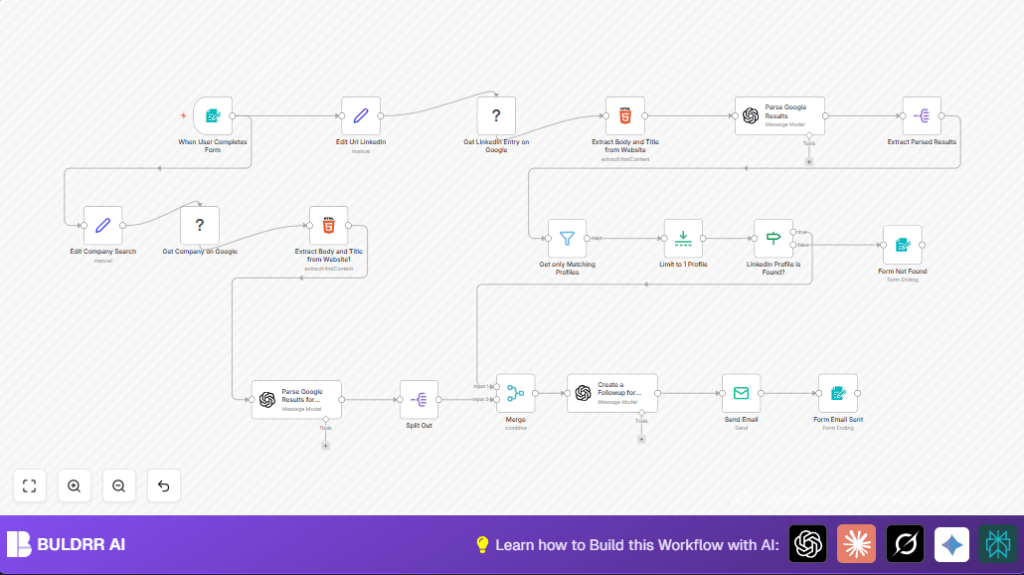
When a user submits a full name and company, the workflow builds special Google search URLs.
It uses Bright Data to scrape search results safely.
Then AI reads the data and picks out matching LinkedIn profiles and business info.
Finally, it sends a custom email to help you reach out.
Inputs → Process → Output Explanation
Inputs
- The user’s form input: full name and company name of the prospect.
Processing Steps
- Build Google search URLs for LinkedIn profiles and company data.
- Use Bright Data’s Web Unlocker to scrape Google results without blocking.
- Extract HTML content from the scraped pages.
- Send extracted HTML to GPT-4O-MINI to find LinkedIn profiles and company details.
- Filter to only keep profiles that closely match the input.
- Combine company information and person profile data.
- Generate a custom follow-up email message formulated as an outreach plan.
- Send the email using SMTP to the user for action.
- Provide a confirmation or failure message back in the form.
Output
- A personalized email sent to the user with prospect profile details.
- A confirmation message on the form that answers if the profile was found or not.
Who Should Use This Workflow?
This is designed for sales and marketing people who need accurate LinkedIn data fast.
It helps teams who waste time manual searching or contacting wrong profiles.
Users who want better outreach messages using AI insights also benefit.
This fits those with some access to n8n and API keys but no heavy technical skills.
Tools and Services Used
- n8n platform: Runs the automation.
- Bright Data Web Unlocker zone: Scrapes Google search results safely.
- OpenAI GPT-4O-MINI: Parses HTML and creates messages.
- SMTP server: Sends emails to the user.
- Embedded form trigger: Collects prospect full name and company.
Beginner Step-by-Step: How to Use This Workflow in n8n
Import and Setup
- Download the workflow file by clicking the Download button on this page.
- Inside the n8n editor, click “Import from File” and select the downloaded workflow.
- Add your Bright Data API Key and select the zone
web_unlocker1in the credentials section. - Add your OpenAI API Key with access to model
gpt-4o-mini. - Set SMTP credentials with correct email, password, and server info.
- Update any hardcoded emails or IDs in the Email Send node or other nodes to match your user email or info.
- Review and test the workflow once by submitting sample data through the embedded form URL.
- Fix any errors found in the log or during testing.
- Activate the workflow by toggling on the activation switch to run it automatically.
Usage Notes
- Share or embed the form URL with sales team members.
- They enter full name and company of prospects.
- The workflow processes and sends follow-up email automatically.
- Users receive confirmation on the form after submission.
For managing your own setup and servers, learn about self-host n8n to keep full control.
Step-by-Step Workflow Description
Form Trigger node
Captures prospect data: full name and company from user input.
Set nodes
Build two Google search URLs. One for LinkedIn profiles, one for company info.
=https://www.google.com/search?q=site%3Alinkedin.com%2Fin+{{ encodeURIComponent($json["Person Fullname"].trim() + " " + $json["Person's company"].trim()) }}Uses encodeURIComponent to make safe search queries.
Bright Data nodes
Scrape Google results pages, bypassing restrictions.
HTML Extract nodes
Get HTML content to send to AI for parsing.
OpenAI (Langchain) nodes
Analyze HTML to find matching LinkedIn profiles and company information.
Filter and Limit nodes
Keep only profile results that match the search input. Limit to one top match.
If node
Check if profile found or none.
Form nodes for user feedback
Show polite message if no profile found.
Merge node
Combine profile and company data.
OpenAI (Langchain) node
Generate personalized outreach email styled in Tailwind HTML.
Email Send node
Send email with follow-up advice to user.
Final Form node
Confirm email was sent.
Customization Ideas ✏️
- Change LinkedIn search to other sites like GitHub by editing the site URL in the search Set node.
- Add more form fields like position or email then update AI’s prompt to parse richer info.
- Switch to a stronger AI model such as
gpt-4for better detail. - Make recipient email dynamic from form input to deliver follow-ups to different users.
Troubleshooting ????
- Bright Data errors: Check API key and zone
web_unlocker1is active. - AI parsing errors: Make sure prompt uses correct data paths and expressions.
- Email sending fails: Confirm SMTP settings and network allow email sending.
Pre-Production Checklist ✅
- Ensure all API keys and credentials are correctly input in n8n.
- Submit test data through the form to check workflow steps.
- Verify JSON references in expressions are correct.
- Send test email from Email Send node to verify SMTP.
- Check AI-generated email HTML is safe for email clients.
Deployment Guide
Activate the workflow in n8n editor by turning on the toggle.
Embed or share the form URL for users to submit prospects info.
Use n8n execution logs to watch for errors.
Update AI prompts and credentials regularly.
Summary of Benefits ✓
✓ Saves hours by automating LinkedIn profile search and company analysis.
✓ Sends action-ready, personalized follow-up emails.
✓ Helps reach the right contact with precise profile filtering.
✓ Easy to use with downloadable workflow and clear configs.
