

Build an MCP Server with Airtable and n8n Automation

Discover how this n8n workflow builds a robust MCP server integrated with Airtable, automating social content management through AI and real-time triggers. Save hours managing social posts, updates, and approvals with seamless Airtable operations.
chatTrigger
agent
memoryBufferWindow
+5
Workflow Identifier: 2212
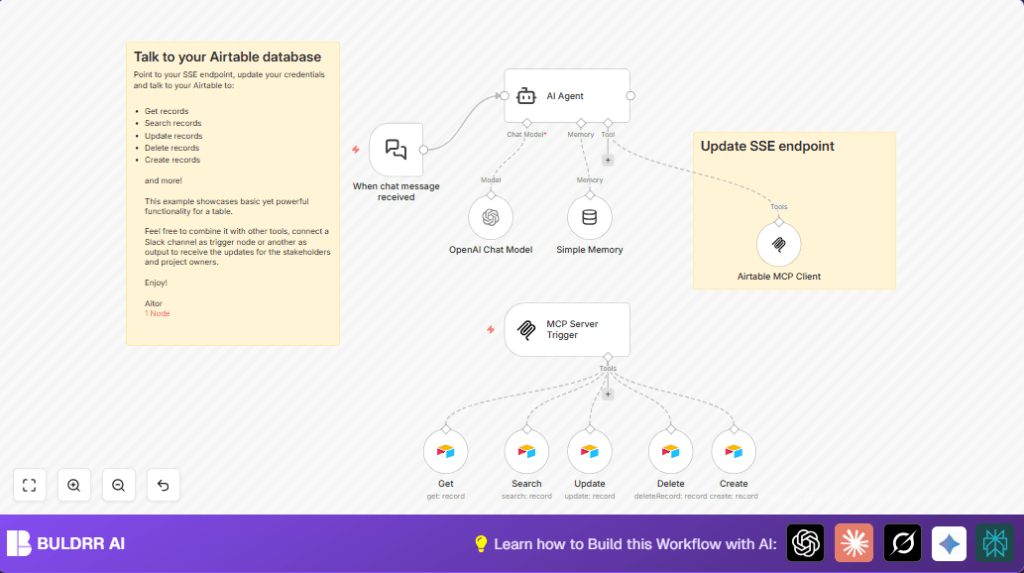
NODES in Use: chatTrigger, agent, memoryBufferWindow, mcpClientTool, lmChatOpenAi, mcpTrigger, airtableTool, stickyNote

Press CTRL+F5 if the workflow didn't load.

Learn how to Build this Workflow with AI:

Visit through Desktop for Best experience

1. Opening Problem Statement

Meet Aitor, a digital marketing manager overwhelmed by the constant flood of social media content updates his team manages across multiple channels. Every day, he spends hours manually updating, creating, searching, and deleting records in Airtable for social posts, juggling approvals, and keeping content fresh. One error or delayed update can result in missed deadlines, confused stakeholders, and inconsistent messaging leading to lost engagement and revenue.

The real crunch? Aitor needs a seamless way to synchronize his Airtable social post database with an intelligent, real-time chat-driven system that automates data retrieval and modification. Without automation, he risks spending countless hours on tedious manual database operations and stakeholder communication.

2. What This Automation Does

This n8n workflow acts as a powerful Managed Chat Platform (MCP) server integrated with Airtable and powered by AI, enabling fluent and intelligent interactions with your Airtable social posts database through chat commands.

  • Real-time chat trigger: Initiates workflow upon receiving chat messages to execute tasks.
  • AI Agent-powered decision making: Uses OpenAI’s GPT-4o model to understand and generate human-like conversational responses and commands.
  • Memory Buffer: Maintains conversational context to handle multi-turn questions and commands accurately.
  • CRUD operations with Airtable: Supports creating, reading, updating, searching, and deleting Airtable social post records automatically based on chat input.
  • Managed client tool for server events: Uses a Server-Sent Events (SSE) endpoint for real-time updates and notifications integration.
  • Custom workflow trigger: Uses an MCP trigger node to link chat input and Airtable operations seamlessly.

By automating these, Aitor can save hours per day on managing social media content, reduce errors in updates, and improve collaboration with stakeholders through instant chat-driven DB operations.

3. Prerequisites βš™οΈ

  • n8n account (cloud or self-hosted) πŸ”Œ
  • OpenAI API account with GPT-4o model access πŸ”‘
  • Airtable account with Personal Access Token credential configured πŸ“Š
  • Airtable base and table configured for social posts management πŸ“
  • Knowledge of your Server-Sent Events (SSE) endpoint for MCP client tool integration ⏱️

4. Step-by-Step Guide

Step 1: Set Up Your Trigger with “When chat message received”

Navigate to n8n editor β†’ Click + Add Node β†’ Search “When chat message received” (LangChain Chat Trigger node) β†’ Add to canvas.

This node listens for incoming chat messages that start the automation flow. You should see a webhook URL generated for external chat clients to send messages here.

Common mistake: Not configuring the webhook on your chat platform or forgetting to use the exact webhook URL causes the workflow not to start.

Step 2: Add the AI Agent Node for Intelligent Responses

Add AI Agent node β†’ Connect output of the trigger node to input of AI Agent.

This node powers the brain of your MCP server, leveraging OpenAI’s GPT-4o model for human-like chat comprehension and generation.

Common mistake: Forgetting to configure the OpenAI Chat Model credentials here will throw authentication errors.

Step 3: Maintain Conversation Context with Simple Memory

Add Simple Memory node β†’ Connect from AI Agent to Simple Memory β†’ Then link back Simple Memory to AI Agent’s memory input.

This node caches recent chat interactions to handle follow-up user queries contextually.

Step 4: Configure the OpenAI Chat Model Node

Add OpenAI Chat Model node β†’ Connect AI Agent’s ai_languageModel output β†’ Input your OpenAI API key in credentials panel.

Select model as gpt-4o. This makes your AI conversationally powerful and up to date.

Step 5: Set Up Airtable MCP Client Tool Node

Add Airtable MCP Client node β†’ Connect AI Agent to the MCP client tool input.

This node manages server-sent event integration using your SSE endpoint to sync Airtable operations seamlessly.

Update the sseEndpoint parameter with your actual SSE URL.

Step 6: Add MCP Server Trigger Node

Add MCP Server Trigger node β†’ Set the webhook path to a unique endpoint (e.g. insert-your-cool-path-here).

This node links inbound chat commands to the internal workflow.

Step 7: Incorporate Airtable CRUD Nodes

Add four Airtable Tool nodes named Get, Search, Update, Delete, and Create.

Configure each with your Airtable base, table for social posts, and Personal Access Token credentials.

Set operations as per the node’s name and use parameters like Record ID or filter formulas for specific queries.

Example for Search node filter:
filterByFormula = "{Status} = 'Needs Approval'"

Common mistake: Incorrect Record IDs or base/table setup causes failed Airtable operations.

5. Customizations ✏️

  • Change SSE Endpoint URL: In the Airtable MCP Client node, update sseEndpoint to your specific server event URL for live updates.
  • Modify Social Channels: In the Airtable nodes’ configuration, adjust the socialChannels array to include or exclude channels like Twitter, LinkedIn, or Instagram depending on your needs.
  • Extend AI Model Customization: Tune the OpenAI Chat Model node to a different GPT-4o model variant or adjust temperature and other options in the node parameters.
  • Customize Record Queries: In the Airtable Search node, change filterByFormula to target different record statuses or tags for dynamic social post retrieval.
  • Integrate Additional Chat Platforms: Replace the “When chat message received” trigger with other chat webhook triggers to support Slack, Discord, or Microsoft Teams.

6. Troubleshooting πŸ”§

Problem: “Workflow does not start on receiving chat message”
Cause: Webhook URL not properly configured or mismatch with chat app.
Solution: Check “When chat message received” node webhook URL and ensure your chat client posts messages there. Regenerate if needed.

Problem: “Airtable operations fail with authentication error”
Cause: Invalid or expired Airtable Personal Access Token.
Solution: Re-generate and update credentials in the Airtable nodes under credentials section.

Problem: “AI Agent responses are empty or nonsensical”
Cause: OpenAI API key missing or model misconfigured.
Solution: Verify OpenAI key in credentials and confirm model selection in the OpenAI Chat Model node.

7. Pre-Production Checklist βœ…

  • Test webhook triggers independently with sample chat messages.
  • Validate OpenAI credentials and test through the OpenAI Chat Model node.
  • Verify Airtable base ID and table names are correctly set in all Airtable nodes.
  • Run CRUD operations manually via n8n to confirm connectivity.
  • Check SSE endpoint accessibility and update URLs accordingly.

8. Deployment Guide

Activate the workflow in n8n by toggling the active switch in the editor.

Ensure continuous operation by monitoring logs in n8n for any workflow errors or failed executions related to Airtable or AI calls.

Set up alerts for critical failures if your system supports notification integrations.

You can also automate stakeholder updates by connecting this workflow to Slack or email nodes downstream as needed.

9. FAQs

  • Q: Can I use Google Sheets instead of Airtable?
    A: This specific workflow uses Airtable’s Personal Access Token and base/table schema, so substituting Google Sheets would require designing new nodes and connections.
  • Q: Does the workflow consume OpenAI API credits?
    A: Yes, each AI-powered response or operation uses your OpenAI API quota based on tokens used.
  • Q: Is my data secure in this workflow?
    A: Credentials are stored securely in n8n, and Airtable and OpenAI have strong security standards. Always protect your API keys.
  • Q: How many records can this handle?
    A: The workflow can handle Airtable API limits, usually enough for medium volumes of social posts, but scaling might require pagination handling.

10. Conclusion

Congratulations! By setting up this n8n workflow, you’ve created a smart MCP server integrated with Airtable that automates your social media content management. You’ve cut down hours spent on manual updating, increased accuracy, and improved team communication through a chat-driven interface backed by OpenAI’s advanced AI.

Next steps? Consider expanding integration with Slack for team alerts, adding image generation for social posts, or automating approval workflows for content managers. Your journey to smarter social content automation starts here!

Promoted by BULDRR AI

Related Workflows

Automate Viral UGC Video Creation Using n8n + Degaus (Beginner-Friendly Guide)

Learn how to automate viral UGC video creation using n8n, AI prompts, and Degaus. This beginner-friendly guide shows how to import, configure, and run the workflow without technical complexity.
Form Trigger
Google Sheets
Gmail
+37
Free

AI SEO Blog Writer Automation in n8n

A complete beginner guide to building an AI-powered SEO blog writer automation using n8n.
AI Agent
Google Sheets
httpRequest
+5
Free

Automate CrowdStrike Alerts with VirusTotal, Jira & Slack

This workflow automates processing of CrowdStrike detections by enriching threat data via VirusTotal, creating Jira tickets for incident tracking, and notifying teams on Slack for quick response. Save hours daily by transforming complex threat data into actionable alerts effortlessly.
scheduleTrigger
httpRequest
jira
+5
Free

Automate Telegram Invoices to Notion with AI Summaries & Reports

Save hours on financial tracking by automating invoice extraction from Telegram photos to Notion using Google Gemini AI. This workflow extracts data, records transactions, and generates detailed spending reports with charts sent on schedule via Telegram.
lmChatGoogleGemini
telegramTrigger
notion
+9
Free

Automate Email Replies with n8n and AI-Powered Summarization

Save hours managing your inbox with this n8n workflow that uses IMAP email triggers, AI summarization, and vector search to draft concise replies requiring minimal review. Automate business email processing efficiently with AI guidance and Gmail integration.
emailReadImap
vectorStoreQdrant
emailSend
+12
Free

Automate Email Campaigns Using n8n with Gmail & Google Sheets

This n8n workflow automates personalized email outreach campaigns by integrating Gmail and Google Sheets, saving hours of manual follow-up work and reducing errors in email sequences. It ensures timely follow-ups based on previous email interactions, optimizing communication efficiency.
googleSheets
gmail
code
+5
Free