
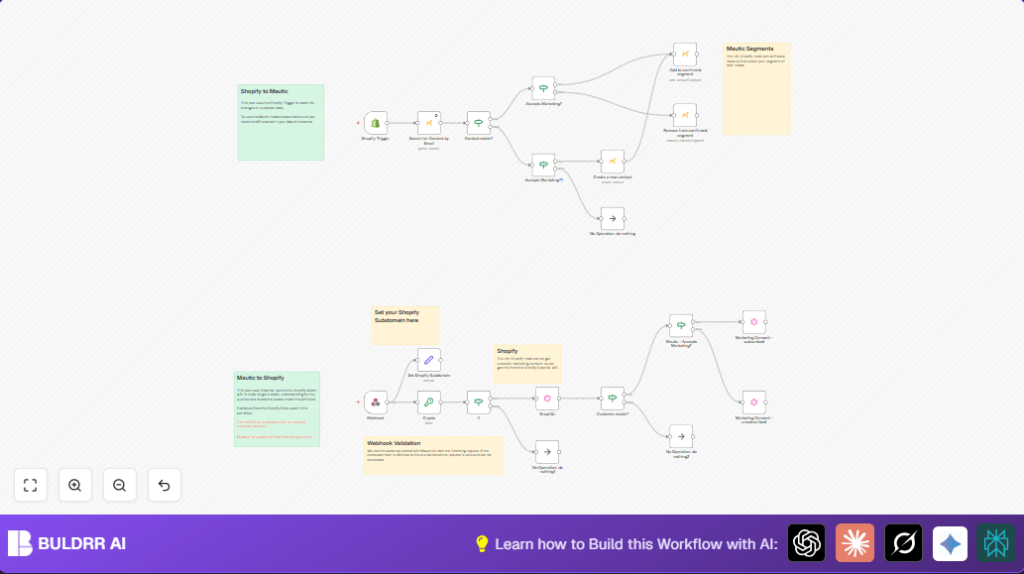

What this workflow does
This workflow connects Shopify and Mautic to keep customer marketing consent up to date automatically.
It listens to customer updates in Shopify and changes Mautic segments based on customer’s consent status.
This stops mistakes of sending emails to customers who said no and saves time from manual syncing.
Who should use this workflow
Anyone running a Shopify store who uses Mautic for email marketing and needs to keep customer consent accurate.
This helps marketing teams stop accidental emails to non-consenting customers and keep lists clean.
Tools and services used
- Shopify API: To get customer updates and update consent data.
- Mautic API: To search, create, and update contacts and segments.
- n8n platform: Hosts the workflow and automation.
- GraphQL API: Updates Shopify marketing consent since this detail is not in Shopify REST API.
- Webhook: Receives subscription status changes from Mautic.
- Crypto (HMAC SHA256): Verifies webhook security.
How the workflow works (Inputs → Process → Output)
Inputs
- Shopify customer updates triggered by changes in customer data including marketing consent.
- Webhook calls from Mautic about subscription status changes.
Processing steps
- When Shopify sends a customer update, the workflow checks if the marketing consent is “subscribed” or not.
- Searches Mautic by email to find if contact exists.
- If contact does not exist, creates a new contact in Mautic.
- Adds or removes contacts from the specified Mautic segment, depending on marketing consent.
- Updates Shopify’s marketing consent field using GraphQL API mutations to keep Shopify data synced.
- When Mautic sends a webhook, verifies HMAC signature for security.
- Based on Mautic webhook data, queries Shopify to confirm customer existence and updates Shopify consent accordingly.
Output
- Accurate Mautic contact segments that match Shopify customer marketing permissions.
- Shopify customer records updated with marketing consent matching Mautic status.
- Reduction of manual errors and saved hours previously spent checking customer data.
Beginner step-by-step: How to use this workflow in n8n
Download and import
- Download the workflow file using the Download button on this page.
- In n8n editor, click the “Import from File” option and select the downloaded workflow.
Configure credentials and variables
- Add your Shopify API credentials in the Shopify Trigger and GraphQL nodes.
- Add your Mautic OAuth2 credentials in the Mautic nodes.
- Update the Mautic Segment ID in “Add to confirmed segment” and “Remove from confirmed segment” nodes to the ID that matches your email list.
- Verify the Shopify subdomain is correct in the nodes that call Shopify APIs.
- Set the shared secret key in the Crypto node to match your Mautic webhook settings for HMAC verification.
Test and activate
- Manually trigger a Shopify customer update or send a test webhook from Mautic to check the workflow runs without errors.
- Check the logs in n8n for any issues and fix credentials or settings if needed.
- Activate the workflow to run automatically when customer updates happen.
- If running on your own system, consider proper token refresh setup for OAuth and use self-host n8n if needed.
Customization ideas
- Change the Mautic segment IDs to fit different customer lists.
- Adjust Shopify subdomain value for different stores.
- Add logging nodes to keep track of errors or important events.
- Expand the If nodes to handle other subscription states, like “pending consent.”
Edge cases and troubleshooting
- If webhook signature verification fails, check shared secret key in Crypto node matches Mautic webhook secret.
- If Shopify GraphQL query says customer not found, verify customer email matches between Shopify and Mautic.
- Ensure workflow credentials have proper API permissions.
- Check for rate limits on Mautic and Shopify APIs if workflow slows or stops.
Summary of results
✓ Customer marketing consent syncs automatically between Shopify and Mautic.
✓ Marketing segments in Mautic update without manual work.
✓ Shopify records stay current with consent info.
✓ Marketing errors and compliance risks reduce.
✓ Staff time saved by removing manual checking.
