

1. What this automation does
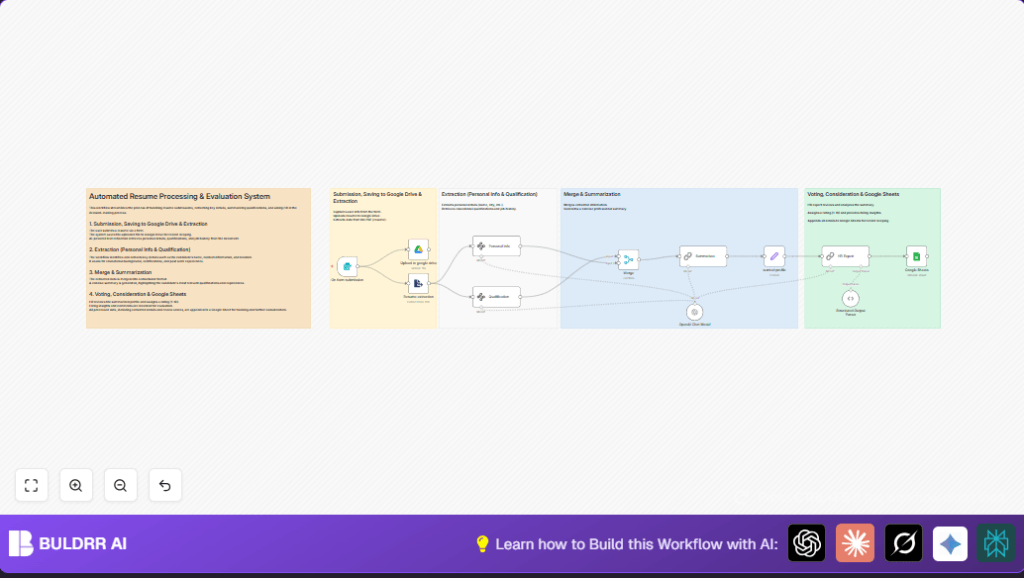
This workflow takes resumes from a form, extracts key info from PDF files, scores candidates based on job fit, and saves the data in a Google Sheet for easy review.
It solves the problem of slow, manual resume review by automating data extraction and evaluation.
The result is faster, more consistent hiring decisions with better organized candidate records.
2. Tools and services used
- n8n workflow automation platform: Runs the workflow steps.
- Google Drive: Stores uploaded resume PDFs.
- Google Sheets: Saves candidate data and scores.
- OpenAI API: Extracts details and evaluates candidate fit.
- Google Form or custom form: Collects candidate submissions.
3. How the workflow works (Input → Processing → Output)
Input
Candidate uploads first name, last name, email, and resume PDF through a web form.
Processing Steps
- Form Trigger node: Captures the submitted data.
- Google Drive node: Saves the resume file securely.
- Extract From File node: Converts PDF resume into text.
- Information Extractor nodes: Extract personal details and qualifications using OpenAI.
- Merge node: Combines extracted info into one candidate profile.
- Chain Summarization node: Creates a short candidate summary.
- Set node: Holds the job profile criteria.
- Chain LLM node: Rates candidate fit from 1 to 10 and generates hiring advice.
- Structured Output Parser node: Formats AI output as JSON.
- Google Sheets node: Appends all info into a tracking spreadsheet.
Output
A row is added in Google Sheets for each candidate, including personal info, resume summary, rating, and application date.
4. Beginner step-by-step: How to use this workflow in n8n production
Download and import
- Download the workflow file using the Download button on this page.
- Open the n8n editor and click on “Import from File”.
- Select and import the downloaded workflow JSON file.
Configure credentials and IDs
- Add your Google Drive, Google Sheets, and OpenAI API Key credentials in n8n.
- Update folder IDs, sheet IDs, email addresses, or channel names if needed, inside respective nodes.
- Check the Set node called “wanted profile” to confirm or edit the job description string.
Test and activate
- Run a test submission through the form or trigger the Form Trigger node manually.
- Verify the data extracts correctly and Google Sheets updates with the test candidate.
- Activate the workflow by toggling the switch at the top right in the n8n editor.
Now the workflow is live and processes real candidates automatically.
5. Customization ideas
- Change the Set node “wanted profile” string to match different job roles or locations.
- Add extra fields like certifications or language skills by updating the schema in the Information Extractor nodes.
- Modify extraction prompts to support multiple languages if resumes come in other languages.
- Add a Slack or Email notification node after Google Sheets to alert HR about new submissions.
- Change the Google Drive folder ID in the upload node to save resumes in a shared team drive.
6. Troubleshooting common issues
- No text extracted from PDF
Cause: Resume extraction node’s binary property is incorrect or missing input file.
Fix: Check the file field output and ensure Extract From File node reads the “Resume” binary data. - AI extraction incomplete or errors
Cause: Schemas in OpenAI nodes are off or prompt instructions unclear.
Fix: Adjust JSON schema in Information Extractor nodes and verify prompts. - Google Sheets append fails
Cause: Wrong column mapping or missing permissions.
Fix: Confirm correct sheet and column IDs, verify OAuth scopes, and ensure sheet allows row appending.
7. Pre-production checklist
- Verify correct Google Drive permissions and folder IDs for uploads.
- Test a resume upload and make sure text extraction outputs meaningful info.
- Confirm extraction schemas work using sample resumes in various formats.
- Check the Set node for the correct job profile description.
- Run full test and verify Google Sheets updates correctly.
- Back up Google Sheets data regularly before high volume use.
8. Deployment guide
After importing and configuring credentials, activate the workflow by turning the switch on inside n8n.
Check credentials for Google Drive, Google Sheets, and OpenAI have correct scopes and are valid.
Monitor executions via the n8n UI and see logs if anything goes wrong.
Optionally, add alert nodes to notify on failures.
The workflow can process many resumes daily but watch API rate limits and adjust concurrency as needed.
Use self-host n8n options if preferred over cloud.
9. Summary
✓ This workflow automatically processes resume uploads into structured profiles inside Google Sheets.
✓ It removes hours of manual resume review by extracting key details and scoring candidates objectively.
✓ The automation keeps candidate data organized, easy to review, and speeds hiring decisions.
→ Once configured, the workflow runs hands-free inside n8n with simple monitoring.
→ Users can customize job profiles, add notifications, and support multiple languages.
→ This system suits small to large recruitment teams seeking faster resume processing.
