
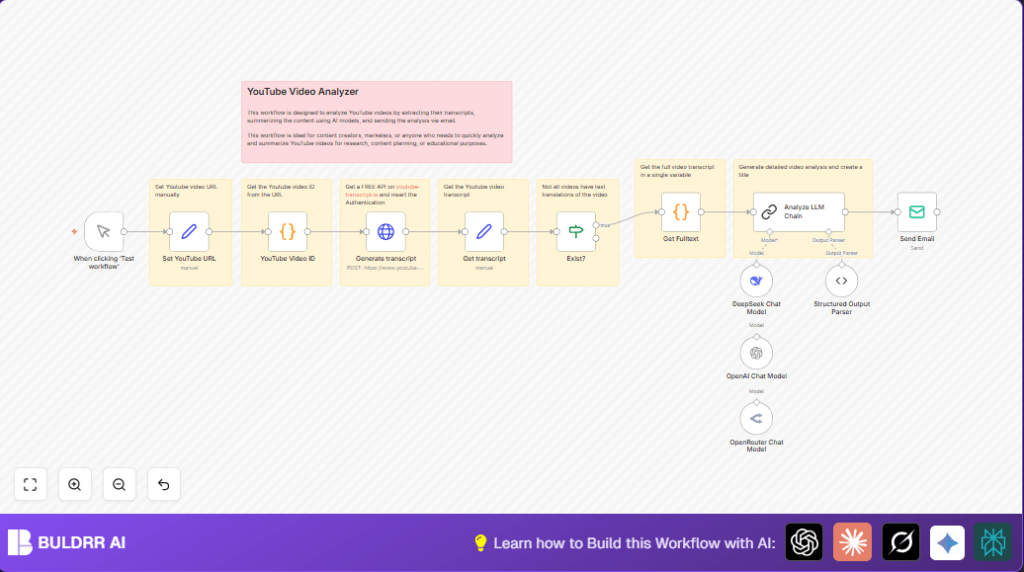

What This Automation Does
This workflow automatically takes a YouTube video URL and finds its transcript using the youtube-transcript.io API.
It then checks if the transcript exists before using AI models like OpenAI GPT-4o-mini to analyze the text and make a clear summary.
Finally, the workflow sends the video summary by email.
This saves time by removing manual reading and creating neat summaries fast.
Who Should Use This Workflow
People who need to study many YouTube videos and want quick summaries.
Anyone working with video research, digital content, or marketing research that needs accurate, fast video insights.
No heavy tech skills needed. Basic n8n knowledge works fine.
Tools / Services Used
- youtube-transcript.io API: Retrieves video transcripts.
- OpenAI GPT-4o-mini, OpenRouter, DeepSeek: AI models for text summary.
- SMTP Email Service: Sends summary emails.
- n8n Automation Platform: Runs and connects all nodes.
Beginner Step-by-Step: How to Use This Workflow in Production
Download and Import Workflow
- Click the Download button on this page to save the workflow file.
- Inside the n8n editor, click the main menu and select “Import from File”.
- Choose the downloaded workflow file to add it to n8n.
Configure API and Email Settings
- Add your youtube-transcript.io API key in the HTTP Request node named Generate transcript.
- Enter OpenAI or chosen AI service API credentials in the linked nodes.
- Update the Email Send node with correct SMTP details and recipient email addresses.
- If needed, update any IDs, channels, or user emails in the nodes as per your needs.
Test and Activate
- Run the workflow once using the Manual Trigger node to confirm all settings work.
- Fix any errors shown in the execution log.
- Turn the workflow toggle on to activate for regular use.
For advanced production, consider replacing the Manual Trigger with a Webhook node to accept URLs from a web form.
For self hosting or more control, check resources for self-host n8n.
Inputs, Processing, and Outputs
Inputs
- YouTube video URL (set in Set YouTube URL node or via webhook).
- API keys and credentials for transcript extraction and AI.
Processing Steps
- Extract video ID from the YouTube URL using Code node.
- Send video ID to youtube-transcript.io API to fetch transcript via HTTP Request node.
- Extract transcript text and language using Set node.
- Confirm transcript exists with an If node.
- Concatenate transcript pieces into full text.
- Send full transcript to AI for summarization using Analyze LLM Chain node.
- Receive a structured summary with title and bullet points.
- Send summary email with result.
Outputs
- Clear bullet-point summary of video content.
- Email sent with video title and summary.
Edge Cases and Failure Handling
- Videos without transcripts trigger checks that stop further processing.
- Invalid YouTube URLs lead to empty video IDs; workflow pauses to avoid errors.
- Missing or wrong API keys cause HTTP errors which show in logs for easy fixes.
- Errors from AI summarization indicate credential or usage problems.
- Email failures usually come from wrong SMTP settings; testing separately helps.
Check the execution logs in n8n to pinpoint failed steps.
Customization Ideas
- Change between AI models by switching Analyze LLM Chain connections.
- Add a Webhook node to get YouTube URLs from a web form dynamically.
- Send emails to multiple addresses by entering comma-separated emails in Email Send node.
- Include logic to filter transcripts by language before summarizing.
Summary of Benefits
✓ Saves hours spent watching videos and taking notes.
✓ Delivers accurate, clear summaries with technical details.
✓ Stops errors from missing transcripts automatically.
✓ Sends professional email summaries without manual work.
✓ Gives flexible AI model options and easy customization.
