
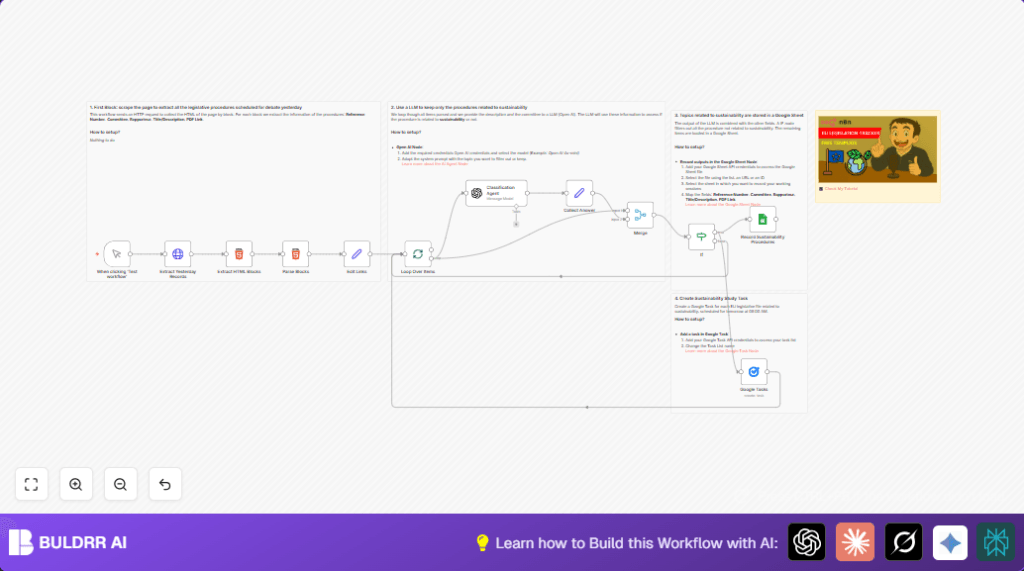

What This Workflow Does
This workflow gathers European Parliament legislative procedures from 18 days ago by default.
It pulls the HTML content of that day’s procedures, finds each law item, and gets details like reference number, committee, rapporteur, title, date, and PDF link.
Then, it asks GPT-4 Turbo AI to check if each item is related to sustainability topics such as environmental protection, circular economy, or pollution reduction.
Only the procedures marked as sustainability-related are saved into Google Sheets.
For each saved procedure, a Google Task is created for follow-up action.
This automation saves time by collecting and filtering relevant legislative items automatically.
Who Should Use This Workflow
This workflow fits people who track EU legislative procedures focused on sustainability.
It helps policy analysts and advocacy groups who want fast, reliable updates without reading many web pages manually.
Users who need to avoid missing sustainability-related laws or deadlines can use this automation.
It reduces manual work and makes sure no important sustainability procedures are overlooked.
Tools and Services Used
- n8n Automation Platform: runs the workflow logic.
- OpenAI GPT-4 Turbo API: classifies procedures for sustainability relevance.
- Google Sheets API: stores filtered procedure data.
- Google Tasks API: creates tasks for selected legislative items.
- European Parliament Website HTTP Interface: provides raw HTML of procedures.
Inputs, Processing, and Outputs
Inputs
- Date parameter set to 18 days ago by default (adjustable).
- HTML content from the European Parliament’s legislative search page.
Processing Steps
- Send HTTP GET request to fetch HTML of legislative items.
- Use HTML extractor nodes to pull each procedure block.
- Parse key details per procedure using CSS selectors.
- Fix incomplete PDF links by adding the domain prefix.
- Split items into batches for handling one by one.
- Send each item’s data to OpenAI GPT-4 Turbo with a strict prompt to decide if it relates to sustainability.
- Receive and collect AI classification: “yes” or “no”.
- Merge classification results back with original data.
- Filter out all items unless sustainability classification is “yes”.
- Append filtered items into Google Sheets.
- Create Google Tasks for each saved sustainability item.
Outputs
- A Google Sheet listing all sustainability-related legislative procedures.
- Google Tasks generated for each listed procedure to organize follow-up.
Beginner Step-by-Step: How to Use This Workflow in n8n
Importing the Workflow
- Download the workflow file by clicking the Download button on this page.
- Open n8n editor where you build workflows.
- Click on “Import from File” and select the downloaded workflow.
Configuration
- Add OpenAI API credentials for GPT-4 Turbo to the OpenAI (LLM) node.
- Enter Google Sheets API credentials and specify the Google Sheet ID and sheet tab to save data.
- Add Google Tasks API credentials and select the task list to create tasks.
- Check the HTTP Request node and adjust the date parameter if needed by editing {{$now.minus(18,’days’).format(‘yyyyMMdd’)}} expression.
- Verify the “Edit Links” Set node properly adds the domain to PDF links.
Testing and Activation
- Run the workflow manually by clicking the Manual Trigger node’s Execute button.
- Check output logs to confirm data fetching, parsing, classification, and saving are working as expected.
- If all works well, activate the workflow for production by enabling it and optionally set a schedule trigger.
If hosting n8n on your own server, consult self-host n8n for setup options.
Customization Ideas
- Change the days offset number in the HTTP Request node to fetch procedures from a different date.
- Modify the AI prompt in the Classification Agent node to include more sustainability-related topics or stricter criteria.
- Adjust batch size in the SplitInBatches node to balance speed and API limits.
- Switch Google Sheets output to other storage options like a database or send notifications instead.
- Edit Google Tasks node to set different due dates, add reminders, or assign tasks to specific users.
Handling Common Problems
- OpenAI API fails or times out: Check if the API key is correct and watch for quota limits. Add retries in n8n as needed.
- Google Sheets append errors: Ensure API scopes allow writing, and the Sheet ID is correct. Reauthorize credentials if needed.
- Broken PDF links: Confirm that the “Edit Links” node prepends the full domain URL correctly.
Summary
✓ Automatically fetches and parses European Parliament legislative records from a set date.
✓ Uses OpenAI GPT-4 Turbo to separate sustainability-related procedures.
✓ Saves relevant items into Google Sheets for easy tracking.
✓ Creates Google Tasks to organize follow-up work.
✓ Saves hours of manual searching and helps avoid missing key laws.
→ Makes monitoring sustainability laws faster and more reliable.
→ Lets policy workers focus on action instead of data collection.
