

Automate GitHub Issue Management with n8n MCP Server

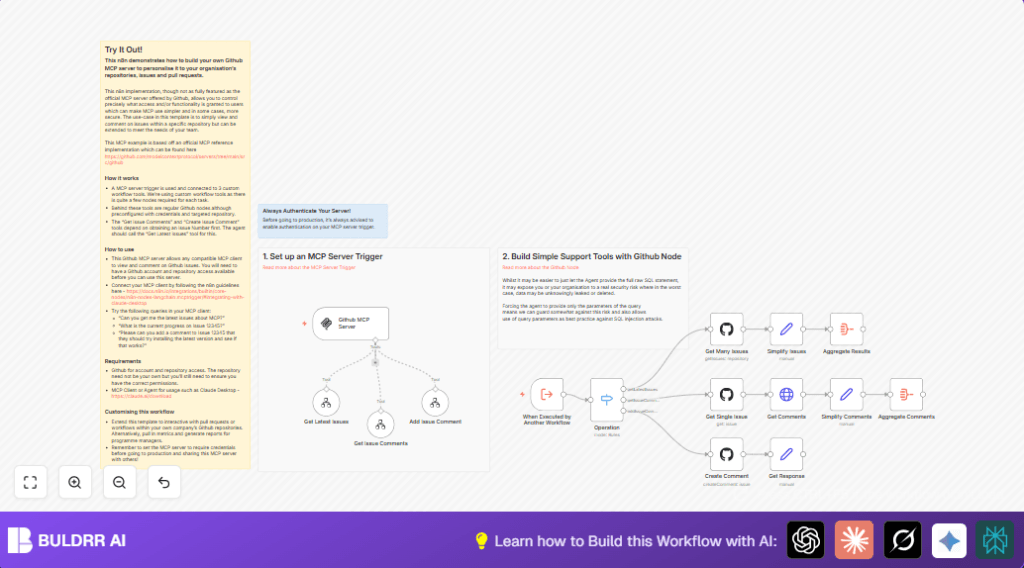
This n8n workflow automates viewing and commenting on GitHub issues using a custom MCP server trigger. It solves the problem of securely managing issue interactions within a specific repository, saving time and reducing manual errors.
executeWorkflowTrigger
switch
mcpTrigger
+6
Workflow Identifier: 2123
NODES in Use: Execute Workflow Trigger, Switch, Sticky Note, MCPTigger, Tool Workflow, GitHub, Set, Aggregate, HTTP Request

Press CTRL+F5 if the workflow didn't load.

Learn how to Build this Workflow with AI:

Visit through Desktop for Best experience

Opening Problem Statement

Meet Sarah, a project manager at a growing software company that heavily relies on GitHub to manage their development workflow. Every day, Sarah spends significant time manually tracking the latest issues and following up with comments or updates on multiple repositories. She wastes hours navigating GitHub’s UI to extract the latest issue information and leave relevant comments based on team discussions. Worse yet, errors sometimes creep in when copying issue numbers or updating comments, leading to miscommunications and delays.

Sarah needs a streamlined, secure way to automate accessing and commenting on GitHub issues to eliminate wasted time and reduce costly errors—especially with her team managing dozens of active issues daily.

What This Automation Does ⚙️

This specialized n8n workflow acts as a custom MCP (Model Context Protocol) server tailored for GitHub repositories to allow seamless interaction with GitHub issues and comments through an MCP client interface. Here’s what happens when it runs:

  • Receives commands from an MCP client to fetch the latest GitHub issues from a specific repository.
  • Retrieves detailed information and all associated comments for individual GitHub issues on demand.
  • Allows adding new comments to GitHub issues directly via the MCP client interaction.
  • Processes and simplifies GitHub API data to return clean, easy-to-use results tailored for the user’s context.
  • Ensures secure access by authenticating GitHub API credentials within n8n.
  • Coordinates multiple workflow tools using an intelligent switch node to handle different operations dynamically.

Benefits include: saving Sarah hours weekly by automating issue lookups and comment management, ensuring error-free updates and empowering the team with an easy question-answer style interface to GitHub issues.

Prerequisites ⚙️

  • 📁 An active n8n account (self-hosting available)
  • 📧 GitHub account with necessary repository access and API credentials configured in n8n
  • 🔑 GitHub API credentials added to n8n for authenticated API requests
  • 💬 Compatible MCP Client (e.g., Claude Desktop) connected to the custom MCP server trigger node

Step-by-Step Guide to Build and Understand This Workflow

1. Set up the MCP Server Trigger Node

Navigate in n8n to add the n8n-nodes-langchain.mcpTrigger node. This node acts as the entry point, listening to commands from MCP clients.

Parameters: Set a unique webhook path (e.g., a UUID) to expose the trigger URL.

After setting up, test the webhook URL by sending a request from your MCP client such as Claude Desktop. You should see the workflow trigger and receive inputs.

Common mistake: Forgetting to secure or authenticate this trigger before going to production could expose your server to unauthorized access.

2. Create the “When Executed by Another Workflow” Trigger Node

This Execute Workflow Trigger node listens for calls from the MCP trigger node’s custom workflows.

Inputs: It expects JSON inputs with properties like operation, repo, issueNumber, and text.

This setup ensures a modular architecture where the MCP trigger delegates tasks to specific workflows.

3. Use the Switch Node to Direct Workflow Operations

Add the Switch Node (type: n8n-nodes-base.switch) immediately after the trigger.

Configure it with three conditions under different outputs:

  • “getLatestIssues” to get recent issues
  • “getIssueComments” to fetch comments on a specific issue
  • “addIssueComment” to post a new comment to an issue

Depending on the operation input from the MCP client, this node routes data to appropriate child workflows.

Common mistake: Not matching the operation string exactly in casesensitive manner may cause the switch to misroute calls.

4. Build the “Get Latest Issues” Tool Workflow

This custom workflow uses multiple nodes:

  • GitHub Node (Get Many Issues): Fetches the latest 10 issues from the specified repo.
  • Set Node (Simplify Issues): Selects and renames important fields like issue number, title, url, reporter username, state, creation and update timestamps, and issue body.
  • Aggregate Node (Aggregate Results): Consolidates all formatted issues into one JSON response for the MCP client.

Use repository “n8n-io/n8n” as example repo in parameters.

Expected outcome: Clean structured data listing latest issues.

Common mistake: Not providing correct repository name formatting (e.g., missing “owner/repo” format) can cause API errors.

5. Build the “Get Issue Comments” Tool Workflow

Composed of these nodes:

  • GitHub Node (Get Single Issue): Retrieves the main issue data specified by issueNumber.
  • HTTP Request Node (Get Comments): Calls the comments URL from the issue data to get all comments.
  • Set Node (Simplify Comments): Extracts important fields like comment ID, issue URL, user, author association, body, and timestamps.
  • Aggregate Node (Aggregate Comments): Combines all formatted comments into one JSON array to return.

Common challenge: Ensuring the HTTP Request credentials are correctly set with GitHub API authentication.

6. Build the “Add Issue Comment” Tool Workflow

This lets users comment on issues via MCP client commands:

  • GitHub Node (Create Comment): Accepts repo, issueNumber, and text inputs to post comments.
  • Set Node (Get Response): Sends an “ok” response after comment creation to acknowledge the operation.

Common mistake: Forgetting to pass or map accurate issue numbers from the MCP client can cause comment failures.

Customizations ✏️

  • 1. Expand to Pull Requests: You can add new tools by cloning the “Get Issue Comments” workflow but targeting Pull Requests endpoints using the GitHub node.
  • 2. Customize Data Fields: Modify the Set nodes like “Simplify Issues” or “Simplify Comments” to include additional metadata like labels, milestones, or reactions.
  • 3. Add Authentication to MCP Trigger: In the MCP Server Trigger node parameters, configure authentication to prevent unauthorized access in production.
  • 4. Adjust Issue Fetch Limit: Update the GitHub node “Get Many Issues” limit parameter from 10 to any desired number based on your repo activity.

Troubleshooting 🔧

  • Problem: “Unauthorized 401 error when calling GitHub API nodes.”
    Cause: API credentials are missing, expired, or incorrect in n8n.
    Solution: Go to Credentials → GitHub API in n8n, verify or re-enter OAuth token or personal access token, and ensure token has correct permissions (repo scope).
  • Problem: “Switch node not routing operations correctly.”
    Cause: Operation strings do not exactly match the switch rules (case sensitive).
    Solution: Inspect input JSON and adjust Switch node conditions to exactly match operation values.
  • Problem: “Comments not appearing after HTTP Request node.”
    Cause: Missing or incorrect GitHub authentication in HTTP Request node.
    Solution: Attach correct GitHub credentials to HTTP Request authentication settings.

Pre-Production Checklist ✅

  • Confirm GitHub API credentials are active and have required repository permissions.
  • Test each tool workflow independently using sample inputs.
  • Send test commands from MCP client to verify the full flow triggers and returns expected data.
  • Enable logging in n8n to monitor errors for quick debugging during initial deployment.
  • Set authentication on MCP Server Trigger in production environments.

Deployment Guide

Activate the whole workflow in n8n by toggling the main MCP Server Trigger node ON. This exposes the webhook URL your MCP client connects to.

Monitor usage logs inside n8n for request counts and failures. Use n8n’s UI to replay any failed executions.

Optionally, host n8n yourself for enhanced control over data security and uptime. You can check out platforms like Hostinger for smooth self-hosting setups.

FAQs

  • Can I use this workflow for private repositories?
    Yes, as long as your GitHub API credentials have access to those repositories.
  • Does this use GitHub API rate limits?
    Yes, it uses authenticated GitHub API calls and respects rate limits depending on your token limits.
  • Is my data secure in this automation?
    Yes, data access is limited by GitHub API authentication and you can secure the MCP server trigger with credentials.
  • Can this scale to large repositories with hundreds of issues?
    Yes, but you might want to paginate or filter API calls to avoid rate limits or large payloads.

Conclusion

By following this tutorial, you’ve built a custom GitHub MCP server in n8n that securely automates fetching issues, viewing comments, and adding new comments all through a conversational MCP client. This saves you and your team countless hours by reducing manual lookups and error-prone copying from GitHub’s UI.

Next steps could include extending this automation to support pull requests, integrating with Slack notifications for issue updates, or generating regular issue summary reports for project managers. You now have a powerful, adaptable foundation to streamline your GitHub issue management.

Happy automating! ✏️

Promoted by BULDRR AI

Related Workflows

Automate Viral UGC Video Creation Using n8n + Degaus (Beginner-Friendly Guide)

Learn how to automate viral UGC video creation using n8n, AI prompts, and Degaus. This beginner-friendly guide shows how to import, configure, and run the workflow without technical complexity.
Form Trigger
Google Sheets
Gmail
+37
Free

AI SEO Blog Writer Automation in n8n

A complete beginner guide to building an AI-powered SEO blog writer automation using n8n.
AI Agent
Google Sheets
httpRequest
+5
Free

Automate CrowdStrike Alerts with VirusTotal, Jira & Slack

This workflow automates processing of CrowdStrike detections by enriching threat data via VirusTotal, creating Jira tickets for incident tracking, and notifying teams on Slack for quick response. Save hours daily by transforming complex threat data into actionable alerts effortlessly.
scheduleTrigger
httpRequest
jira
+5
Free

Automate Telegram Invoices to Notion with AI Summaries & Reports

Save hours on financial tracking by automating invoice extraction from Telegram photos to Notion using Google Gemini AI. This workflow extracts data, records transactions, and generates detailed spending reports with charts sent on schedule via Telegram.
lmChatGoogleGemini
telegramTrigger
notion
+9
Free

Automate Email Replies with n8n and AI-Powered Summarization

Save hours managing your inbox with this n8n workflow that uses IMAP email triggers, AI summarization, and vector search to draft concise replies requiring minimal review. Automate business email processing efficiently with AI guidance and Gmail integration.
emailReadImap
vectorStoreQdrant
emailSend
+12
Free

Automate Email Campaigns Using n8n with Gmail & Google Sheets

This n8n workflow automates personalized email outreach campaigns by integrating Gmail and Google Sheets, saving hours of manual follow-up work and reducing errors in email sequences. It ensures timely follow-ups based on previous email interactions, optimizing communication efficiency.
googleSheets
gmail
code
+5
Free