

What this workflow does
This workflow monitors many GitHub repositories in real time using webhooks.
It solves the problem of checking each repository manually for changes like code commits or pull requests.
The workflow registers GitHub webhooks automatically for all repositories you want to watch.
When code changes happen, the workflow gets notified immediately without polling the API again and again.
The workflow extracts important commit details, then sends messages about changes to Telegram or Slack.
This saves time and prevents missing updates.
How this workflow works: Inputs, Processing, and Outputs
Inputs
- A list of repository URLs to monitor: The full GitHub HTTPS URLs you add into the Repos to Monitor node.
- GitHub Personal Access Token: Required for API calls to register and delete webhooks. It must have
admin:repo_hookscope, andreposcope if monitoring private repos. - Webhook Trigger URL: The public HTTPS URL from the Webhook Trigger node to receive events from GitHub.
- Telegram or Slack credentials: For notification nodes to send messages.
Processing Steps
- The workflow reads the list of repositories to monitor.
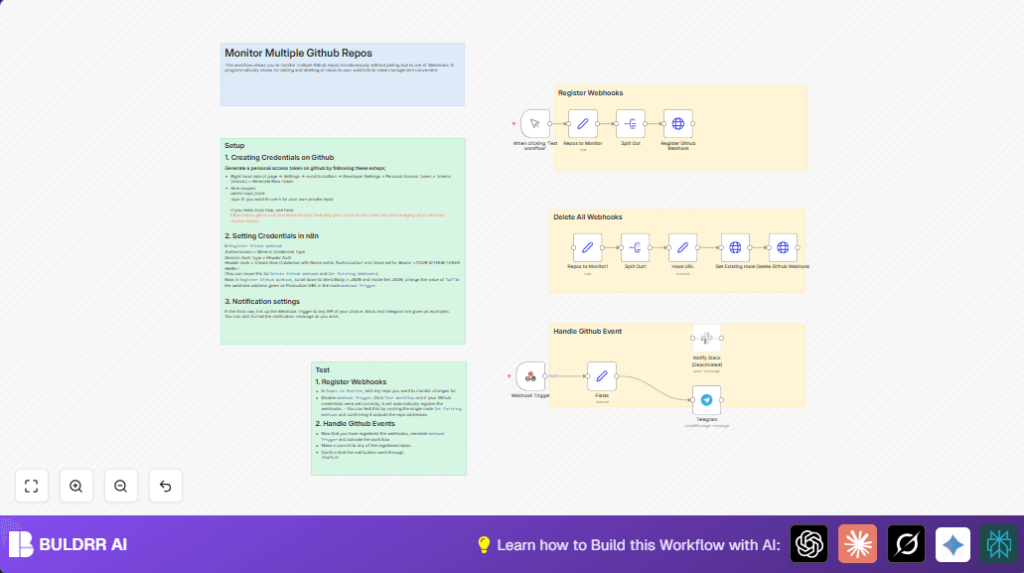
- The Register Github Webhook node registers webhooks on each repo using GitHub API. It sends GitHub events to the Webhook Trigger URL.
- When a GitHub event happens (push or pull request), GitHub calls the webhook URL.
- The Webhook Trigger node receives this event and passes data to a node that extracts key fields.
- The extracted data includes repository name, commit info, author, changed files, message, and URLs.
- Notification nodes send formatted messages based on this data to Telegram or Slack.
- Deleting webhooks uses a set of nodes to list current hooks and remove them via the GitHub API.
Outputs
- Real-time notifications in Telegram or Slack about code commits and pull requests.
- Logs of registered webhooks for each monitored repository.
- Successful webhook deletion confirmation if used.
Who should use this workflow
Anyone managing many GitHub repositories and needing fast updates on code changes.
The workflow helps avoid time lost in manual checks and API polling limits.
Users with basic n8n knowledge and GitHub tokens can set it up easily.
It is helpful for teams, developers, or project managers monitoring multiple repos.
Tools and services used
- n8n automation platform: Runs the workflow and nodes.
- GitHub API: Registers and deletes webhooks on monitored repositories.
- Telegram Bot API: Receives notifications about commits and pull requests.
- Slack API (optional): Alternative channel for receiving notifications.
- HTTP Header Authentication with GitHub token: Secures API calls.
Beginner step-by-step: How to use this workflow in n8n production
Step 1: Import workflow
- Download the workflow file using the Download button on this page.
- Inside the n8n editor, click on “Import from File” and upload the downloaded workflow.
Step 2: Configure credentials and information
- Open the Register Github Webhook node.
- Set up header authentication credentials with your GitHub Personal Access Token, including “Bearer ” prefix before the token.
- Apply the same credentials to the webhook registration and deletion nodes.
- Update the
urlfield in the JSON of the Register Github Webhook node to match the public HTTPS URL from the Webhook Trigger node. - Open the Repos to Monitor node and edit its JSON to add full GitHub HTTPS URLs of repositories to watch. Make sure URLs have no trailing slash.
- If you want notifications, set your Telegram bot token and target chat ID in the Telegram node or configure Slack node as needed.
Step 3: Test workflow
- Disable the Webhook Trigger node temporarily.
- Run “Test workflow” to register webhooks on all listed repos.
- Check the output or use the Get Existing Hook node to confirm webhooks are registered.
Step 4: Activate workflow
- Enable the Webhook Trigger node.
- Activate the workflow to make it listen for GitHub events 24/7.
- Make a commit or pull request in a monitored repo to test receiving notifications.
Customization ideas
- Change notification channel by enabling Slack node and entering Slack API credentials.
- Add more GitHub event types (e.g.,
issues,fork,release) in webhook registration JSON to monitor wider events. - Use Function node to filter repositories by name pattern before webhook registration.
- Edit notification message templates to include branch name, detailed commit links, or other info.
Common problems and how to fix
401 Unauthorized error from GitHub API
Cause: Bad or missing GitHub personal access token in authentication headers.
Fix: Make sure the token has admin:repo_hook scope (and repo for private repos) and is entered with “Bearer ” prefix in n8n credentials.
No webhook events received after activating
Cause: Webhook URL not reachable by GitHub or Webhook Trigger node is off.
Fix: Check that the webhook URL is public, uses HTTPS, and that the trigger node and workflow are active.
Summary of results
✓ Saves hours daily by automating GitHub repo monitoring.
✓ Sends real-time commit and pull request alerts without polling.
✓ Works with many repositories dynamically via a watchlist.
✓ Easily add or remove repos without manual webhook setup.
✓ Supports notifications to Telegram and Slack.
→ Keeps users informed of code updates fast and reliably.
→ Reduces API rate limit issues from polling requests.
