
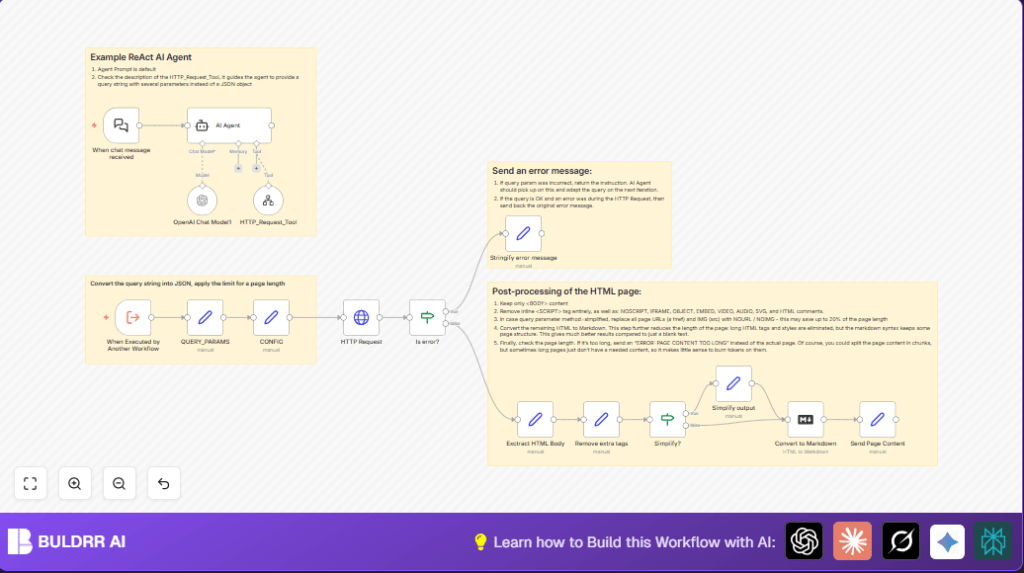

What This Automation Does
This workflow gets web page content from a link you give it.
It cleans the page to keep only the main parts and removes scripts, ads, and other clutter.
You can choose to simplify the content even more by replacing links and images with placeholders.
After cleaning, it changes the HTML into Markdown form, which is easier to read and use with AI tools.
If the final content is too long, the workflow tells you with an error message instead of sending too much data.
Who Should Use This Workflow
This helps people who want to get clean text from webpages without doing it by hand every day.
It fits well for users working with teams, preparing reports, or feeding cleaned text into AI models for summaries or analysis.
No deep technical skills required, but some basic understanding of URLs and queries is needed.
Tools and Services Used
- n8n Workflow: Runs the full process automatically.
- HTTP Request Node: Gets raw HTML content from a URL.
- Set Nodes: Parse query strings, configure limits, and prepare data.
- If Nodes: Check for errors and decide if simplification is needed.
- Regex Functions: Extract webpage body and remove unwanted tags.
- Markdown Conversion Node: Turn clean HTML into Markdown text.
- OpenAI API (optional): For further processing or summarization.
Inputs, Processing Steps, and Outputs
Inputs
- A chat message with a query string containing the web page URL.
- An optional parameter indicating if the content should be simplified.
- An optional maximum length limit to control output size.
Processing Steps
- Parse the query string into usable parameters.
- Set a default or custom maximum content length.
- Make an HTTP request to get full HTML content from the URL.
- Check for errors in fetching content and handle them gracefully.
- Extract only the body part of the HTML.
- Remove scripts, iframes, videos, and other noisy HTML tags.
- Optionally simplify by replacing real URLs with placeholders.
- Convert the cleaned content to Markdown format.
- Check the length of the Markdown content and return it if within limits.
Outputs
- The Markdown text of the cleaned webpage content.
- Error messages if content is too long or URL is invalid.
Beginner Step-by-Step: How to Use This Workflow in n8n Production
Download and Import Workflow
- Find and click the “Download” button on this page to save the workflow file.
- Open the n8n editor where the workflow will run.
- Use the menu option to “Import from File” and upload the downloaded JSON workflow.
Configure Credentials and Parameters
- Provide the required API keys or credentials, such as the OpenAI API key in the credential settings.
- Check if there are any IDs, emails, channel names, or folder paths in nodes and change them to fit your environment.
- If needed, update URL parameters or query settings so the workflow matches your content sources.
Test and Activate Workflow
- Run a test trigger using a chat message input with the query string, for example:
?url=https://example.com&method=fullto confirm the workflow works.
- Once tests pass, activate the workflow to let it run automatically on new chat messages.
- Monitor workflow runs for errors and adjust settings if necessary.
If using self-host n8n, consider reviewing self-host n8n resources to optimize and secure the setup.
Common Edge Cases or Failures
- If the input chat message does not contain a proper query string, the workflow will not run properly. Always check input format.
- Malformed or unusual webpage HTML without clear tags can cause extraction failures.
- Using a too low maxlimit may cause early errors about content length.
- Invalid URLs or unreachable sites will return error messages from the HTTP Request node.
Ideas for Customization
- Change the default maxlimit value to control output size as suited to user needs.
- Add removal of other types of HTML elements by extending regex in the cleaning step.
- Customize error messages to use language or tone matching your audience.
- Switch the OpenAI model in the AI nodes if using them to try different AI capabilities.
- Add new processing methods beyond “full” and “simplify” by editing the workflow logic.
Summary
✓ This workflow automatically fetches and cleans webpage content.
✓ It outputs the cleaned content in Markdown for easy reading or AI tools.
→ It saves many hours of manual copying, pasting, and cleanup.
→ It handles errors and length limits safely to avoid failures.
