

What This Workflow Does
This workflow extracts transcripts from YouTube videos automatically when given a video URL. It solves the problem of copying transcripts manually or using unreliable tools. The output is a clean and readable transcript, with extra details like video URL and language.
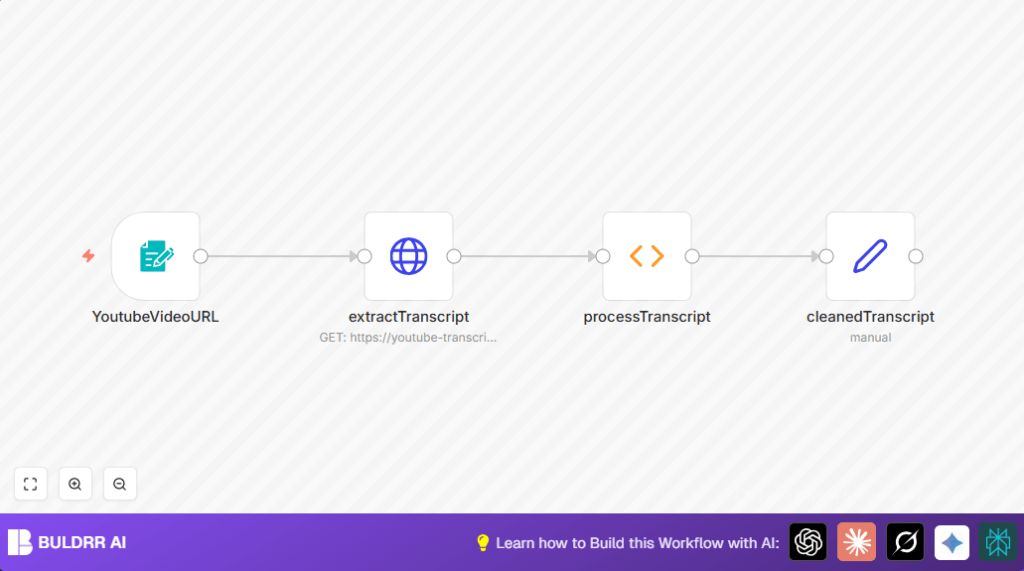
The user inputs a YouTube video link. The workflow fetches raw transcript data from an API. Then it cleans the text by fixing spaces and punctuation. Finally, it gives back an easy-to-use transcript.
Who Should Use This Workflow
This workflow is for content creators who want fast and accurate YouTube transcripts. It helps those who need subtitles, content repurposing, or keyword research without manual errors. No technical skills are required to operate it.
Tools and Services Used
- n8n: Automates the workflow steps.
- youtube-transcript3 API on RapidAPI: Provides raw transcript data from YouTube videos.
- Custom Form Trigger node: User inputs YouTube video URL.
- HTTP Request node: Calls the API with video URL.
- Function node: Processes and cleans transcript text.
- Set node: Formats the final cleaned transcript output.
Inputs, Processing Steps, and Outputs
Inputs
- YouTube video URL entered via a form in the Form Trigger node.
Processing Steps
- The HTTP Request node sends the video URL to the youtube-transcript3 API.
- API response contains raw transcript data in JSON format.
- The Function node extracts the text segments from the JSON.
- Function node cleans the transcript by removing extra spaces and fixing punctuation.
- The Set node reformats the cleaned transcript for output.
Outputs
- A JSON object with keys: success, videoUrl, rawTranscript, cleanedTranscript, duration, offset, and language.
- The cleanedTranscript is a human-readable string with corrected spaces and punctuation.
Beginner Step-by-Step: How to Use This Workflow in n8n
Step 1: Import Workflow
- Download the workflow file using the Download button on this page.
- Open the n8n editor and click Import from File.
- Choose the downloaded workflow file and import it.
Step 2: Configure Credentials and Settings
- Add your RapidAPI key in the HTTP Request node headers (replace “your_api_key”).
- Check the Form Trigger node to ensure the “Youtube Video Url” field is required.
- Update any IDs, emails, channels, or folder names if added later for integrations.
Step 3: Test and Activate
- Test the workflow by opening the webhook URL from the Form Trigger node and submit a valid YouTube video URL with captions.
- Check the execution results to confirm the transcript is fetched and cleaned correctly.
- Activate the workflow by toggling it to “Active” to run in production.
If self hosting n8n is preferred for full control, see self-host n8n resources.
Edge Cases and Failure Handling
If no transcript is available, the workflow returns a JSON with success: false and a clear message. Some YouTube videos do not have captions or are restricted.
Incorrect or missing RapidAPI key causes HTTP 403 errors. Check API key and header spelling carefully.
If the form from Form Trigger node does not load, verify the webhook URL is accessed correctly in the browser.
Customization Ideas
- Add more fields in the Form Trigger node to capture extra data like language preference.
- Connect a Google Sheets node after the Set node to save transcripts for tracking.
- Use an Email node (like Gmail) to send transcripts automatically to team members.
- Extend HTTP Request to ask for different language transcripts if the API supports it.
- Add decision (If) nodes to handle cases without transcript and send user-friendly notifications.
Summary
✓ Automatically extract YouTube video transcripts from any URL.
✓ Clean up transcript text for easy use.
✓ Outputs a clear JSON with transcript and video info.
✓ Saves manual work and reduces errors.
✓ Works inside n8n with simple nodes and API calls.
✓ Easy to customize and extend for extra features.
