
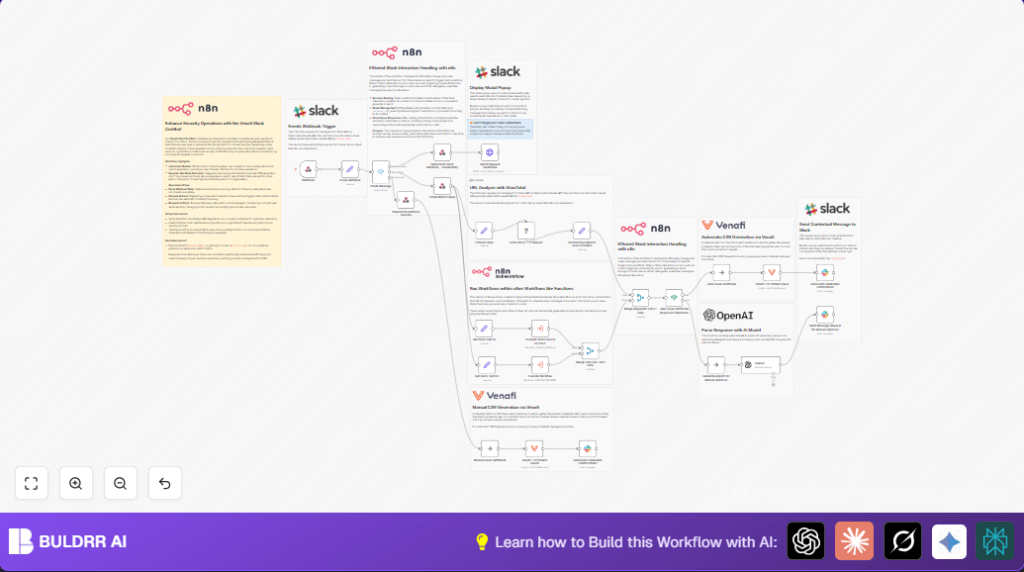

What this workflow does
This workflow automates SSL certificate requests from Slack. It solves the problem of slow and risky manual certificate approvals. The system checks domain safety with VirusTotal and uses AI to assess risk before issuing certificates or asking for human review.
The result is fewer errors, faster processing, and safer certificate handling.
Who should use this workflow
This workflow is for security teams or engineers who handle many SSL certificate requests. It helps if certificate requests come through Slack and you want to reduce manual work and mistakes.
Users do not need deep technical skills but should know basics about SSL certificates and Slack modals.
Tools and services used
- Slack API: To get user requests via modals and send messages.
- Venafi TLS Protect Cloud: To generate SSL certificates automatically.
- VirusTotal API: To check if a domain is known for malicious activity.
- OpenAI API (GPT-4O-MINI): To analyze VirusTotal data and categorize risk level.
- n8n automation platform: To connect all tools and automate the steps.
Inputs, processing, and outputs
Inputs
- SSL certificate requests submitted via Slack modal forms including domain name, validity period, and optional notes.
- Slack user and team information from the interaction payload.
Processing steps
- Webhook node listens for Slack events and receives user inputs.
- Parse webhook raw data to extract Slack form submissions and actions.
- Route the interaction based on Slack callback_id (e.g., open modal, submit form, button press).
- Open Slack modal to collect certificate request details.
- Extract domain and other fields from submitted form.
- Enrich data by converting Slack user ID to email and team ID to team name via sub-workflows.
- Call VirusTotal API to scan the requested domain for malicious or suspicious reports.
- Summarize VirusTotal scan results to key metrics for simpler evaluation.
- Send summarized data to OpenAI to analyze risk level (Low, Medium, High) and give a recommendation.
- Use a conditional node to auto-issue the certificate if no malicious reports exist or send the request for manual review if risk is medium or high.
- For auto-issued certificates, generate CSR through Venafi TLS Protect Cloud and notify the Slack channel with request details and buttons.
- If manual review is needed, send a detailed report with risks and buttons for approval or denial in Slack.
Outputs
- Automatic SSL certificate generation for safe domains.
- Slack notifications with actionable information about certificate status.
- Manual review requests in Slack for high-risk domains.
Beginner step-by-step: How to build this in n8n
Step 1: Import the workflow
- Download the workflow file using the Download button on this page.
- Open the n8n editor where the workflow should run.
- Use “Import from File” in n8n to load the downloaded workflow.
Step 2: Configure API credentials
- Add your Slack API credentials in the credential settings.
- Enter your Venafi TLS Protect Cloud API key in the respective node.
- Update the VirusTotal API key in the VirusTotal HTTP Request node headers.
- Fill in the OpenAI API key for AI risk analysis.
Step 3: Customize IDs and channels
- Review and update Slack channel IDs used for notifications if you want to change where messages go.
- Check any user or team IDs or email mappings if specific to your workspace.
Step 4: Test the workflow
- Trigger a sample certificate request from Slack using the modal.
- Watch the workflow run and check Slack for notifications and CSR issuance.
Step 5: Activate workflow
- Once testing is successful, set the workflow to “Active” in n8n.
- Make sure the Webhook URL is accessible publicly to receive Slack events.
For better control, consider running self-host n8n to keep services private and scalable.
Customization ideas
- Slack modal: Edit the JSON in Venafi Request Certificate node to add or remove fields.
- VirusTotal key: Swap the API key in the VirusTotal node to change accounts or use different tiers.
- AI prompt: Change the OpenAI node prompt to adjust risk assessment rules.
- Slack notifications: Alter the channel ID to send messages to different teams.
- Approval steps: Add nodes to log requests to a database or send emails for escalations.
Handling errors and edge cases
- If Slack modals do not open, check API credentials and Slack app permissions for views.open scope.
- If VirusTotal API returns 403 errors, update the API key to a valid one.
- If certificates not auto-issued despite no malicious reports, verify the IF node condition uses the correct JSON path.
- Watch API quotas to avoid rate limiting from VirusTotal or OpenAI.
- Ensure webhook URLs are live and reachable to receive Slack events properly.
Summary of results
✓ Automates SSL certificate requests with domain safety checks.
✓ Uses AI to classify risk and reduce manual work.
→ Fast and secure certificate issuance for safe domains.
→ Slack notifications keep teams updated with clear actions.
→ Manual approvals triggered only for risky or suspicious domains.
