
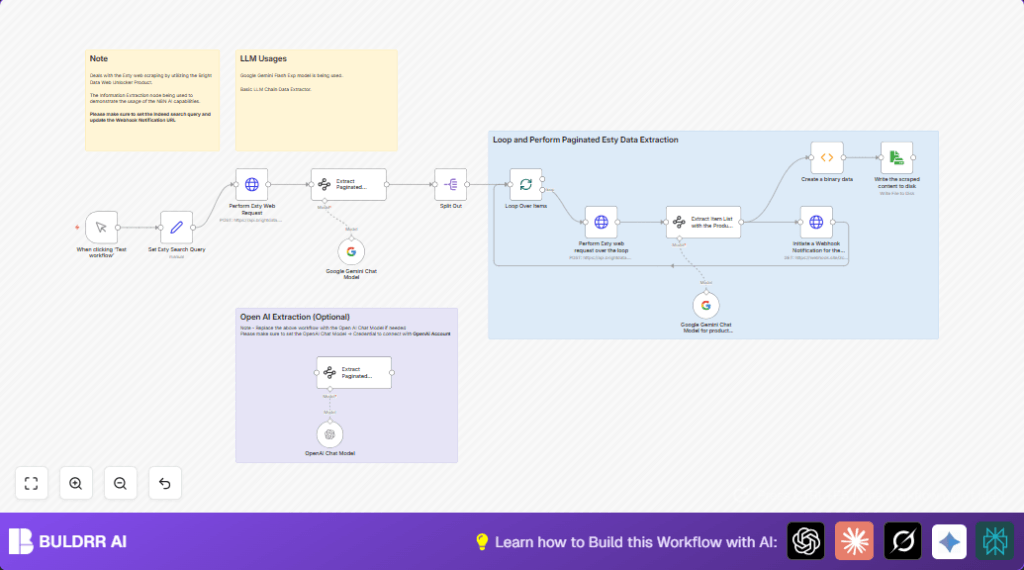

What This Automation Does
This workflow takes a search URL for products on Etsy and scrapes multiple pages of results automatically using Bright Data’s Web Unlocker API.
Then it uses Google Gemini AI to pull out product info like images, names, links, brands, and prices into clean data.
Finally, it sends summary info to a webhook and saves detailed JSON files locally.
This cuts the time for Etsy research from many hours to just minutes and keeps the data accurate.
Tools and Services Used
- n8n automation platform: For building and running the workflow.
- Bright Data Web Unlocker API: To bypass Etsy’s scraping blocks and get raw page content.
- Google Gemini AI (via Google PaLM API): To extract structured product information from raw HTML or markdown.
- Optional – OpenAI GPT-4 API: Alternative AI model for data extraction if preferred.
Inputs, Processing Steps, and Outputs
Inputs
- Etsy search URL with query and pagination (e.g., “wall art for mum” sorted by newest).
- Bright Data Web Unlocker API credentials.
- Google Gemini API credentials.
- Optional OpenAI API credentials for AI extraction.
Processing Steps
- POST Etsy search URL and related data to Bright Data API to retrieve raw page content.
- Use Google Gemini AI to find all pagination links from the first page.
- Loop through each pagination URL, scrape content again with Bright Data API.
- Use AI to extract structured product details from each page’s content.
- Send summaries to a webhook for external notification.
- Encode and save all detailed data to local disk as JSON files.
Outputs
- Structured JSON files of Etsy product data stored locally for offline use.
- Real-time webhook notifications carrying product summary data.
Beginner Step-by-Step: How to Use This Workflow in n8n
Importing the Workflow
- Download the provided workflow JSON file using the Download button on this page.
- Open the n8n editor where you want to run the workflow.
- Click “Import from File” and select the downloaded workflow file.
Configuring Credentials
- Go to each node that requires external access, like the HTTP Request nodes.
Add or update Bright Data API credentials with your valid API Key. - Enter Google Gemini API keys where the Google Gemini nodes ask for credentials.
- If using OpenAI alternative nodes, set the OpenAI API Key in those nodes.
- Update any placeholder URLs, such as the webhook URL, with your own target endpoint.
Testing and Activation
- Run the workflow once manually by triggering the Manual Trigger node to check for errors.
- Watch the output of each node to confirm data passes correctly.
- Fix any errors related to credentials or file paths that appear.
- When tests succeed, activate the workflow to run automatically or on schedule.
- Ensure your n8n setup has permission to write to the local disk if saving JSON files.
You can setup scheduled runs using a Cron node if regular updates are needed.
For running this on your own server or VPS, consider self-host n8n resources.
Why This Workflow Exists
Manually copying Etsy product data from pages is slow and error-prone.
This workflow automates that task so the user spends less time collecting and more time creating or selling.
It works better because APIs avoid blocks and use AI to clean the messy data.
The user gets fresh product info faster and can make better choices about their shop.
How The Workflow Works
The first input is a search URL capturing the product keyword and page.
The workflow sends this URL to Bright Data’s API to get the page’s raw content even if Etsy tries to block the scraper.
Then, Google Gemini reads that raw content to find all pagination links on the page.
The system loops over all pagination URLs, sending each one again to Bright Data’s API for content retrieval.
For each page content, AI models extract useful product information and parse results into structured data.
This structured data can then be pushed out via webhooks or saved locally as JSON files the user can open later.
Common Issues and How To Fix Them
- HTTP Request Fails 401 Unauthorized: Check that Bright Data API Key in the HTTP Request node is correct and not expired.
- AI Extraction Returns Empty Data: Make sure raw HTML text is passed fully and JSON schemas in AI Information Extractor nodes match exactly.
- File Write Permission Errors: Confirm the ReadWrite File node targets a writable folder and n8n process has write permission.
Customization Ideas
- Change the search keywords in the Set node by editing the Etsy URL to track other products.
- Replace Google Gemini AI nodes with OpenAI GPT-4 nodes for different extraction results.
- Modify file output format in the ReadWrite File node to save CSV or XML instead of JSON.
- Update webhook URLs in the HTTP Request notification node to call any desired service or messaging app.
- Extend pagination scraping by increasing loop limits or batch sizes to gather more pages.
Summary and Results
✓ The workflow quickly collects Etsy product data from many pages automatically.
✓ It turns blocked web requests into structured JSON data.
✓ Webhook notifications keep the user updated in real time.
→ Research time drops from hours to minutes.
→ Data accuracy improves over manual copying.
→ The user can better watch competitors and update their own shop.
