
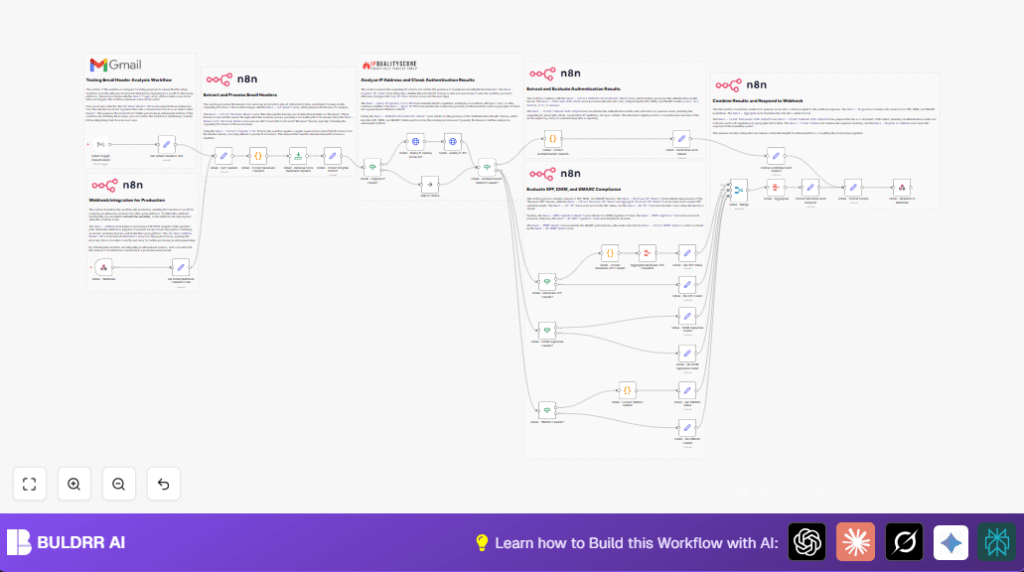

What This Workflow Does
This n8n workflow helps find the real sender’s IP from Gmail emails. It checks if the IP is safe or risky using online services. It also looks at email safety checks like SPF, DKIM, and DMARC. The result is a clear report showing if an email is trusted or suspicious.
This solves the problem of confusing email headers and unclear sender information. The user gets fast, exact details about email origins and authentication. This helps catch phishing and spam quickly.
Who Should Use This Workflow
This workflow is for people who check email security often. Especially useful for IT security teams or anyone facing many suspicious emails. It saves time and lowers mistakes by automating header checks. Users who want detailed email sender info fast will find this helpful.
Tools and Services Used
- Gmail API with OAuth2: To read emails from a Gmail account.
- IP Quality Score API: To check IP reputation and spam risk.
- IP-API.com: To find the geographic location and organization of the IP.
- n8n nodes: Including HTTP Request, Code, Set, If, Merge, and Webhook nodes to build the logic.
Inputs, Processing, and Outputs
Inputs
- New Gmail emails triggered by the Gmail Trigger node (for testing) or input via webhook.
- Email headers extracted from the email data.
- User API Key for the IP Quality Score service.
Processing Steps
- Extract all “Received” headers from emails to track email routes.
- Keep only the last “Received” header representing the sender’s IP.
- Remove internal or private IPs to isolate the real sender IP with regex.
- Check if a valid IP was found; if yes, query reputation and geolocation APIs.
- Look for the “Authentication-Results” header in emails.
- Extract and interpret SPF, DKIM, and DMARC results from headers.
- Handle cases where specific auth headers are missing by searching separately.
- Combine all collected data into a clean JSON report.
- Send this report back via webhook or output nodes.
Outputs
- Structured JSON data showing sender IP, IP reputation, geolocation, spam risk.
- Email authentication statuses for SPF, DKIM, DMARC with pass/fail indicators.
- A usable response for external systems or users to assess email trust quickly.
Beginner Step-by-Step: How to Use This Workflow in n8n
Step 1: Import the Workflow
- Download the workflow file using the Download button on this page.
- Open the n8n editor where you want to run this automation.
- Use Import from File in n8n to load the downloaded workflow.
Step 2: Add Your Credentials and Keys
- Add your Gmail OAuth2 credentials in n8n’s Credential Manager.
- Insert your IP Quality Score API Key in the HTTP Request node settings.
- Check and update any email addresses, folder IDs, or webhook paths if needed.
Step 3: Test the Workflow
- Enable the Gmail Trigger node to fetch new emails for testing.
- Save and run the workflow to confirm it triggers and processes emails correctly.
- Check outputs for valid IP extraction and authentication results.
Step 4: Activate for Production
- Once tested, disable the Gmail Trigger if using webhook input instead.
- Activate the workflow to make webhook endpoints live for external queries.
- Monitor executions and logs in n8n to ensure smooth operation.
If hosting n8n yourself, consider self-host n8n for better security and control.
Handling Edge Cases and Failures
- If no sender IP is found, the workflow skips IP reputation checks safely.
- If API calls fail (e.g., wrong key or limits), errors are caught and handled.
- Private or local IP addresses are filtered out using a strong regex pattern.
- Missing authentication headers lead to fallback checking individual headers.
Customization Ideas
- Change fraud score thresholds in the formatting nodes to match security level needs.
- Add more header checks by extending the code nodes capturing headers.
- Send alerts through Slack or Microsoft Teams by adding notification nodes after output.
- Include more IP reputation services by adding HTTP calls after IP validation.
- Modify webhook endpoint paths to fit your API naming preference.
Summary
✓ This workflow finds the true sender IP from Gmail emails.
✓ Checks IP reputation and location with online APIs.
✓ Extracts email authentication results for SPF, DKIM, and DMARC.
→ Produces a clear JSON report for email trust analysis.
→ Saves time and reduces mistakes in email security review.
