

What This Workflow Does ⚙️
This workflow finds and summarizes the best learning resources from HackerNews comments about a topic you want to learn.
It solves the problem of spending too many hours reading mixed, messy comments.
You get a clear list of top courses, books, articles, and videos sent to your email automatically.
The inputs are your learning topic and email from a form.
It processes HackerNews Ask HN posts plus their comments and analyzes them using Google Gemini AI.
The output is a personalized email with well-organized recommended resources.
Inputs, Processing Steps, and Output
Inputs
- Learning topic: Entered by user in the online form.
- Email address: Entered by user in the online form.
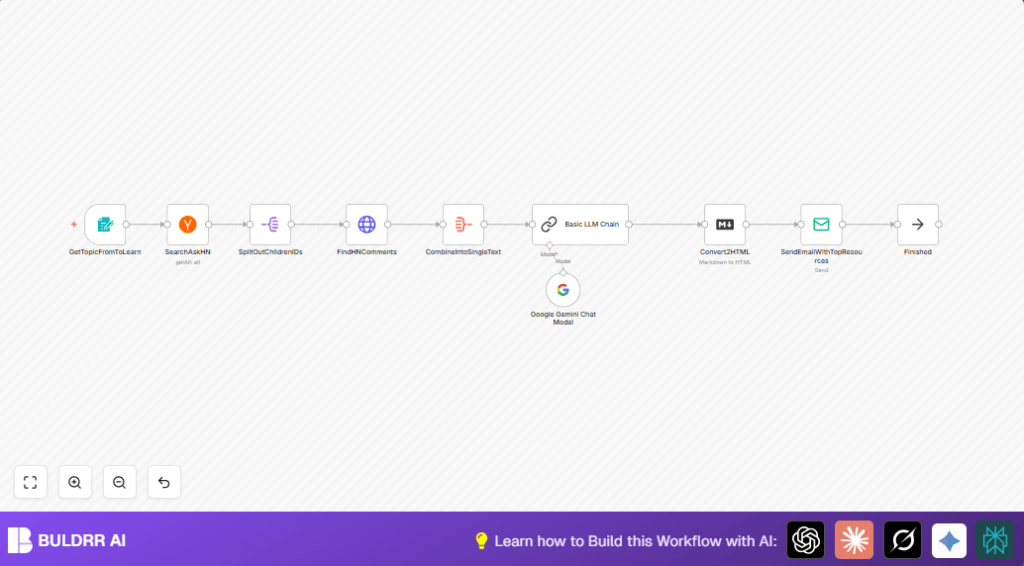
Processing Steps
- Search HackerNews Ask HN posts: Using topic keyword and “ask_hn” tag filter.
- Fetch comments: Break down post children IDs and fetch each comment via HackerNews API.
- Aggregate comment text: Combine all comment texts into one large input.
- Analyze with AI: Use a Basic LLM Chain with Google Gemini Chat model to extract, categorize, and evaluate learning resources.
- Format output: Convert AI markdown recommendation into HTML.
- Send email: Email the HTML results to the user’s provided email address via SMTP.
Output
A clear, neat email with top learning resources across categories, difficulty levels, and sentiment notes.
Who Should Use This Workflow
This is good for learners who waste time filtering noisy HackerNews comments.
Also, people who want personalized, quick recommendations for topics like Python, AI, or DevOps.
Users with some access to n8n and API keys can set this up and avoid manual searching.
Tools and Services Used
- n8n workflow editor: To build and run the automation.
- HackerNews API node: To search Ask HN posts and get comments.
- HTTP Request node: To fetch each comment detail.
- Google Gemini (PaLM) API: To analyze and extract learning resources.
- SMTP email provider: To send recommendation emails.
- Optional self-host n8n: For privacy and control, see self-host n8n.
Beginner Step-by-Step: How to Use This Workflow in n8n
Step 1: Download and Import the Workflow
- Find the Download button on this page and download the workflow file.
- Inside your n8n editor, click “Import from File” and upload the downloaded workflow.
Step 2: Add Credentials and Update Settings
- Add your Google Gemini (PaLM) API credentials in the Google Gemini Chat Model node settings.
- Add SMTP credentials for your email provider in the Email Send node.
- Check the HackerNews node to make sure the topic keyword expression matches the form field, for example:
= $json["I want to learn"] - If needed, update any recipient email fields or IDs.
Step 3: Test the Workflow
- Open the form URL set in the Form Trigger node (path: /learn).
- Submit a test topic and email.
- Watch the workflow run in the n8n editor to confirm no errors occur.
Step 4: Activate for Production
- Once tested, switch the workflow from draft to active status.
- The workflow now runs whenever the form is submitted.
Follow these steps, and the automation will send curated HackerNews learning resources to your email.
Customization Ideas ✏️
- Add multiple topics with comma-separated inputs in the form and modify the search node to handle them.
- Include YouTube Search node to fetch video tutorials related to the topic.
- Change email formatting by customizing the Markdown or adding an HTML Template node.
- Use an external sentiment analysis API or node to improve quality filtering.
- Set up a Cron Trigger node to run daily summary emails on preset topics.
Handling Edge Cases and Troubleshooting ????
Google Gemini API authentication fails: Check that API keys are correct and billing is enabled.
No comments found from HackerNews search: Verify “ask_hn” tag and that keyword matches user input.
Email sending errors: Confirm SMTP credentials and send a test email from the Email Send node.
Workflow does not trigger on form submission: Confirm form path and that required fields (especially email) are set.
Pre-Production Checklist ✅
- Test form submission with valid inputs.
- Confirm HackerNews node returns relevant Ask HN posts.
- Check if HTTP Request node fetches comments with text.
- Verify AI node outputs structured markdown.
- Send a test email to confirm SMTP setup.
- Backup workflow file before making big changes.
Deployment Guide
Activate the workflow in n8n to start receiving submissions.
Make sure the form URL is accessible to users.
Monitor email logs inside the Email Send node for failures.
Consider scheduling regular tests if switching to automatic runs.
If privacy or custom control are required, consider self-host n8n on your server.
Summary
✓ Saves hours wasted on filtering unorganized HackerNews comments.
✓ Sends personalized, clear learning resources by email.
✓ Uses simple form input to trigger full data search and AI analysis.
✓ Supports many topics dynamically.
✓ Works well inside n8n with accessible nodes and easy customization.
→ Converts community knowledge into neat learning guides fast.
→ Lowers risk of missing high-quality resources.
→ Provides step-by-step beginner-friendly setup and running instructions.
