

Automate Notion Task Reminders to Slack Users with n8n

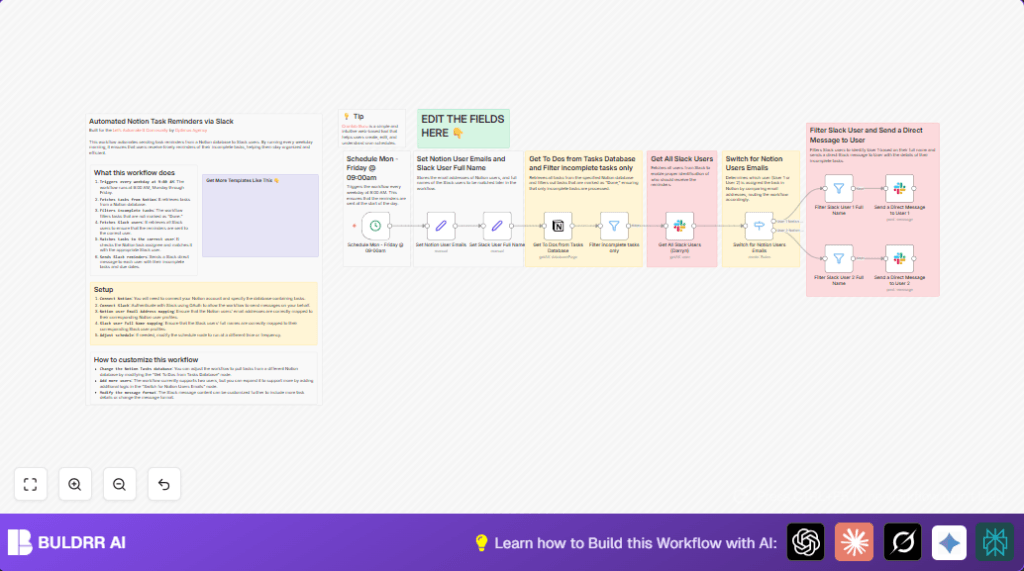
Stop missing important tasks with this n8n workflow that automates sending Notion task reminders as direct Slack messages every weekday morning. It fetches tasks, filters incomplete ones, matches them to Slack users, and delivers timely reminders.
cron
slack
notion
+3
Workflow Identifier: 1847
NODES in Use: cron, set, notion, filter, slack, switch

Press CTRL+F5 if the workflow didn't load.

Learn how to Build this Workflow with AI:

Visit through Desktop for Best experience

1. Opening Problem Statement

Meet Darryn Balanco, a project manager managing multiple task lists in Notion while coordinating with his team through Slack. Each weekday morning, Darryn spends at least 30 minutes manually sifting through Notion tasks to identify what’s incomplete and then messaging each team member their assignments. This repetitive process is error-prone—sometimes tasks get overlooked or delayed, causing workflow bottlenecks and lost productivity across the team.

Imagine missing a critical due task because a reminder was forgotten or a delay in notification cascaded into missed deadlines. For Darryn and his small but busy team, every minute lost to manual follow-ups equals lost time on actual work and potential project delays.

2. What This Automation Does

This n8n workflow tackles Darryn’s challenge with a streamlined automated reminder system that runs every weekday at 9:00 AM. Here’s what happens when it runs:

  • It triggers automatically from a Cron schedule node, ensuring reminders go out punctually Monday through Friday.
  • Queries the Notion database to fetch all task entries, pulling in up-to-date task information.
  • Filters tasks to identify only those incomplete (i.e., not marked “Done”).
  • Fetches all Slack users via Slack API to identify recipients correctly.
  • Matches each task’s Notion assignee email against a preset list of users to route tasks correctly.
  • Sends a tailored Slack direct message to each user, listing their pending tasks with due dates.

By automating these steps, Darryn saves at least 2.5 hours per week on manual reminders and drastically reduces missed updates, helping his team stay consistently on track.

3. Prerequisites ⚙️

  • Notion account with access to the task database 📁
  • Slack workspace with OAuth credentials to send messages 📧🔑
  • n8n account to create and run workflows 🔌
  • Optional: Self-host n8n workflow (e.g., on Hostinger) for more control and data privacy ⏱️

4. Step-by-Step Guide

Step 1: Create a Cron Trigger for Weekday Schedule

Navigate to + Add Node → Trigger → Cron.

Set the cron expression to 0 9 * * 1,2,3,4,5 to run every Monday to Friday at 9:00 AM.

You should see the Cron node ready to trigger the workflow on the configured schedule.

Tip: Use Crontab Guru to understand and test cron syntax.

Step 2: Store Notion User Emails with Set Node

Add a Set node named “Set Notion User Emails.” Create string fields for each user’s Notion email, for example:

This helps map tasks correctly to users later.

Step 3: Store Slack User Full Names with Set Node

Next, add another Set node called “Set Slack User Full Name.” Add string fields with the Slack full names to match:

  • User 1 Slack Full Name: Darryn Balanco
  • User 2 Slack Full Name: Cassandra Balanco

Step 4: Retrieve All Tasks from Notion Database

Add a Notion node named “Get To Dos from Tasks Database.”

Set resource to databasePage and operation to getAll.

Enter your Notion Tasks database ID to connect.

You will see a batch of task entries including properties like Status, Task, Due date, and Assigned User.

Step 5: Filter Out Completed Tasks

Add a Filter node called “Filter incomplete tasks only.”

Set the condition to filter tasks where Status is not equal to Done.

This ensures only pending tasks continue in the workflow.

Step 6: Retrieve All Slack Users

Add a Slack node named “Get All Slack Users (Darryn).”

Choose resource as user and operation getAll.

Authenticate with Slack OAuth2 credentials.

This node fetches all Slack users to compare against task assignees.

Step 7: Match Notion Task Users to Emails Using Switch Node

Add a Switch node named “Switch for Notion Users Emails.”

Define rules comparing the task’s Notion User email property to the stored user emails in step 2.

This routes tasks to either “User 1 Notion Tasks” or “User 2 Notion Tasks” outputs based on match.

Step 8: Filter Slack Users by Full Name

Create two Filter nodes:

  • One to find Slack user with full name matching User 1’s Slack full name.
  • Another to filter for User 2’s Slack full name.

This ensures the reminder is sent to the correct Slack user.

Step 9: Send Slack Direct Message Reminders

Add two Slack nodes named “Send a Direct Message to User 1” and “Send a Direct Message to User 2.”

Set the channel to the Slack user ID from the corresponding filter node, and craft the message text to list the incomplete tasks and due dates using expressions like:

=☑️  {{ $('Filter incomplete tasks only').item.json.Task }} (Due: {{ $('Filter incomplete tasks only').item.json.Due.start }})

Enable markdown formatting for clarity.

When these nodes run, users get direct Slack reminders of their current incomplete tasks right in their inbox.

5. Customizations ✏️

  • Add More Users: Extend the “Set Notion User Emails” and “Set Slack User Full Name” nodes with additional emails and names, then expand the Switch node with further rules for new users.
  • Change Notion Database: In the “Get To Dos from Tasks Database” node, update the database ID to the new target Notion tasks database for different project teams.
  • Modify Slack Message Format: In the Slack message nodes, customize the message text or attachment layout to include priority, notes, or tags from Notion properties.

6. Troubleshooting 🔧

Problem: “Notion database ID is invalid or empty”

Cause: Incorrect or missing database ID in the Notion node.

Solution: Recheck the Notion database ID copy-pasted from your Notion workspace and ensure it is input exactly in the “Get To Dos from Tasks Database” node.

Problem: “Slack OAuth credentials not authorized”

Cause: Slack OAuth token expired or missing correct permissions.

Solution: Reauthenticate Slack OAuth credentials under your Slack node settings and verify the OAuth scopes include messaging permissions.

7. Pre-Production Checklist ✅

  • Verify your Notion integration has query access to the Tasks database.
  • Confirm Slack OAuth credentials authenticate correctly and can send direct messages.
  • Run a manual workflow test on a weekday morning and confirm Slack messages are received as expected.
  • Backup current Notion data before modifying task assignments or properties.

8. Deployment Guide

Activate the Cron node to enable the workflow schedule to run every weekday at 9:00 AM.

Monitor the workflow execution logs in n8n for any errors or failures immediately after the scheduled triggers.

Adjust Slack messages or user mappings as team members change roles.

10. Conclusion

By setting up this n8n automation, you’ve created a reliable, hands-off process that fetches and filters Notion tasks and delivers personalized Slack reminders for incomplete items every weekday morning. This automation saves Darryn and his team at least 2.5 hours weekly that would otherwise be lost to manual coordination.

Next, consider extending this workflow to support more users, integrate Slack reactions for task confirmation, or add a reporting summary sent weekly to team leads.

With this setup, staying organized and on top of critical tasks becomes effortless.

Promoted by BULDRR AI

Related Workflows

Automate Viral UGC Video Creation Using n8n + Degaus (Beginner-Friendly Guide)

Learn how to automate viral UGC video creation using n8n, AI prompts, and Degaus. This beginner-friendly guide shows how to import, configure, and run the workflow without technical complexity.
Form Trigger
Google Sheets
Gmail
+37
Free

AI SEO Blog Writer Automation in n8n

A complete beginner guide to building an AI-powered SEO blog writer automation using n8n.
AI Agent
Google Sheets
httpRequest
+5
Free

Automate CrowdStrike Alerts with VirusTotal, Jira & Slack

This workflow automates processing of CrowdStrike detections by enriching threat data via VirusTotal, creating Jira tickets for incident tracking, and notifying teams on Slack for quick response. Save hours daily by transforming complex threat data into actionable alerts effortlessly.
scheduleTrigger
httpRequest
jira
+5
Free

Automate Telegram Invoices to Notion with AI Summaries & Reports

Save hours on financial tracking by automating invoice extraction from Telegram photos to Notion using Google Gemini AI. This workflow extracts data, records transactions, and generates detailed spending reports with charts sent on schedule via Telegram.
lmChatGoogleGemini
telegramTrigger
notion
+9
Free

Automate Email Replies with n8n and AI-Powered Summarization

Save hours managing your inbox with this n8n workflow that uses IMAP email triggers, AI summarization, and vector search to draft concise replies requiring minimal review. Automate business email processing efficiently with AI guidance and Gmail integration.
emailReadImap
vectorStoreQdrant
emailSend
+12
Free

Automate Email Campaigns Using n8n with Gmail & Google Sheets

This n8n workflow automates personalized email outreach campaigns by integrating Gmail and Google Sheets, saving hours of manual follow-up work and reducing errors in email sequences. It ensures timely follow-ups based on previous email interactions, optimizing communication efficiency.
googleSheets
gmail
code
+5
Free