
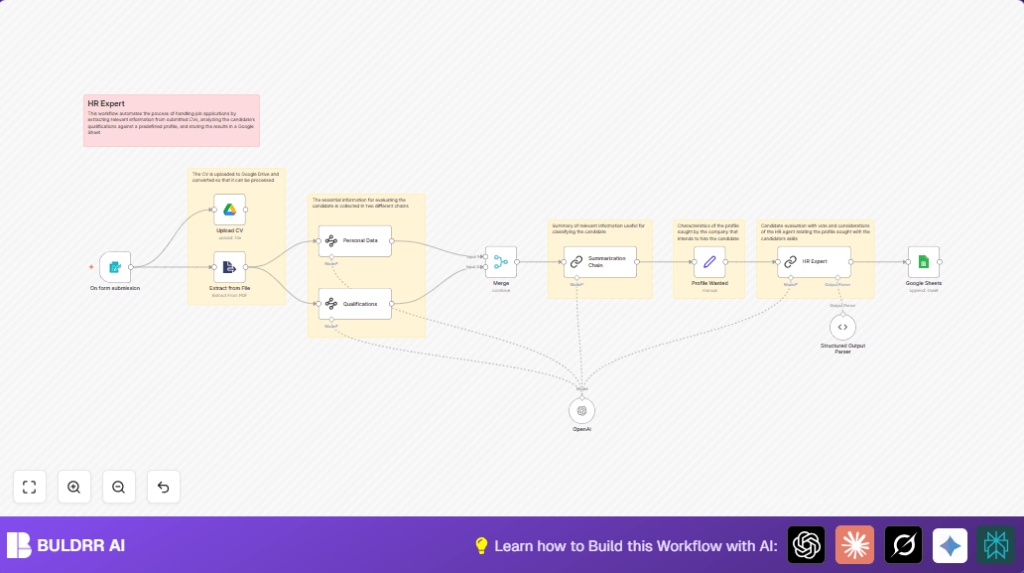

What this workflow does
This workflow takes job applications with PDF CVs and extracts useful information automatically.
It pulls out personal data, education, work history, and skills from the CV.
Then it summarizes the candidate profile and compares it with a target job description.
Finally, it saves all results in a Google Sheet for tracking.
This saves hours of manual screening and gives fair, consistent candidate evaluations.
Who should use this workflow
This workflow is made for HR staff at small or medium companies.
It suits teams handling many job applications and CVs in PDF format.
No advanced tech skills are needed once setup is done.
Users want to automate candidate data extraction and scoring to speed up hiring.
Tools and services used
- n8n: Automated workflow platform for nodes and integration.
- Google Sheets: Stores candidate data and scores in a spreadsheet.
- Google Drive: Stores uploaded CV PDF files securely.
- OpenAI API (Langchain integration): AI-powered text extraction, summarization and candidate fit scoring.
All accounts require credentials entered into n8n before running.
Workflow inputs, processing, and outputs
Inputs
- Form submissions with candidate name, email, and uploaded CV in PDF format.
Processing Steps
- Webhook node triggers on form submission.
- Extract text content from uploaded CV PDF using Extract from File node.
- Save original CV in Google Drive via Google Drive node.
- Use Langchain Information Extractor node to find personal data like city and birthdate.
- Use another Information Extractor node to get education, job history, and skill list.
- Merge extracted data into one JSON object.
- Summarize candidate profile into a brief readable text with Langchain Summarization Chain.
- Set the ideal job profile description as editable text in a Set node.
- Run the Langchain Chain LLM node as AI HR expert to score candidate fit and provide reasoning.
- Parse the AI output with a Structured Output Parser node to get clear fields like score and comments.
- Append all candidate data and AI evaluations to a Google Sheet row via the Google Sheets node.
Outputs
- Stored CV files in Google Drive folder.
- Candidate detailed info plus AI score saved in Google Sheets.
- Readable profile summaries and numeric fit votes available for HR review.
Beginner step-by-step: How to use this workflow in n8n
Importing the workflow
Download the workflow file from this page using the Download button.
Inside n8n editor, choose “Import from File” and upload the downloaded workflow file.
Configure credentials and IDs
Fill in the OpenAI API key in workflow credentials.
Add Google Drive and Google Sheets credentials if not set yet.
Adjust the Google Sheets node with your spreadsheet ID and sheet name.
Check the Google Drive upload folder matches your Drive setup.
Set job profile description
In the Set node named “Profile Wanted,” update the profile_wanted field.
Write a clear text about the target candidate skills, location, and role.
Test and activate
Submit a test form with a sample PDF CV to trigger the workflow.
Confirm the workflow runs with no errors and Google Sheet updates.
Activate the workflow for production use by switching it on in the n8n UI.
Share or embed the form webhook URL to start receiving real applications.
If self hosting n8n on your own server, consider using self-host n8n for stable operation.
Customization ideas
- Change the job profile text anytime to match different positions or skills.
- Add more info extraction fields like language skills or certifications by editing the Langchain extractor prompts.
- Switch Google Drive upload to other cloud storage like OneDrive by replacing the node and credentials.
- Add email or Slack notifications after saving to Google Sheets to alert HR staff immediately.
- Modify AI prompts to allow multi-language CV processing if hiring internationally.
Edge cases and troubleshooting tips
- If Extract from File fails, the PDF may be a scanned image without text.
Use OCR tools to convert scanned PDFs before upload. - If the AI HR Expert output is empty or broken, check the Langchain prompt inputs.
Ensure the profile summary and wanted profile text exist and are well formed. - If Google Sheets append fails, verify the spreadsheet ID and sheet name.
Make sure Google credentials have permission to edit the sheet.
Summary of benefits and results
✓ Saves many hours spent reading and scoring CVs manually.
✓ Extracts detailed candidate data automatically and accurately.
✓ Provides clear numeric scoring and reasoning for fast HR decisions.
✓ Keeps all candidate info and CVs organized in Google services.
✓ Easy to update for new roles or extra data points.
✓ Helps run consistent and fair candidate evaluations every time.
