

What This Automation Does
This workflow creates a chat interface to talk with Google Search Console data in simple English.
It helps to get answers about website performance without coding or complex dashboards.
The main result is fast, clear insights shown as easy markdown tables in chat.
You can ask questions like “How did my site do last month?” or “Show top queries for product pages.”
The bot talks to Search Console API behind the scenes.
Who Should Use This Workflow
This is good for people who work with website data but do not want to write code.
Anyone needing quick Search Console reports in natural language will benefit.
Tools and Services Used
- Google Search Console API: Provides website search data.
- OpenAI GPT-4o model: Understands user questions and plans API calls.
- Postgres Database: Stores chat history to keep conversation context.
- n8n Automation Platform: Runs the workflow connecting all parts.
- Webhook with Basic Auth: Receives chat messages securely.
Beginner Step-by-Step: How to Use This Workflow in n8n
Download and Import
- Click the Download button on this page to save the workflow JSON file.
- Open your n8n editor.
- Go to Import from File and upload the saved workflow.
Configure Credentials
- Add your Google Search Console OAuth credentials under n8n credentials.
- Enter your OpenAI API Key in the OpenAI Chat Model node.
- Set up Postgres credentials pointing to your database.
Update Identifiers
- Check if any property URLs, emails, or table names need updating in the workflow nodes.
- Update webhook Basic Auth username and password if needed.
Test and Activate
- Send a test POST request to the webhook with sample chatInput and sessionId.
- Verify you receive a chat reply in markdown with insights.
- Activate the workflow in n8n for production use.
For self hosting n8n, see self-host n8n.
Inputs, Processing, and Outputs
Inputs
- User chat messages sent as JSON payloads to the Webhook node.
- Session identifier to keep track of conversation.
Processing
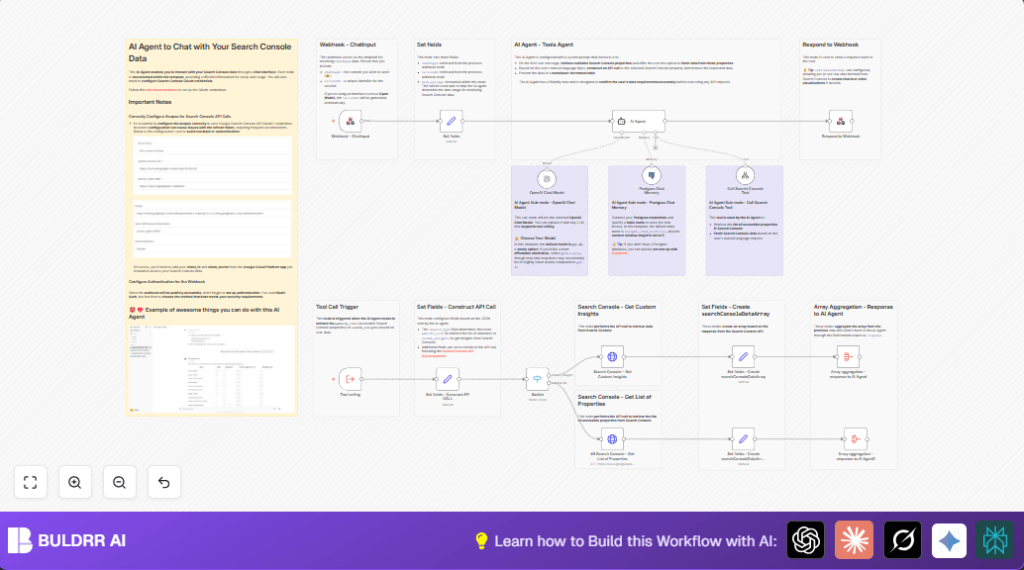
- Set fields node extracts chatInput, sessionId, and adds current date.
- AI Agent using GPT-4o interprets user input, manages conversation memory in Postgres.
- Agent calls the Search Console Tool sub-workflow for data retrieval.
- Set fields – Construct API CALL builds API request parameters dynamically.
- Switch node routes between listing properties or custom data fetch.
- HTTP Request nodes call Google Search Console API using OAuth2.
- Set fields and Aggregate nodes format and combine API results.
Outputs
- AI-generated chat reply showing requested Search Console insights.
- Results are formated in markdown tables for readability.
- Chat history saved for follow-up questions.
Common Edge Cases and Failures
- If OAuth2 token refresh fails, check Google Cloud OAuth scopes.
- If webhook responds with unauthorized, verify Basic Auth settings.
- If API call returns empty data, confirm property URLs and date ranges are correct.
Customization Ideas
- Change system prompt in the AI Agent node to focus on specific Search Console metrics.
- Adjust default row limits or dimensions in Set fields – Construct API CALL.
- Use other OpenAI models in the OpenAI Chat Model node for cost control.
- Replace webhook Basic Auth with token-based authentication if your system needs it.
Conclusion
This workflow lets you ask Google Search Console questions in simple chat.
It removes need for APIs or complicated dashboards.
Users save hours weekly and cut errors doing data reports.
You get fast answers, easy tables, and chat memory for follow-ups.
Next steps might be adding scheduled reports or Slack alerts.
You made data analysis less painful and more human.
