
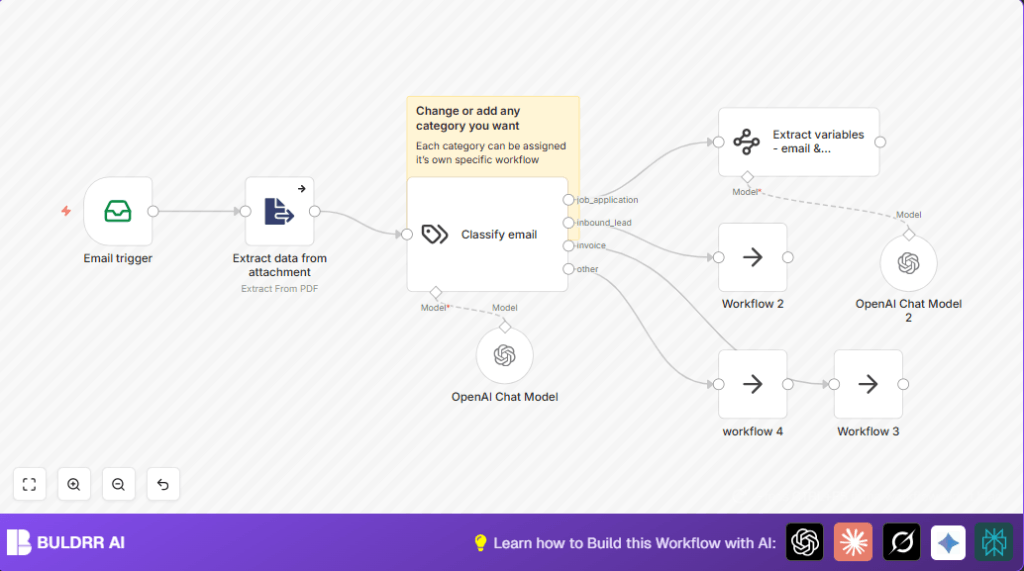

What this workflow does
This workflow reads emails from an IMAP inbox and finds job applications automatically.
It then reads attached PDF resumes.
Next, it uses OpenAI to sort the emails into types like job application or invoice.
It also pulls key applicant details like names, age, work history.
Finally, it sends the data to other flows for actions like replying or storing info.
This saves time by automating reading and sorting emails.
Who should use this workflow
This workflow helps HR or recruitment teams overwhelmed with many emails.
If manual reading of job applications wastes hours weekly, this can reduce that load.
It works best when many applications arrive via email with PDF resumes.
Users should have basic email accounts with IMAP access.
OpenAI API access is needed for text classification and data extraction.
Tools and services used
- IMAP email account: To fetch emails and attachments.
- n8n platform: For building the automation workflow.
- ExtractFromFile node: To read text from PDF resumes.
- OpenAI TextClassifier node: To categorize emails.
- OpenAI InformationExtractor node: To pull specific applicant details.
- NoOp nodes: Placeholders for next process steps like scheduling or storage.
Inputs, processing steps, and outputs
Inputs
- Emails from the defined IMAP inbox.
- Attachments from emails, specifically PDF resumes.
- Fetch emails: The EmailReadImap node grabs all new emails.
- Extract PDF text: The ExtractFromFile node pulls out text from the PDF attachments.
- Classify emails: The TextClassifier node uses OpenAI to decide if the email is a job application, lead, invoice, or other.
- Extract applicant info: The InformationExtractor node gets details like first and last names, age, residence, study, work experience, and personal traits from email plus resume.
- Route outputs: The workflow sends the processed data to different NoOp nodes as placeholders for later real workflows.
- Emails sorted by category.
- Structured data with key applicant information.
- Branches ready for further action like scheduling or data saving.
Processing Steps
Outputs
Step-by-step guide to use this workflow in n8n
Import the workflow
- Download the workflow file using the Download button on this page.
- Open the n8n editor where the workflow will run.
- Use the menu option “Import from File” to upload the workflow file.
Set up credentials and settings
- Add your IMAP email credentials in the EmailReadImap node.
- Insert your OpenAI API Key in the TextClassifier and InformationExtractor nodes.
- Check folder names or email addresses if the workflow needs specific ones.
- If needed, update any IDs or channels for downstream nodes like where to send results.
Test and activate
- Run the workflow once manually to make sure emails are fetched and processed.
- Look for errors and fix any credential or connection problems.
- Turn on the workflow toggle to activate it so new emails start getting processed automatically.
For users who prefer hosting n8n themselves, consider self-host n8n to have full control.
Common issues and how to fix them
- Cannot connect to email: Double-check IMAP user, password, server address.
- No text from PDF attachment: Make sure the attachment is a PDF file.
- OpenAI classification not working: Verify the API Key and check you did not miss feed text input from both email and attachment.
- Information extraction missing fields: Confirm the desired fields are listed correctly in the node settings.
Ways to customize the workflow
- Add more categories in the TextClassifier node to match your company email types.
- Extract extra details like certifications, languages, or references in the InformationExtractor node.
- Replace the NoOp nodes with real workflows to send emails, update spreadsheets, or notify via Slack.
Summary of benefits and results
✓ Automates reading and sorting of incoming job application emails.
✓ Saves hours of manual processing time each week.
✓ Extracts structured applicant information from emails and PDFs.
✓ Reduces errors from manual data handling.
✓ Makes following up faster and easier by routing data to other systems.
