

Automate GitLab Merge Requests with n8n HTTP Nodes

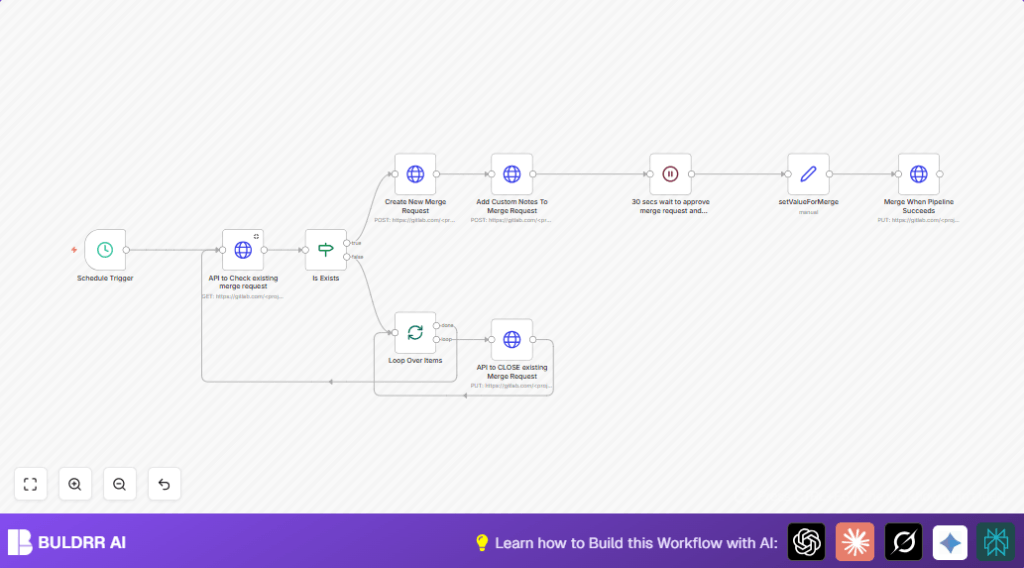
This workflow automates managing GitLab merge requests, saving you hours of manual tracking and updates by automatically checking, creating, commenting, closing, waiting, and merging requests via GitLab APIs using n8n’s HTTP Request nodes.
httpRequest
if
splitInBatches
+3
Workflow Identifier: 1553
NODES in Use: HTTP Request, If, Split In Batches, Wait, Set, Schedule Trigger

Press CTRL+F5 if the workflow didn't load.

Learn how to Build this Workflow with AI:

Visit through Desktop for Best experience

1. Opening Problem Statement

Meet Sarah, a DevOps engineer at a mid-sized tech company. Every day she juggles multiple feature branches to merge into the main repository on GitLab. With dozens of merge requests (MRs) open, she spends countless hours manually checking if duplicate MRs exist, creating new ones, adding notes, waiting for CI pipelines to finish, and then merging or closing them. This manual process not only wastes her valuable time but also introduces human errors like duplicate merge requests or premature merging before CI completion. Sarah needs a reliable automated solution to streamline her GitLab merge request workflow and prevent bottlenecks.

2. What This Automation Does

This n8n workflow automates the entire lifecycle of GitLab merge requests by using GitLab’s API and n8n’s HTTP Request nodes. When triggered on schedule, it drives the following outcomes:

  • Checks for existing open merge requests for specific source branches, avoiding duplicates.
  • Creates new merge requests automatically if none exist for a source branch.
  • Adds custom comments to freshly created merge requests for clear context.
  • Waits 30 seconds to allow merge request approval and pipeline completion.
  • Automatically merges merge requests once the associated pipeline succeeds, optionally deleting source branches.
  • Closes existing merge requests that no longer need processing in batch mode.

By automating these steps, Sarah saves hours each day, eliminates human error, and ensures merges happen only after successful CI pipelines.

3. Prerequisites ⚙️

  • GitLab account with API access and a PRIVATE-TOKEN for API authentication.
  • n8n workflow automation platform — can be cloud-hosted or self-hosted (see Hostinger for self-hosting).
  • Basic understanding of GitLab branches and merge requests.
  • Optional: Access to the source and target branch names and merge titles as input parameters to this workflow.

4. Step-by-Step Guide

Step 1: Set Up the Schedule Trigger Node

In n8n, click “+ New Workflow”. Then add the Schedule Trigger node:

  • Go to Nodes Panel, search for Schedule Trigger, and add it.
  • Configure the interval as desired (e.g., every hour or every day) to run this automation regularly.
  • You should see a regular trigger firing as per your setup.
  • Common Mistake: Forgetting to start the workflow or enabling it to run on schedule.

Step 2: Add HTTP Request Node to Check Existing Merge Requests

Add the HTTP Request node named API to Check existing merge request:

  • Set URL to https://gitlab.com//merge_requests. Replace with your actual GitLab project ID.
  • Configure query params: state=opened and source_branch={{sourceBranchName}}.
  • Set header parameter: PRIVATE-TOKEN={{gitlabToken}} for authentication.
  • Ensure it sends headers and query parameters correctly.
  • Outcome: This node fetches any open MRs for the specified source branch.
  • Common Mistake: Not replacing or not providing the API token properly.

Step 3: Add If Node to Check If Merge Request Exists

Add an If node named Is Exists:

  • Set condition to check if {{ $node["API to Check existing merge request"].data.isEmpty() }} returns true.
  • This node evaluates whether any existing MRs were found.
  • Outcome: Routes workflow to create new MR if none exist or handle existing ones.

Step 4: Create New Merge Request if None Exist

Add another HTTP Request node named Create New Merge Request:

  • Use URL https://gitlab.com//merge_requests with POST method.
  • Send form-urlencoded body parameters: source_branch={{sourceBranchName}}, target_branch={{targetBranchName}}, and title={{mergeTitle}}.
  • Pass the PRIVATE-TOKEN header as before.
  • Outcome: Automatically creates a new MR in GitLab.

Step 5: Add Comments to the Merge Request

Add another HTTP Request node called Add Custom Notes To Merge Request:

  • Set URL: https://gitlab.com//merge_requests/{{merge_iid}}/notes with POST method.
  • Body parameter: body={{mergeComments}} (the comment text you want to add).
  • Header includes the API token.
  • Outcome: Adds your custom message to the MR for context.

Step 6: Wait 30 Seconds for Pipeline and Approval

Add a Wait node named 30 secs wait to approve merge request and pipeline to finish1:

  • Set wait duration to 30 seconds.
  • Outcome: Gives time for manual approval and pipeline completion before merging.

Step 7: Set Merge Behavior Flags

Add a Set node called setValueForMerge:

  • Assign two boolean flags: merge_when_pipeline_succeeds set to false and should_remove_source_branch set to true.
  • Outcome: Prepares the merge request options for merge timing and source branch deletion.

Step 8: Merge the Merge Request After Pipeline Success

Add another HTTP Request node named Merge When Pipeline Succeeds:

  • Use URL https://gitlab.com//merge_requests/{{merge_iid}}/merge with PUT method.
  • Send a JSON body with keys merge_when_pipeline_succeeds and should_remove_source_branch using values from the previous Set node.
  • Include authorization header with your API token.
  • Outcome: Merges MR only after successful pipeline and optionally removes source branch.

Step 9: Loop Over Items to Close Old Merge Requests

Add a Split In Batches node named Loop Over Items:

  • Used for batch processing existing MRs to close them.
  • Connect with API to CLOSE existing Merge Request HTTP node to update each MR’s state to closed.
  • Outcome: Efficiently closes multiple open MRs in batch mode.

Step 10: HTTP Request to Close Merge Requests

Add HTTP Request node named API to CLOSE existing Merge Request:

  • URL: https://gitlab.com//merge_requests/{{merge_iid}}, method PUT.
  • Send form-urlencoded body parameter state_event=close to close the MR.
  • Include the API token header.
  • Outcome: Closes MRs in the GitLab project efficiently.

5. Customizations ✏️

  • Change merge timing behavior: In the setValueForMerge node, switch merge_when_pipeline_succeeds from false to true to automate merging precisely after pipeline success.
  • Modify source branch deletion: Toggle the should_remove_source_branch flag to false in setValueForMerge if you want to keep branches after merge.
  • Add dynamic merge comments: Adjust the Add Custom Notes To Merge Request node’s body parameter to include dynamic content like MR author or timestamp for more detailed notes.
  • Extend waiting time: Increase the wait time in the 30 secs wait to approve merge request and pipeline to finish1 node depending on your CI pipeline length.

6. Troubleshooting 🔧

Problem: “API call returns 401 Unauthorized”
Cause: Invalid or missing PRIVATE-TOKEN in HTTP Request nodes.
Solution: Double-check your GitLab personal access token and make sure it has proper scopes. Update the token in all HTTP Request nodes’ header parameters.

Problem: “Merge request not found or API returns empty list”
Cause: Incorrect project ID or source branch name in query parameters.
Solution: Verify the project ID and dynamic variable names exactly match your GitLab setup. Test the API endpoint separately to confirm.

Problem: “Merge does not occur even after pipeline success”
Cause: Incorrect body parameters or flags in the merge HTTP Request.
Solution: Make sure the JSON body uses boolean values correctly from the Set node and the endpoint URL includes the correct merge request IID.

7. Pre-Production Checklist ✅

  • Confirm personal access token has API scope.
  • Test API endpoints in GitLab’s API explorer or via curl.
  • Verify all dynamic variables (branch names, merge titles, MR IDs) are passed correctly.
  • Run the workflow manually with debug logs to ensure no node errors.
  • Backup project branches and MRs if necessary before running automation.

8. Deployment Guide

  • Activate the workflow in n8n by clicking “Activate” in the top right.
  • Ensure the schedule trigger is configured correctly to run regularly.
  • Monitor execution logs in n8n for errors or API failures.
  • Adjust waiting times and API tokens as needed based on usage.

9. FAQs

Q: Can I use GitHub instead of GitLab for this workflow?
A: This workflow is specific to GitLab’s API endpoints and Merge Request flow. You would need to adjust HTTP Request nodes for GitHub’s Pull Requests API.

Q: Does this workflow consume GitLab API credits?
A: Yes, every HTTP Request calls GitLab’s API. Monitor your GitLab API usage limits to avoid exhaustion.

Q: Is my GitLab token secure in n8n?
A: Use n8n credentials management to securely store and reference tokens instead of plain text in nodes.

10. Conclusion

By following this guide, you have automated your GitLab merge request management using n8n’s HTTP Request nodes. You reduced manual work by automatically checking for existing MRs, creating new ones when needed, adding comments, waiting for pipeline completion, merging conditionally, and closing obsolete requests.

This workflow can save you significant time daily, reduce errors, and improve your CI/CD reliability. Next, consider automating issues tracking or deployment rollbacks using similar API-empowered workflows in n8n.

Promoted by BULDRR AI

Related Workflows

Automate Viral UGC Video Creation Using n8n + Degaus (Beginner-Friendly Guide)

Learn how to automate viral UGC video creation using n8n, AI prompts, and Degaus. This beginner-friendly guide shows how to import, configure, and run the workflow without technical complexity.
Form Trigger
Google Sheets
Gmail
+37
Free

AI SEO Blog Writer Automation in n8n

A complete beginner guide to building an AI-powered SEO blog writer automation using n8n.
AI Agent
Google Sheets
httpRequest
+5
Free

Automate CrowdStrike Alerts with VirusTotal, Jira & Slack

This workflow automates processing of CrowdStrike detections by enriching threat data via VirusTotal, creating Jira tickets for incident tracking, and notifying teams on Slack for quick response. Save hours daily by transforming complex threat data into actionable alerts effortlessly.
scheduleTrigger
httpRequest
jira
+5
Free

Automate Telegram Invoices to Notion with AI Summaries & Reports

Save hours on financial tracking by automating invoice extraction from Telegram photos to Notion using Google Gemini AI. This workflow extracts data, records transactions, and generates detailed spending reports with charts sent on schedule via Telegram.
lmChatGoogleGemini
telegramTrigger
notion
+9
Free

Automate Email Replies with n8n and AI-Powered Summarization

Save hours managing your inbox with this n8n workflow that uses IMAP email triggers, AI summarization, and vector search to draft concise replies requiring minimal review. Automate business email processing efficiently with AI guidance and Gmail integration.
emailReadImap
vectorStoreQdrant
emailSend
+12
Free

Automate Email Campaigns Using n8n with Gmail & Google Sheets

This n8n workflow automates personalized email outreach campaigns by integrating Gmail and Google Sheets, saving hours of manual follow-up work and reducing errors in email sequences. It ensures timely follow-ups based on previous email interactions, optimizing communication efficiency.
googleSheets
gmail
code
+5
Free