
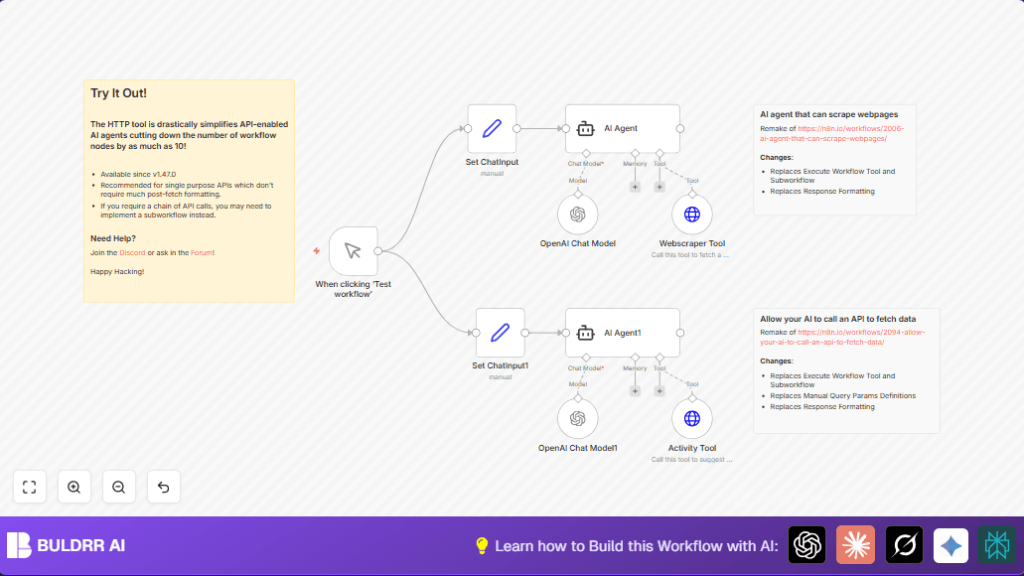

Build an AI Agent to Scrape Webpages with n8n HTTP Tool

This n8n workflow automates webpage scraping using an AI agent empowered by OpenAI and a single HTTP request tool. Save hours on manual data extraction from websites with structured, up-to-date info retrieval.
agent
lmChatOpenAi
toolHttpRequest
+2
Workflow Identifier: 1524
NODES in Use: manualTrigger, set, agent, lmChatOpenAi, toolHttpRequest

Press CTRL+F5 if the workflow didn't load.

Learn how to Build this Workflow with AI:

Visit through Desktop for Best experience

Opening Problem Statement

Meet Sarah, a digital marketer responsible for tracking relevant updates on multiple websites, including competitor activity and industry news. Every day, Sarah spends hours manually visiting different websites, copying the latest info like blog posts, product updates, and issue trackers, then formatting this data into reports. This process is tedious and error-prone, costing Sarah nearly 5 hours weekly, delaying timely insights and leading to missed opportunities.

If only Sarah could automate this web scraping task efficiently while still having intelligent understanding and summarization of the data she’s fetching — all without complex multi-step scripts or external services.

What This Automation Does

This workflow builds an AI-powered web scraping agent inside n8n that can fetch and interpret webpage content automatically with just a few nodes.

  • Automated webpage content extraction: Scrapes main content from specified web pages using the Firecrawl API HTTP Request tool.
  • AI-driven data processing: Uses the OpenAI Chat model through the Langchain agent to intelligently interpret and respond to scraping tasks and outputs.
  • Dynamic input handling: Processes user prompts to specify scraping tasks, like “Get the latest 10 issues from GitHub” or “Suggest an educational activity”.
  • Single HTTP Request simplification: Leverages a single HTTP request node to drastically reduce workflow complexity compared to subworkflows or multiple API calls.
  • Versatile activity suggestions: Includes an additional REST API call to a boredom-busting activity API to fetch relevant activity ideas on request.
  • Combined manual trigger: Easily test and run the workflow interactively via manual trigger, great for experimenting with various prompts.

This means Sarah can now automatically get structured data from websites and intelligently query it through AI prompts in under minutes, reclaiming valuable hours every week.

Prerequisites ⚙️

  • n8n account: You need a running n8n instance, either cloud-hosted or self-hosted.
  • OpenAI API key: Create an OpenAI account and generate an API key for GPT usage in the AI Chat model and Langchain agents.
  • Firecrawl API key: Obtain credentials for the Firecrawl API, which allows fetching webpage content in a clean JSON format.
  • Basic knowledge of n8n workspace: Familiarity with adding nodes, setting parameters, and running workflows.

Step-by-Step Guide

Step 1 – Add a Manual Trigger Node
Navigate to “Nodes” panel > Search for “Manual Trigger” > Drag it into your canvas.
You will see a simple button to manually start the workflow. This is your entry point.
Common mistake: Forgetting to connect this node to next ones disables firing the workflow.

Step 2 – Configure User Input via Set Node
Add a Set node and connect from the Manual Trigger.
Click the node to open parameters.
Under “Values”, add a new field “chatInput” with string type.
Example value: Can get the latest 10 issues from https://github.com/n8n-io/n8n/issues?
This simulates Sarah asking the AI agent what to scrape.
Common mistake: Not using proper full URLs or incomplete prompts might cause unpredictable responses.

Step 3 – Add the AI Agent Node
Search for “Langchain Agent” (node type @n8n/n8n-nodes-langchain.agent) > Add to canvas.
Set the “Text” parameter as ={{$json.chatInput}} to dynamically feed input.
Choose prompt type: “define”.
This node is the core AI decision maker.
Common mistake: Not linking to a proper AI language model node will cause errors.

Step 4 – Configure OpenAI Chat Model Node
Add a node for the OpenAI Chat Model (@n8n/n8n-nodes-langchain.lmChatOpenAi) and connect it to the AI Agent node.
Enter your OpenAI API credentials under “Credentials”.
This lets your AI Agent communicate with GPT
Expected outcome: Your agent can ask GPT for assistance in interpreting scraping queries.

Step 5 – Add Webscraper HTTP Request Tool
Search and add the “HTTP Request” node configured for the Firecrawl API.
Method: POST, URL: https://api.firecrawl.dev/v0/scrape.
Under Body parameters, add the “url” parameter pointing to the user input URL.
Set extra options such as “onlyMainContent: true”, “replaceAllPathsWithAbsolutePaths: true”, and “removeTags” to clean the returned content.
Connect this node as the “ai_tool” input of the AI Agent node.
This call fetches raw webpage content you want to scrape.
Common mistake: Forgetting API key setup in HTTP node.

Step 6 – Add Secondary AI Agent and OpenAI Chat Model for Activity Suggestions
This workflow includes a second AI Agent node and OpenAI Chat Model powered by Langchain for suggesting activities.
Connect a second Set node similar to Step 2 but with input “Hi! Please suggest something to do. I feel like learning something new!”
Add an HTTP Request node pointing to the “https://bored-api.appbrewery.com/filter” API to fetch activities based on parameters like “type” and “participants”.
Connect this HTTP node as tool input to the second AI Agent node.
This integration expands your bot’s versatility for additional use cases.
Common mistake: Missing or incorrect query parameters leading to empty response.

Step 7 – Test the Workflow
Use the Manual Trigger button.
Watch the data flow from input prompt to web scraping, AI analysis, and activity suggestion.
Check the output messages for correctness.
Outcome: Sarah now gets structured web data and AI chat synopsis with minimal setup and no coding.

Customizations ✏️

  • Customize scraping target URLs: Change “chatInput” text in the Set nodes to different webpage URLs or queries.
    Adjust AI prompt style in Agent nodes if needed to refine interpretation.
  • Add more API tools: In the AI Agent nodes, add more HTTP Request nodes to include APIs like news, weather, or other resources.
    This expands the assistant capabilities.
  • Alter returned content parts: Adjust “removeTags” setting in the Firecrawl HTTP Request to include images or videos.
    This enables richer data extraction as needed.
  • Change Activity API filters: Modify parameters passed to the boredom Activity API to filter by different types or participant counts.
    Useful for personalized suggestions.

Troubleshooting 🔧

  • Problem: “HTTP Request node returns 401 Unauthorized”

    Cause: Missing or invalid Firecrawl API key credentials.

    Solution: Go to the HTTP Request node → Credentials → Ensure correct Firecrawl API key is selected and active.
  • Problem: AI Agent fails to process input text

    Cause: Missing or improperly linked OpenAI Chat Model node.

    Solution: Verify AI Agent node connections to the OpenAI Chat model node and check API keys.
  • Problem: Empty or incomplete webpage content returned

    Cause: Incorrect body parameters or Firecrawl API ‘removeTags’ options filtering too aggressively.

    Solution: Adjust ‘removeTags’ parameter in HTTP Request node body to allow needed HTML elements.

Pre-Production Checklist ✅

  • Verify OpenAI API credentials in all Langchain nodes.
  • Test Firecrawl API HTTP Request independently with a sample URL.
  • Run Manual Trigger and verify output data flow correctness.
  • Check n8n workflow connections: Manual Trigger → Set Inputs → AI Agents → HTTP tools.
  • Backup your workflow JSON before making major edits.

Deployment Guide

Once tested, activate your n8n workflow by toggling the active status top-right.
Use the Manual Trigger to kick off workflow runs during development.
For production, consider integrating this workflow with webhook triggers for automatic scraping on schedule.
Monitor executions and errors via n8n’s execution log for stability.

FAQs

  • Can I use other web scraping APIs instead of Firecrawl? Yes, but you’ll need to adjust the HTTP Request node URL, method, and parameters accordingly.
  • Does this workflow consume OpenAI API credits? Yes, each AI Agent call requires OpenAI API usage which is billable per usage.
  • Is my data secure? Yes, your credentials are stored securely in n8n and API calls are encrypted.
  • Can this workflow handle multiple scraping requests at once? It’s designed for single requests; scaling requires workflow cloning or queuing strategies.

Conclusion

By completing this tutorial, you’ve built an intelligent AI-powered web scraping agent in n8n that drastically reduces manual data gathering effort. Sarah can now run automated queries that fetch and understand live web content with a single HTTP API call and AI processing, saving hours weekly and staying ahead in her work.

Next, you might explore adding more API integrations like social media data, automating report generation from extracted data, or building multi-step chained workflows for advanced data pipelines. Ready to automate your information gathering? Let’s keep building smarter bots!

Promoted by BULDRR AI

Related Workflows

Automate Viral UGC Video Creation Using n8n + Degaus (Beginner-Friendly Guide)

Learn how to automate viral UGC video creation using n8n, AI prompts, and Degaus. This beginner-friendly guide shows how to import, configure, and run the workflow without technical complexity.
Form Trigger
Google Sheets
Gmail
+37
Free

AI SEO Blog Writer Automation in n8n

A complete beginner guide to building an AI-powered SEO blog writer automation using n8n.
AI Agent
Google Sheets
httpRequest
+5
Free

Automate CrowdStrike Alerts with VirusTotal, Jira & Slack

This workflow automates processing of CrowdStrike detections by enriching threat data via VirusTotal, creating Jira tickets for incident tracking, and notifying teams on Slack for quick response. Save hours daily by transforming complex threat data into actionable alerts effortlessly.
scheduleTrigger
httpRequest
jira
+5
Free

Automate Telegram Invoices to Notion with AI Summaries & Reports

Save hours on financial tracking by automating invoice extraction from Telegram photos to Notion using Google Gemini AI. This workflow extracts data, records transactions, and generates detailed spending reports with charts sent on schedule via Telegram.
lmChatGoogleGemini
telegramTrigger
notion
+9
Free

Automate Email Replies with n8n and AI-Powered Summarization

Save hours managing your inbox with this n8n workflow that uses IMAP email triggers, AI summarization, and vector search to draft concise replies requiring minimal review. Automate business email processing efficiently with AI guidance and Gmail integration.
emailReadImap
vectorStoreQdrant
emailSend
+12
Free

Automate Email Campaigns Using n8n with Gmail & Google Sheets

This n8n workflow automates personalized email outreach campaigns by integrating Gmail and Google Sheets, saving hours of manual follow-up work and reducing errors in email sequences. It ensures timely follow-ups based on previous email interactions, optimizing communication efficiency.
googleSheets
gmail
code
+5
Free