
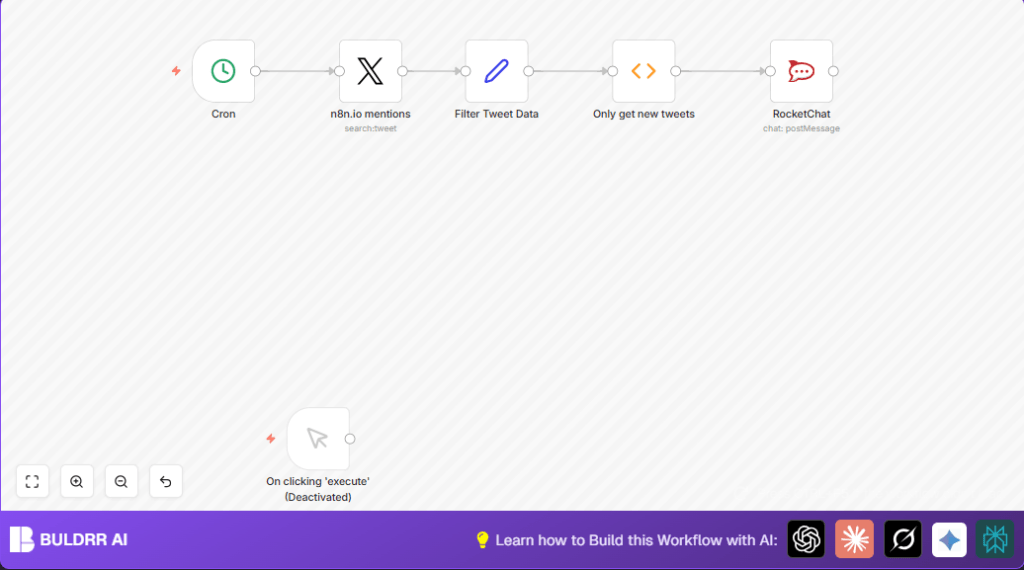

Automate Twitter Mention Alerts with n8n & RocketChat

Struggling to keep up with every @mention on Twitter? This n8n workflow automatically tracks new mentions of @n8n_io and instantly sends alerts to your RocketChat channel, saving you precious monitoring time and ensuring no conversation slips past unnoticed.
twitter
rocketchat
cron
+3
Workflow Identifier: 1479
NODES in Use: Manual Trigger, Set, Function, Twitter, RocketChat, Cron

Press CTRL+F5 if the workflow didn't load.

Learn how to Build this Workflow with AI:

Visit through Desktop for Best experience

1. The Real Challenge: Keeping Track of Twitter Mentions for Jane

Meet Jane, a community manager for a fast-growing software company. Her primary responsibility is to actively monitor social media, especially Twitter, for any mentions of her brand’s handle, @n8n_io. This is crucial to respond timely to customer queries, engage with followers, and gather valuable feedback.

However, Jane spends nearly 2 hours daily manually checking Twitter mentions, copying tweets, and pasting them into communication platforms for her team. This tedious process leads to delayed responses, missed mentions during busy hours, and decreased team productivity. Moreover, errors like repeating alerts or overlooking an important tweet occur often. The time lost equates to missed customer engagement opportunities and potentially lost sales.

Now, Jane needs a reliable, automated solution to track new Twitter mentions and instantly notify her team in RocketChat, eliminating manual checks and ensuring real-time awareness.

2. What This Automation Does for Jane

When this n8n workflow runs, it automates the monitoring and alerting for Twitter mentions of @n8n_io. Here is what happens:

  • Every minute, it searches Twitter for any new mentions of @n8n_io.
  • It filters and extracts key tweet information—tweet text, tweet ID, and a direct URL to the tweet.
  • It compares newly found tweets against previously seen tweet IDs to identify only new mentions, avoiding duplicates.
  • For each new mention, it sends a formatted alert message directly to a predefined RocketChat channel.
  • The team gets notified instantly, allowing them to respond faster while reducing oversight.
  • Saves Jane approximately 2 hours daily in manual monitoring time while ensuring no tweet goes unnoticed.

3. Prerequisites ⚙️

  • Twitter account with developer access for API credentials (OAuth1) to allow automated search of mentions.
  • RocketChat workspace and API credentials to post messages automatically.
  • n8n account (cloud or self-hosted) to set up and run the workflow.
  • Optional self-hosting service like Hostinger if you want more control over your n8n instance.

4. Step-by-Step Guide to Build This Twitter Mention Alert Workflow

Step 1: Set Up the Cron Trigger to Run Periodically

Go to n8n Dashboard, click + Add Node, select Cron. Configure it to run every 1 minute:

  • In the node’s Trigger Times section, choose everyX, unit minutes, value 1.

You should see the Cron node scheduled to run automatically every minute. This triggers the Twitter search repeatedly without manual input.

Common mistake: Forgetting to enable the node after adding it will prevent the workflow from triggering.

Step 2: Add the Twitter Node to Search Mentions

Add a Twitter node next to Cron:

  • Select the operation search.
  • Set searchText to @n8n_io to target your handle mentions.
  • Under credentials, select or create your Twitter OAuth1 credential.

Connect the Cron node’s output to the Twitter node input.

On execution, this node fetches all recent tweets mentioning your handle.

Common mistake: Using an incorrect or expired Twitter credential will cause API call failures.

Step 3: Format and Filter Tweet Data with the Set Node

Add a Set node to streamline the data:

  • Configure three fields: Tweet (tweet text), Tweet ID (unique identifier), and Tweet URL.
  • Use expressions to map data from the Twitter node:
    ={{$node["n8n.io mentions"].json["text"]}} for Tweet text,
    ={{$node["n8n.io mentions"].json["id"]}} for Tweet ID,
    and build Tweet URL as:
    =https://twitter.com/{{$node["n8n.io mentions"].json["user"]["screen_name"]}}/status/{{$node["n8n.io mentions"].json["id_str"]}}

Connect the Twitter node’s output to this Set node.

This step assures only the necessary tweet info moves down the workflow.

Common mistake: Omitting the exact expression syntax can cause empty or incorrect fields.

Step 4: Filter Only New Tweets Using the Function Node

Add a Function node to compare current tweet IDs with stored old tweet IDs:

Copy and paste this JavaScript code into the node’s code editor:

const staticData = getWorkflowStaticData('global');
const newTweetIds = items.map(item => item.json["Tweet ID"]);
const oldTweetIds = staticData.oldTweetIds;

if (!oldTweetIds) {
  staticData.oldTweetIds = newTweetIds;
  return items;
}

const actualNewTweetIds = newTweetIds.filter((id) => !oldTweetIds.includes(id));
const actualNewTweets = items.filter((data) => actualNewTweetIds.includes(data.json['Tweet ID']));
staticData.oldTweetIds = [...actualNewTweetIds, ...oldTweetIds];

return actualNewTweets;

This ensures you only get alerts for fresh mentions, preventing duplicate notifications.

Common mistake: Modifying this code without understanding static data storage can cause repeated or missed tweets.

Step 5: Send Alerts to RocketChat

Add a RocketChat node at the end:

  • Set the channel, e.g., general.
  • Use the expression feature to compose your message:
    New Mention!: {{$node["Filter Tweet Data"].json["Tweet"]}}. See it here: {{$node["Only get new tweets"].json["Tweet URL"]}}
  • Link your RocketChat API credentials.

Connect the Function node to this node.

This sends formatted messages directly into your team’s chat channel for immediate attention.

Common mistake: Incorrect channel name or expired API token will prevent message delivery.

Step 6: Activate and Test Your Workflow

Make sure all nodes are enabled. Click Activate in n8n.

Wait for the Cron trigger to run automatically, then check your RocketChat channel for new mention alerts.

Run manual tests by triggering the workflow with recent tweets or create sample data for instant results.

Common mistake: Forgetting to activate the workflow will result in silent failure.

5. Customizations ✏️

  • Change the Mention Handle: In the Twitter node, replace @n8n_io with another Twitter handle to track mentions of any account.
  • Adjust Notification Frequency: Modify the Cron node timing to 5 or 10 minutes for less frequent alerts depending on team needs.
  • Post to Different Channels: In the RocketChat node, switch the channel name to target specific teams or project groups.
  • Add Additional Tweet Info: Extend the Set node to include user name, follower count, or tweet creation date with expressions based on Twitter node data.

6. Troubleshooting 🔧

Problem: Twitter API returns “401 Unauthorized” error.

Cause: Invalid or expired OAuth1 credentials.

Solution: Re-create or refresh your Twitter OAuth1 credentials in n8n Settings → Credentials. Test API connection before using.

Problem: RocketChat messages not appearing despite successful workflow run.

Cause: Incorrect channel name or revoked API token.

Solution: Verify the channel name in the RocketChat node matches exactly. Generate a new RocketChat API token and update credentials.

Problem: Duplicate tweet alerts showing repeatedly.

Cause: Static data storage in Function node not working correctly or cleared accidentally.

Solution: Ensure the Function node’s code for saving oldTweetIds remains intact. Avoid clearing Workflow Static Data unless needed.

7. Pre-Production Checklist ✅

  • Confirm active Twitter API credentials with read permissions.
  • Check RocketChat API credentials and channel settings.
  • Test each node individually: Cron triggers, Twitter API fetch, Set data formatting, Function filtering, RocketChat messages.
  • Verify in RocketChat that messages are received promptly after running the workflow.
  • Backup your workflow configuration before major changes.

8. Deployment Guide

Once tested successfully, activate the workflow in n8n. The Cron node starts polling tweets every minute, automating monitoring indefinitely.

Monitor n8n execution logs regularly to catch any failures or slowdowns. Adjust Cron frequency based on load and team needs.

Consider setting up alerting on workflow errors if your team relies heavily on this automation.

9. FAQs (Optional)

Q: Can I track mentions of multiple Twitter handles with this workflow?
A: Yes, duplicate this workflow or modify the Twitter node to accept a list of handles and loop over them with a SplitInBatches node.

Q: Does this consume Twitter API rate limits quickly?
A: Running every minute uses some calls but is generally within the free tier limits for Twitter API standard access.

Q: Is my tweet data safe in this automation?
A: Yes, all data is handled securely within your own n8n environment and encrypted where applicable.

10. Conclusion

You’ve just built an effective Twitter mention alert system using n8n and RocketChat that saves Jane about 2 hours per day in manual monitoring, prevents missed mentions, and boosts team responsiveness.

Next, consider automating reply tweets based on keyword triggers or logging mentions in Google Sheets for analytics.

Ready to take your social media handling to the next level? With this workflow, real-time tweet monitoring is just a few clicks away!

Promoted by BULDRR AI

Related Workflows

Automate Viral UGC Video Creation Using n8n + Degaus (Beginner-Friendly Guide)

Learn how to automate viral UGC video creation using n8n, AI prompts, and Degaus. This beginner-friendly guide shows how to import, configure, and run the workflow without technical complexity.
Form Trigger
Google Sheets
Gmail
+37
Free

AI SEO Blog Writer Automation in n8n

A complete beginner guide to building an AI-powered SEO blog writer automation using n8n.
AI Agent
Google Sheets
httpRequest
+5
Free

Automate CrowdStrike Alerts with VirusTotal, Jira & Slack

This workflow automates processing of CrowdStrike detections by enriching threat data via VirusTotal, creating Jira tickets for incident tracking, and notifying teams on Slack for quick response. Save hours daily by transforming complex threat data into actionable alerts effortlessly.
scheduleTrigger
httpRequest
jira
+5
Free

Automate Telegram Invoices to Notion with AI Summaries & Reports

Save hours on financial tracking by automating invoice extraction from Telegram photos to Notion using Google Gemini AI. This workflow extracts data, records transactions, and generates detailed spending reports with charts sent on schedule via Telegram.
lmChatGoogleGemini
telegramTrigger
notion
+9
Free

Automate Email Replies with n8n and AI-Powered Summarization

Save hours managing your inbox with this n8n workflow that uses IMAP email triggers, AI summarization, and vector search to draft concise replies requiring minimal review. Automate business email processing efficiently with AI guidance and Gmail integration.
emailReadImap
vectorStoreQdrant
emailSend
+12
Free

Automate Email Campaigns Using n8n with Gmail & Google Sheets

This n8n workflow automates personalized email outreach campaigns by integrating Gmail and Google Sheets, saving hours of manual follow-up work and reducing errors in email sequences. It ensures timely follow-ups based on previous email interactions, optimizing communication efficiency.
googleSheets
gmail
code
+5
Free