

What This Workflow Does
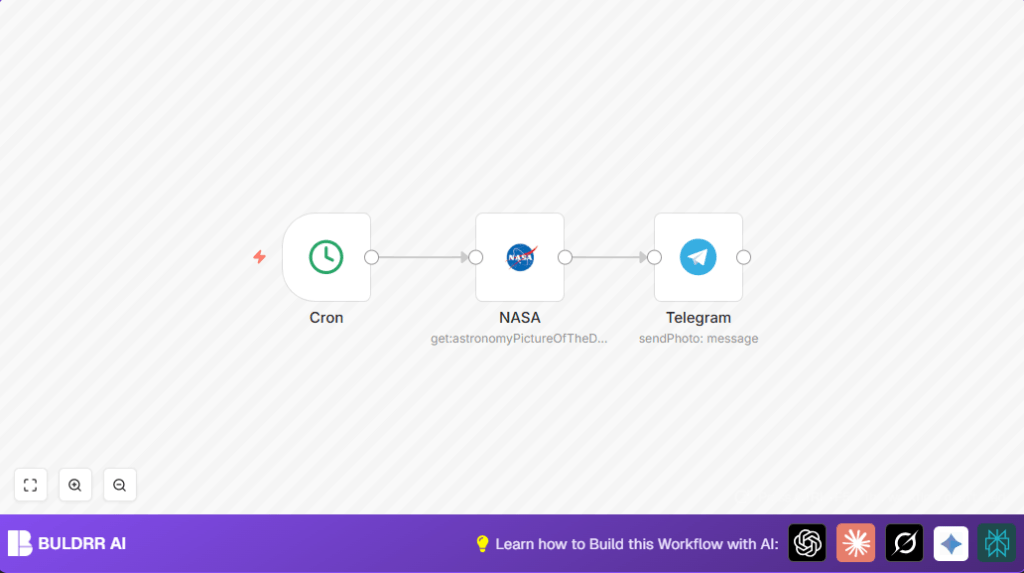
This workflow automatically fetches NASA’s Astronomy Picture of the Day every day at 8 PM and posts the image with its title caption directly to a Telegram channel. It saves time by removing the need to download and upload pictures manually. With this automation, the Telegram channel always has fresh space photos without daily effort.
The automation hits NASA’s API to get the image URL and title. Then, it sends a photo message to Telegram using the bot linked to the target channel. This keeps the channel active and engages the audience regularly.
Who Should Use This Workflow
Anyone who shares NASA’s daily space images on a Telegram channel and wants to stop doing it by hand. This workflow is ideal for non-technical users who want to save about 15 minutes daily and avoid forgetting to post. It needs basic setup of a NASA API key and a Telegram bot with admin rights in the channel.
Tools and Services Used
- NASA API: Provides Astronomy Picture of the Day data (image URL and title).
- Telegram Bot API: Sends photos and messages to Telegram channels.
- n8n Automation Platform: Runs all workflow nodes including Cron, NASA, and Telegram nodes.
The Twitter node is not used here. You should use self-host n8n or n8n cloud to run this workflow reliably every day.
Beginning Use: How to Run This Workflow in n8n
Importing the Workflow
Step 1: Download Workflow File
- Click the Download button on this page to get the workflow file.
Step 2: Import into n8n
- In the n8n editor, use Import from File to load the saved workflow file.
Configuring After Import
Step 3: Add NASA API Credentials
- Go to the NASA node and add your valid NASA API Key in credentials.
Step 4: Set Telegram Chat ID and Bot Credentials
- Open the Telegram node and set the Telegram channel Chat ID (e.g.
-485365454). - Make sure the Telegram bot credentials are added, and the bot is admin in that channel.
Testing and Activation
Step 5: Test the Workflow
- Run the workflow once manually to check if NASA image posts correctly to Telegram channel.
Step 6: Activate for Daily Use
- Turn on activation at the top right in n8n editor. This runs the workflow every day at 8 PM automatically.
Make sure n8n server or cloud instance where the workflow runs is using the correct timezone set in the Cron node.
Inputs, Processing, and Outputs
Inputs
- Triggers daily at 8 PM by the Cron node.
- NASA API provides the Astronomy Picture of the Day data (image URL and title).
- Telegram channel Chat ID and bot credentials provided by user.
Processing
- The Cron node fires the workflow at set time.
- The NASA node requests the APOD data without downloading image locally.
- The Telegram node sends the APOD image URL as a photo message, using the title as a caption.
Outputs
- The Telegram channel receives a photo with a caption of the day’s Astronomy Picture.
- The channel stays updated daily without manual posting.
Common Problems and Fixes
- Telegram “Invalid Chat ID” error: Usually caused by wrong chat ID format or the bot missing admin rights. Fix by adding a hyphen before the chat ID (channels need a negative ID) and verify bot is admin.
- NASA node authentication errors: Occur if the API Key is missing or incorrect. Double-check your NASA API Key in n8n credentials.
- No image appearing in Telegram: Ensure the NASA node is not set to download the file. It should provide a URL for Telegram node to send.
- Workflow not running at expected time: Confirm Cron node timing and n8n server timezone match your target time (8 PM).
Customization Ideas
- Change the posting time by editing the Cron node hour value.
- Add a Telegram sendMessage node before sending photo to post a greeting or extra text.
- Turn on Download in the NASA node to save images locally and send via a file node instead of a URL.
- Modify the Telegram node’s caption to add hashtags, date, or more information.
Summary
✓ Posts NASA Astronomy Picture of the Day automatically every day at 8 PM.
✓ Saves about 15 minutes daily by removing manual download and upload.
✓ Keeps Telegram channel fresh and audience engaged regularly.
✓ Uses NASA API and Telegram Bot via n8n nodes.
✓ Easy to set up with basic API keys and bot permissions.
✓ Runs reliably with scheduled Cron trigger in n8n.
