
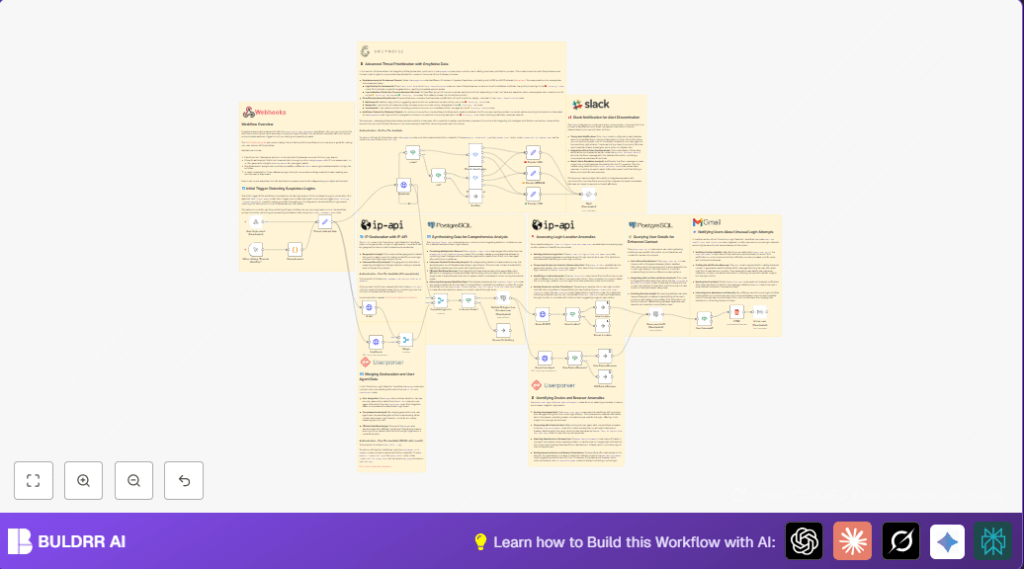

What This Automation Does
This workflow finds risky logins fast. It checks if the IP address is bad or sneaky. It looks where the login came from. It sees what device and browser were used. It checks if these are new or strange compared to past logins. Then it gives a risk level and sends alerts to Slack and emails to users. This saves time and helps spot real threats early.
Tools and Services Used
- GreyNoise API: Checks if IP address has bad history.
- IP-API: Finds physical location of IP.
- UserParser API: Breaks down user agent into device, browser, OS.
- Postgres Database: Stores past login info for comparison.
- Gmail SMTP or OAuth2: Sends email alerts to users.
- Slack API: Sends alerts to security team chat.
Who Should Use This Workflow
This is for security teams watching login events. They want to stop account hacks fast. Also useful for anyone with many users logging in daily. It helps reduce time spent checking false alarms. Good for companies with access to APIs and a Postgres database.
Inputs, Processing Steps, and Outputs
Inputs
- Login event JSON with IP, user agent, user ID, timestamp.
Processing Steps
- Receive login event through Webhook node.
- Extract IP, user agent, timestamp, URL, and user ID using Set node.
- Send IP to GreyNoise API to check reputation.
- Branch flow based on GreyNoise flags (
noiseandriotvalues). - Classify threat priority (High, Medium, Low) using Switch nodes.
- For uncertain threats, query Postgres for user’s last 10 logins.
- Query IP-API for geolocation of current login.
- Compare new location to historical cities.
- Call UserParser API to parse user agent details.
- Check if device/browser/OS is new or changed.
- Merge GreyNoise, geolocation, and user agent data to get full context.
- Fetch user email and profile from Postgres for notification.
- Send email alert if user has email.
- Send Slack alert to security team with priority and details.
Outputs
- Security team Slack messages with login alerts and IP reputation link.
- Email notifications to users if unusual login detected.
- Priority tag on each login event to guide response.
Beginner Step-by-Step: How to Use This Workflow in n8n
Step 1: Import Workflow
- Download the workflow file using the Download button on this page.
- Open n8n editor, click on “Import from File” and select the downloaded workflow JSON.
Step 2: Add Credentials and Configure Settings
- Set up API credentials for GreyNoise and UserParser in n8n’s Credentials section.
- Check and update any IDs, emails, Slack channel names, database table names as needed.
- Ensure Postgres credentials are correct and connected.
Step 3: Test the Workflow
- Trigger a sample login event manually via Webhook node or use test data.
- Check Slack and email outputs for correct alerts.
Step 4: Activate Workflow for Production
- Activate the Webhook node to start receiving real login events.
- Monitor workflow runs in n8n UI for errors or missed alerts.
- Consider enabling retry settings on critical nodes to avoid lost events.
For those who want to run this on their own server, consider self-host n8n for full control and security.
Common Errors and How to Fix Them
- GreyNoise API call fails or returns no data: Check API Key is valid and network is working.
- No email sent to user: Verify user email exists in Postgres; check Gmail node credentials.
- Postgres query errors or no results: Confirm table names and SQL syntax, ensure userId parameter is passed correctly.
Customization Ideas
- Change how the workflow sets priority rules for different GreyNoise classifications.
- Increase or lower the number of past logins queried from Postgres.
- Adjust user email notification HTML content for branding or extra instructions.
- Add SMS alerts after priority is set using Twilio or other services.
- Extend workflow to trigger multi-factor authentication on suspicious logins.
Summary of Benefits
✓ Saves hours by automating login threat checks.
✓ Quickly spots suspicious IPs, locations, and devices.
✓ Sends clear alerts to security team and users.
✓ Easy to import and configure inside n8n.
✓ Reduces false alarms and missed threats.
