

Opening Problem Statement
Meet Emma, a customer support manager at a tech startup that frequently receives complex questions about various software products. Often, customers reference the latest updates on official websites and documentation. Emma’s team struggles to provide quick, accurate answers because manually searching websites for up-to-date information is time-consuming, prone to error, and delays responses. Sometimes, outdated knowledge leads to confusion or lost sales. Imagine Emma spending hours daily copying, pasting, searching, and verifying details from multiple web sources.
This is the exact challenge the AI Agent Chatbot with Jina.ai Webpage Scraper workflow solves. It automates real-time web scraping integrated into an AI chatbot, slicing down Emma’s workload drastically while boosting answer accuracy with live data access.
What This Automation Does
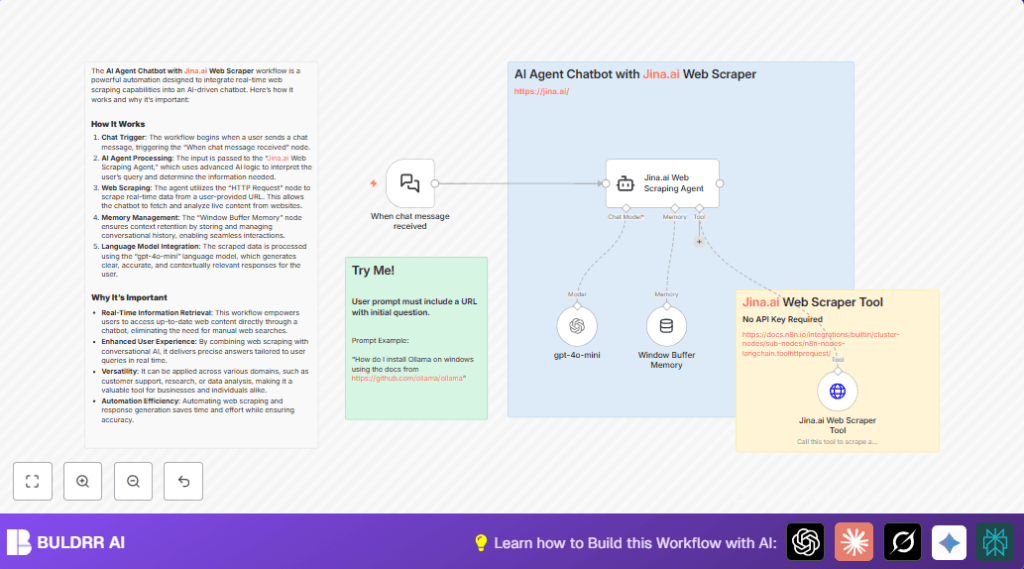
When this workflow runs, it transforms a simple chat input into an intelligent, context-rich response powered by real-time web data. Here’s what happens specifically:
- The chatbot triggers automatically upon receipt of any chat message from a user.
- The input question is routed to an AI agent designed to understand the query semantics.
- The AI agent uses the Jina.ai Web Scraper Tool to fetch relevant, up-to-date website content by extracting URLs embedded in the user’s question.
- Scraped web data is passed to a language model (GPT-4o-mini) which processes and generates a comprehensive, concise answer.
- Context retention is managed by a Window Buffer Memory node, enabling conversational flow and continuity.
- The final answer delivered is not generic but drawn from fresh web content, providing accurate, real-time solutions.
This means Emma and her team save hours daily and eliminate errors from outdated info, all through automated, smart interaction.
Prerequisites ⚙️
- n8n Account with workflow automation access.
- OpenAI Account (with API key) for GPT-4o-mini language model integration (used in LM Chat OpenAI node).
- Internet access to let the workflow perform live HTTP requests for scraping.
- No API key required for Jina.ai Web Scraper Tool node.
Step-by-Step Guide
Step 1: Set Up the Chat Trigger Node
Navigate in n8n editor to add the When chat message received node from LangChain integrations.
Configure it to listen for incoming chat messages from your chat platform connected to n8n.
You should see a webhook URL generated for this trigger.
This webhook will receive chat inputs as payloads.
Common mistake: Forgetting to activate webhook or incorrect chat platform integration.
Step 2: Configure Jina.ai Web Scraping Agent Node
Add the Jina.ai Web Scraping Agent node.
In the parameters, paste this prompt which instructs the agent to use the scrape_website tool:
=You have access to a powerful scrape_website tool that can retrieve real-time web content. Use this tool to extract any needed information from the website, analyze the data, and craft a clear, accurate, and concise answer to the user's question.
User Question: {{ $json.chatInput }}
No additional options need to be changed.
This node is the core AI interpreter and controller of scraping.
Common mistake: Misplacing the variable or leaving the prompt blank.
Step 3: Connect the GPT-4o-mini Language Model Node
Add the gpt-4o-mini node from the LangChain LM Chat OpenAI integration.
Choose the model “gpt-4o-mini”.
Link this node as the AI language model for the Jina.ai Web Scraping Agent node.
Use your OpenAI API credentials.
This model parses and enriches the scraped content before generating the final chatbot answer.
Common mistake: Incorrect API credentials or model selection.
Step 4: Insert the Window Buffer Memory Node
Add the Window Buffer Memory node to manage conversation context.
Link it as the AI memory source for the Jina.ai Web Scraping Agent.
This node preserves prior chat messages’ context to maintain coherent session interactions.
Common mistake: Forgetting to connect this node leads to disjointed chat responses.
Step 5: Integrate the Jina.ai Web Scraper Tool Node
Include the Jina.ai Web Scraper Tool node of type LangChain Tool HTTP Request.
Set its URL parameter dynamically as =https://r.jina.ai/{url}, where {url} is parsed from the user’s chat input.
Describe the tool as “Call this tool to scrape a website. Extract the URL from the user prompt.”
Connect this node as the AI tool for the Jina.ai Web Scraping Agent.
Common mistake: Incorrect or static URL values.
Step 6: Add Sticky Notes for Documentation
Insert Sticky Note nodes to document workflow parts:
– “AI Agent Chatbot with Jina.ai Web Scraper” overview
– Notes on usage and prompt examples
This helps maintain and understand the workflow.
Common mistake: Skipping documentation makes collaboration difficult.
Step 7: Activate and Test Your Workflow
Switch the workflow to active mode.
Trigger a chat input containing a question with a URL (e.g., “How do I install Ollama on windows using the docs from https://github.com/ollama/ollama”).
Observe the chatbot provide a response extracted directly from the live webpage.
Confirm that the context of prior chats is remembered across messages.
Common mistake: Not including a URL in the prompt prevents scraping.
Customizations ✏️
- Change Language Model
In thegpt-4o-mininode, select a different OpenAI model such as “gpt-3.5-turbo” for cost or output preference.
This adjusts response style and costs. - Modify Scraper Prompt
In theJina.ai Web Scraping Agentnode, edit the prompt text to tailor the scraping instructions for different domains or details.
For example, ask it to focus only on FAQ sections of websites. - Extend Memory Window
Adjust settings in theWindow Buffer Memorynode to store longer conversational history.
This creates richer multi-turn dialogue capabilities. - Add Custom Pre-processing
Insert a Code node before the scraper to parse URLs or clean input text as needed.
This improves scraping accuracy for messy prompts.
Troubleshooting 🔧
- Problem: “Chatbot returns vague or no answer”
Cause: Input prompt missing a valid URL or unclear query.
Solution: Make sure user messages include URLs like “https://example.com” and clear questions. - Problem: “HTTP request fails or times out”
Cause: Website blocking scraping or network issues.
Solution: Test URL in a browser, use proxies if necessary, or check firewall settings. - Problem: “Memory node not saving context”
Cause: Missing or broken connection from the Window Buffer Memory node.
Solution: Verify correct wiring and active memory settings.
Pre-Production Checklist ✅
- Verify OpenAI API credentials are active and without quota issues.
- Test webhook URL from “When chat message received” node with sample chat input containing URL.
- Test Jina.ai Web Scraper Tool node manually with test URLs.
- Ensure Window Buffer Memory node correctly stores and recalls message history.
- Confirm workflow links properly from trigger through agent, memory, tool, and language model nodes.
Deployment Guide
Once tested, set the workflow status to active in n8n.
Make sure your chat platform is integrated with n8n’s webhook URL from the trigger node.
Monitor initial runs for errors or timeouts in the execution logs.
Adjust node timeouts or retries if needed.
Because it works with live HTTP requests and AI models, ensure your API keys remain secure and usage limits are tracked.
FAQs
- Can I use a different AI model?
Yes, you can swap outgpt-4o-minifor any OpenAI model supported by n8n LangChain nodes, likegpt-3.5-turbo. - Does scraping consume API credits?
The scraping itself is via Jina.ai without an API key, but language model calls do consume OpenAI API credits. - Is my data safe?
All data flows through your n8n instance and OpenAI endpoints securely. Use self-hosting for best privacy control. - Can this handle large volumes?
Yes, but high volume chat usage may require scaling n8n resources and managing API limits.
Conclusion
With this AI Agent Chatbot with Jina.ai Webpage Scraper, you’ve built a smart chatbot that dynamically scrapes live webpages to deliver timely, accurate answers. Emma no longer wastes hours searching documentation manually. This automation saves time, reduces errors, and impresses users with real-time data answers.
Next, you might explore integrating this workflow with customer support platforms like Slack or Microsoft Teams for seamless team collaboration. Or enhance the scraper to collect structured data tables from websites for reporting automation. Another idea is to expand memory capabilities to support long-term customer interaction histories.
Start experimenting and see how live data enriches your chatbot conversations today!