
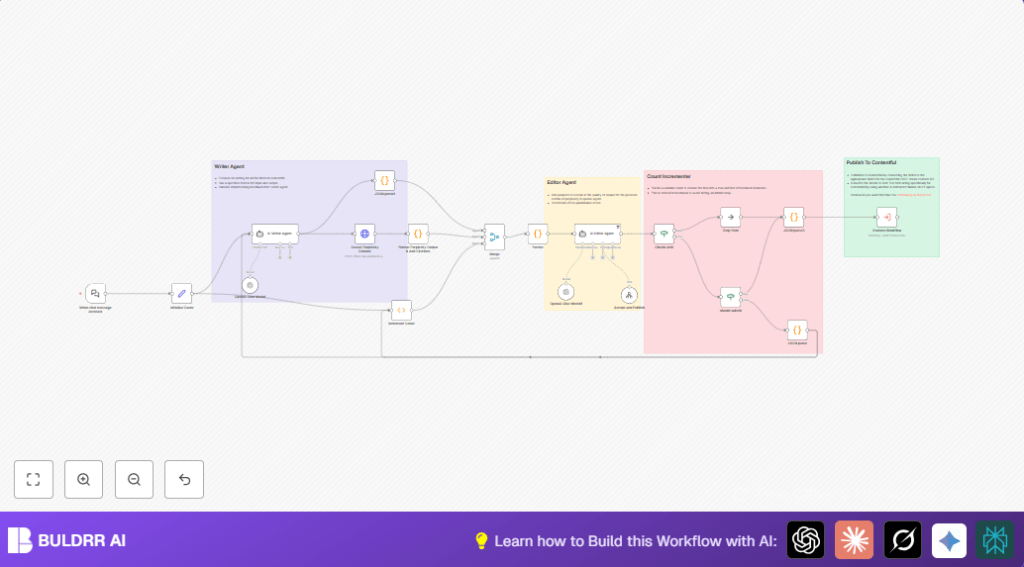

What This Automation Does
This workflow creates knowledge base articles fast and with less mistakes.
It solves the problem of spending many hours writing and fixing articles manually.
The final result is well-researched, clear, and SEO-friendly articles published automatically.
Why Use This Workflow
The workflow is made for content teams who want to save time.
It stops repeated editing and messy structure problems.
You get better articles that help customers without waiting long.
Tools and Services Used
- OpenAI Chat Model (GPT-3.5 or GPT-4.5): Writes draft and edits article content.
- Perplexity AI API: Gathers detailed research with citations.
- Contentful CMS: Posts the finished articles online.
- n8n Workflow Automation Platform: Connects all the steps.
Inputs, Processing, and Outputs
Inputs
- User sends a topic via the public chat trigger.
- Initial JSON with article title and content.
- API keys for OpenAI, Perplexity, and Contentful.
Processing Steps
- Set iteration counter to zero.
- Use OpenAI to draft or update article JSON.
- Request deep research content with citations from Perplexity AI.
- Clean and format research output by adding citation links.
- Merge draft and research data for review.
- Run OpenAI editor agent to check quality and suggest changes.
- Check iteration count to avoid infinite loops.
- Decide to publish or redo based on editor decision.
Outputs
- High-quality, SEO-optimized article JSON.
- Final article published as a new entry in Contentful CMS.
Beginner Step-by-Step: How to Use This Workflow in n8n
Importing the Workflow
- Download the workflow file using the “Download” button on this page.
- Open the n8n editor where you want to use the workflow.
- Use the “Import from File” option to load the workflow.
Configuring Credentials and Settings
- Add OpenAI API Key in the credentials section.
- Add Perplexity AI API Key in the HTTP Request node headers.
- Set up Contentful CMS credentials and map required fields.
- Check and update IDs, email addresses, channels, or folders used in nodes as needed.
- Review system messages or prompts for category lists and SEO metadata fields; update if necessary.
Testing and Activating
- Trigger the chat webhook by sending a test article topic.
- Watch workflow run in n8n to confirm no errors occur.
- Check output articles in a staging area of Contentful.
- Once tests pass, toggle the workflow “Active” switch to start production runs.
For those choosing to run on an own server environment, consider the self-host n8n resource.
Step-by-Step Breakdown
1. Chat Trigger Setup
- Use the Webhook node named “When chat message received” to listen for new topic inputs.
- Make the webhook public and share the URL.
2. Initialize Iteration Count
- Connect to a Set node called “Initialize Count”.
- Define variable “iterationCount” as 0.
3. Write or Update Article
- Use Langchain Agent node named “AI Writer Agent.
- Provide JSON instructions with fields like title, slug, category, and SEO metadata.
4. Generate Research Content
- Call Perplexity AI API with HTTP Request node “Create Perplexity Content”.
- Send article title and improvement points.
5. Format Research Output
- Clean text and add markdown citations in Code node “Format Perplexity Output & Add Citations”.
6. Merge Data
- Use Merge node to combine draft, research content, and iteration counter.
7. Quality Review
- Run Langchain Agent node “AI Editor Agent” to check and suggest improvements.
8. Check Iteration Limit
- Use If node “Check Limit” to compare iterationCount against max 3.
- Stop workflow if limit reached.
9. Decide or Submit
- If node “Should submit” routes to publish or rewrite.
10. Publish Article
- Trigger Execute Workflow node to publish content into Contentful.
Common Customizations
- Change article category options in the “AI Writer Agent” system message.
- Adjust max iteration count in “Check Limit” node.
- Switch Perplexity API model in the HTTP request node.
- Make chat trigger private for controlled access.
- Add extra SEO metadata fields in AI prompts.
Troubleshooting Tips
- Watch for JSON parse errors in code nodes; use try/catch.
- Check Perplexity API key for auth errors.
- Ensure iterationCount increments correctly to stop infinite loops.
- Validate field mappings to Contentful to avoid publishing failures.
Pre-Production Checklist
- Test that all API keys are active and correctly set.
- Send test chat trigger messages.
- Verify iteration counter works as expected.
- Run full workflow test with sample article.
- Confirm AI editor feedback is useful.
- Test publishing to a staging CMS environment.
Deployment
After testing, turn on the workflow using the “Active” toggle in n8n.
Make sure webhook URL stays accessible for chat triggers.
Check execution logs to catch errors early.
Update AI models or APIs without stopping workflow.
Summary
✓ Saves many hours of manual writing and editing.
✓ Improves article quality with research and SEO.
✓ Standardizes publishing for consistency.
✓ Stops endless editing with controlled loops.
✓ Lets content teams focus on growth not fixes.
