

What This Automation Does
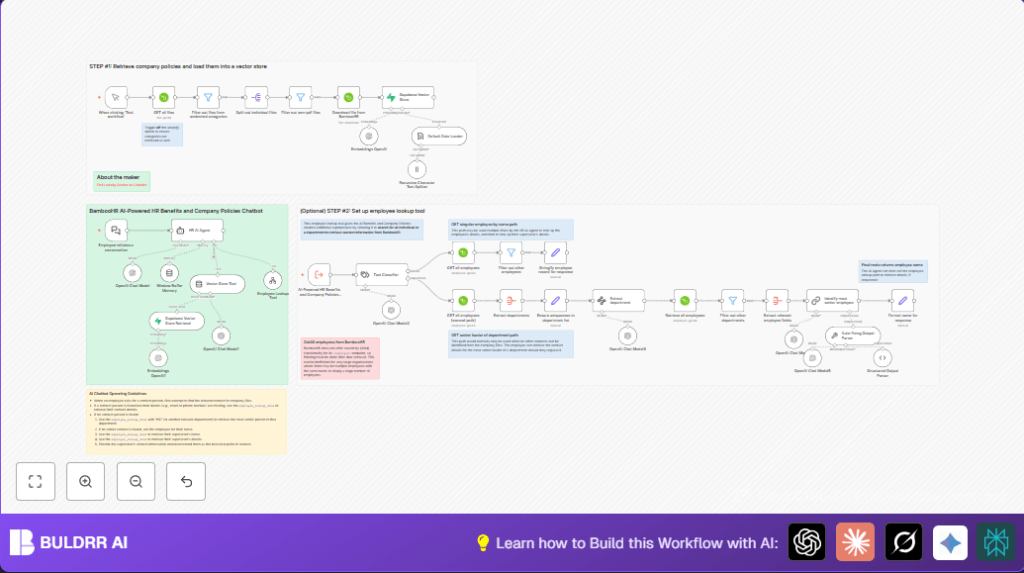
This workflow creates an HR assistant chatbot that helps answer employee questions fast.
It pulls company policy files and benefits documents from BambooHR, turns them into searchable data, and uses OpenAI models to answer questions well.
The chatbot can also look up employees and department heads to provide the right contact info.
Your employees get quick, correct answers anytime, while HR saves hours on repetitive tasks.
- Gets all policy and benefits files from BambooHR and indexes them in a vector database.
- Listens for employee questions in natural language and triggers smart AI responses.
- Uses text embeddings and vector search to find relevant info from documents.
- Queries BambooHR data to find employee or department senior contact info.
- Supports fallback rules to always give a useful contact if direct info is missing.
- Maintains conversational context to handle multi-turn chats smoothly.
Tools / Services Used
- n8n: Automates the entire workflow with nodes and triggers.
- BambooHR API: Provides company policy PDF files and employee data via API.
- OpenAI API: Generates embeddings and interprets questions with GPT-4 or similar models.
- Supabase Vector Store: Stores document embeddings for quick semantic search.
- Langchain Nodes: Organizes AI tools and chat memory for better response flow.
Inputs, Processing Steps, and Outputs
Inputs
- Employee questions sent via chat to a webhook trigger.
- Company policy and benefits PDF files stored in BambooHR.
- Employee data like names, departments, job titles from BambooHR.
Processing Steps
- Retrieve all files from BambooHR with categories to filter policy documents.
- Filter only PDFs from relevant categories, then download these files.
- Split and chunk documents for embedding via OpenAI.
- Insert document embeddings into Supabase vector store.
- Listen for employee questions through webhook.
- Classify whether question asks about a person or department.
- Call BambooHR API to lookup employee or senior contact based on classification.
- Use Langchain with conversation memory to generate accurate answers blending AI model and retrieved data.
- Apply fallback logic to find best contact if lookup fails.
Output
- Instant chatbot answers with company policy info, benefits details, or contact persons.
- Clear conversational context maintained over multi-turn questions.
- Contact info for employee or department senior given when asked.
Beginner Step-by-Step: How to Use This Workflow in n8n
Step 1: Download and Import Workflow
- Download the workflow JSON using the Download button on this page.
- Go to the n8n editor you already opened.
- Click “Import from File” and select the downloaded workflow JSON to add it.
Step 2: Configure Credentials and Settings
- Add BambooHR API credentials in n8n credentials section.
- Enter your OpenAI API Key for language model access.
- Set up Supabase credentials for vector database storage.
- Update any IDs, emails, or workflow-specific settings like department names if needed.
Step 3: Test the Workflow
- Run the manual Webhook node trigger labeled “When clicking ‘Test workflow’” to start.
- Check the execution results and outputs for expected data.
Step 4: Activate Workflow for Production
- Turn on the toggle switch in the top right corner to set the workflow live.
- Connect the webhook URL into your company chat interface or intranet.
Note: For better control, consider self-host n8n on your server or VPS.
Customization Ideas
- Add support for more file types such as DOCX by editing filter nodes.
- Adjust chunk sizes and overlap in the text splitter node to improve AI response memory.
- Modify system prompt messages to include company culture or special instructions.
- Extend employee lookup tool to get extra details like phone numbers or office locations.
- Implement language detection to support multilingual employee queries.
Common Problems and Fixes
- No files retrieved: Check BambooHR API use. Ensure simplifyOutput is off and credentials are valid.
- Employee not found: Verify exact name spelling and update BambooHR employee data regularly.
- Embedding slow or failing: Use smaller chunk sizes in text splitter and monitor OpenAI API usage.
Pre-Production Checklist
- Confirm BambooHR credentials return files with correct categories.
- Test OpenAI API key validity and quota.
- Verify Supabase vector store inserts and queries work with sample data.
- Run classification node tests for person vs department queries.
- Simulate chat conversations to check AI response quality.
- Check error paths route properly to fallback contacts.
Deploying Your HR Chatbot
After testing, switch the workflow live in n8n.
Place the webhook in an employee intranet chat or portal so staff can ask questions anytime.
Watch for errors or slow responses in the n8n execution logs.
Tune OpenAI parameters if needed for faster or clearer answers.
Summary
✓ Employees get fast answers to HR questions on policies, benefits, and contacts.
✓ HR saves hours weekly by no longer answering repetitive queries.
✓ Conversational AI with document and employee data support keeps answers accurate.
✓ Works fully automated in n8n with BambooHR, OpenAI, and Supabase.
✓ Easy to configure via API keys and update with new documents.
