

1. What this workflow does
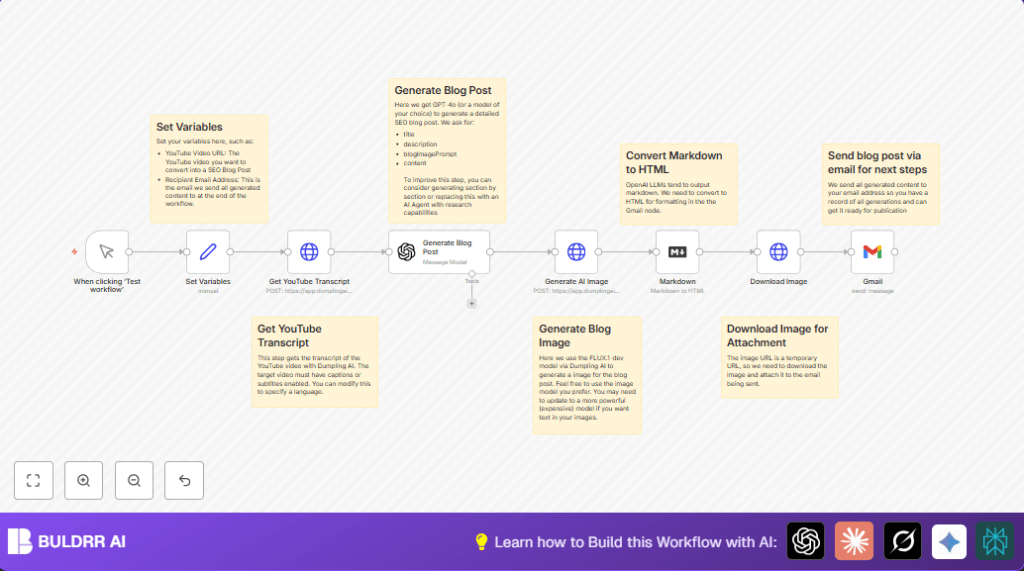
This workflow changes YouTube video transcripts into SEO-friendly blog posts automatically.
It takes the video URL, gets the transcript, writes a blog using AI, makes a blog image, and emails it.
This saves many hours of work and gives you ready-to-use content fast.
You start with a YouTube video link that has captions on.
Then the workflow gets the transcript text from Dumpling AI’s API.
Next, it sends the transcript to GPT-4o to write a catchy blog post with a title, keywords, and description.
It also asks Dumpling AI’s FLUX.1-dev model to make an AI image for the blog.
The blog text in markdown is changed to HTML for email format.
The image is downloaded and attached to the email.
Finally, the completed blog post is emailed via Gmail to your chosen address.
You get a well-structured blog post and custom image for easy review and publishing.
2. Who should use this workflow
If you work with content from YouTube videos and want blog posts fast, this workflow helps.
It is good for marketers, bloggers, and anyone needing SEO content from videos.
The workflow works only with videos that have subtitles enabled on YouTube.
It is designed for users who have basic knowledge of n8n flows and APIs.
It cuts down manual work like transcription, research, and image creation.
This lets you focus on editing and publishing instead of long prep steps.
3. Tools and services used
- Dumpling AI API: For getting YouTube transcripts and creating AI images.
- OpenAI GPT-4o: To generate SEO-optimized blog content from transcripts.
- Gmail with OAuth2: To send the completed blog post as an email.
- n8n automation platform: To build and link all the workflow nodes together.
4. Beginner step-by-step: How to use this workflow in n8n
Step 1: Download the workflow file
- Find the Download button on this page.
- Click to save the workflow file (.json) on your computer.
Step 2: Import into n8n
- Make sure you are inside the n8n editor screen.
- Click the hamburger menu and choose “Import from File.”
- Select the saved workflow file and import.
Step 3: Configure credentials and variables
- Add and test your Dumpling AI API Key credentials in n8n.
- Add your OpenAI API Key for GPT-4o usage.
- Set up Gmail credentials with OAuth2 for sending emails.
- In the Set Variables node, update the YouTube video URL and recipient email address.
Step 4: Test the workflow
- Click the Manual Trigger node and run the workflow once to check it runs without errors.
- Verify email arrives correctly with blog content and attached image.
Step 5: Activate for production use
- Switch the Manual Trigger node to a schedule trigger if desired.
- Save and activate the workflow. It will run automatically on your chosen schedule.
- Monitor execution and logs to catch any issues.
If you use self-host n8n setups, see here for guidance.
5. Workflow inputs, processing, and outputs
Inputs
- YouTube video URL with captions enabled.
- Recipient email address for sending blog posts.
Processing steps
- Get transcript text via Dumpling AI API from YouTube URL.
- Send transcript to GPT-4o model to create SEO blog post with title, keywords, description, and content.
- Generate AI image using blog image prompt from GPT output via Dumpling AI FLUX.1-dev model.
- Convert markdown blog content into HTML for email use.
- Download generated image binary to attach in email.
- Send email from Gmail node with subject, HTML content, and image attachment.
Outputs
- Email received with full SEO blog post and AI-generated cover image.
- Ready-to-publish blog content that saves time and effort.
6. Common edge cases and troubleshooting
Missing or empty transcript
If the YouTube video has no captions, the transcript API will return empty.
Make sure the video URL is correct and captions are available.
AI blog content incomplete or off-topic
Check prompt instructions in the Generate Blog Post node.
Make sure the transcript input is valid and complete before sending to GPT.
Email sending errors
Verify Gmail OAuth2 credentials have not expired.
Confirm recipient email address is valid and formatted correctly.
Image download fails
The AI image URL may expire quickly.
Set the Download Image node to binary mode to fetch data properly.
7. Ideas to customize the workflow
- Change the AI model from GPT-4o to GPT-3.5-turbo to lower cost.
- Add language code to Dumpling AI transcript request for other spoken languages.
- Use a time trigger instead of manual trigger to run automatically.
- Fetch YouTube metadata (title, description) via API to enrich blog posts.
- Switch Gmail node with SMTP or SendGrid for alternative email providers.
8. Summary of benefits and outcome
✓ The workflow automates blog post creation from YouTube videos.
✓ Saves several hours per blog post by skipping manual transcription and content writing.
✓ Provides SEO-optimized blog text with proper structure and keywords.
✓ Creates a custom AI-generated blog cover image.
✓ Sends content ready for review via email with attachments.
✓ Is configurable for schedule, AI model, and email setup.
→ Results in consistent publishing of quality content derived from video.
→ Removes manual steps to improve productivity and reduce errors.
