
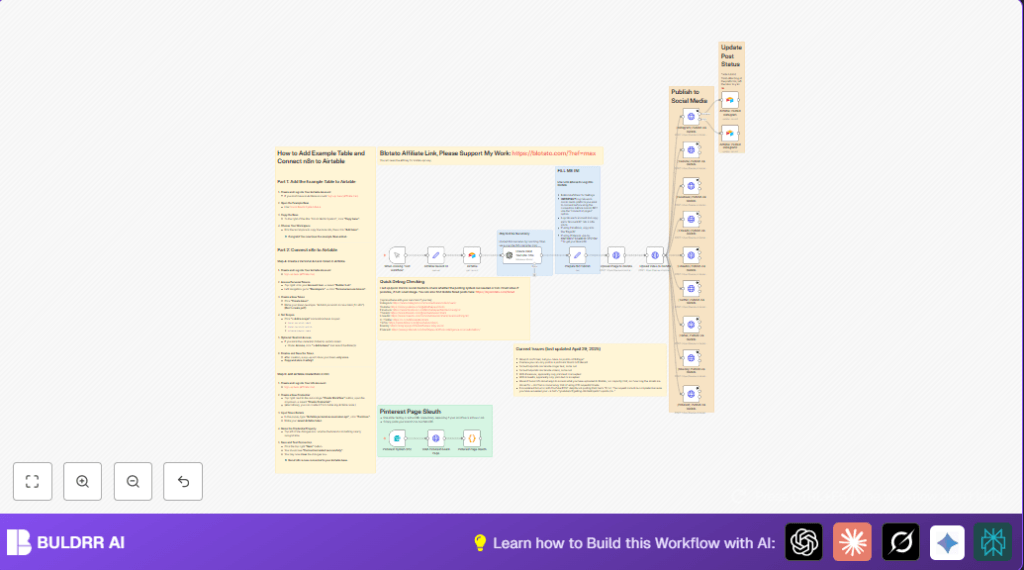

What This Workflow Does
This workflow automates posting videos and images across many social media platforms. It stops the problem where users spend too much time uploading and make mistakes. The system uses Airtable for content, uploads media to Blotato, then posts with captions customized for each platform. The result is timely, correct posts on Instagram, Facebook, YouTube, TikTok, LinkedIn, Twitter (X), Threads, Bluesky, and Pinterest.
It also checks YouTube titles with AI to make them catchy, handles special platform needs like Facebook pages and Pinterest boards, and updates Airtable with post status. If one platform fails, others still post. The user saves hours weekly and avoids manual errors.
Tools and Services Used
- n8n: Workflow automation tool to run the sequence.
- Blotato API: Hosts media and posts content to social media accounts.
- Airtable: Stores media URLs and captions used per post.
- OpenAI API: Validates and improves YouTube video titles using GPT-4.1-mini.
- Social media accounts: Instagram, Facebook, YouTube, TikTok, LinkedIn, Twitter (X), Threads, Bluesky, Pinterest integrated via Blotato.
Inputs, Processing Steps, and Output
Inputs
- Airtable base with media URLs, text captions, and account IDs.
- Media files: videos and images ready for posting.
- API keys for Blotato, Airtable, and OpenAI.
- Pinterest board URL if Pinterest posting used.
Processing Steps
- Load media info and captions from Airtable using the Airtable node.
- Set platform IDs and prepare text in Set node named “Prepare for Publish”.
- Upload media (videos and images) to Blotato via HTTP Request nodes.
- Validate YouTube video title using OpenAI node with a prompt to create catchy, short titles.
- Post content to each social media platform using separate HTTP Request nodes calling Blotato APIs with platform-specific parameters.
- Handle Pinterest board ID extraction from URL using a Form Trigger, an HTTP request, and a JavaScript Code node parsing the HTML.
- Update Airtable records with post status and timestamps.
- Allow the workflow to continue posting on other platforms even if one fails.
Output
- Published media posts on all selected social platforms with matched captions and settings.
- Airtable record updated to show published or error status per platform.
- YouTube titles improved for viral potential by AI.
- Dynamic Pinterest board targeting when URL input used.
- Saving several hours weekly by automating all posting steps.
Beginner Step-by-Step: How to Use This Workflow in n8n
1. Import the Workflow
- Download the workflow file by clicking the Download button on this page.
- In the n8n editor, click “Import from File” and select the downloaded file.
2. Set Up Credentials
- Add your API keys in n8n Credentials manager for Blotato, Airtable, and OpenAI.
- Update any account IDs, page IDs, board IDs, or table names in the Set node or HTTP Request nodes as needed.
3. Test the Workflow
- Run the workflow manually first to check media uploads and posting succeed.
- Review Airtable to confirm the status updates appear accurately.
- If errors occur, check API key validity and JSON payload formats.
4. Activate for Production
- Enable the workflow trigger or schedule it as desired inside n8n.
- Monitor the execution logs for errors or failed posts.
- Make sure all credentials are secure and rotate API keys regularly.
If hosting n8n on your server or VPS, visit self-host n8n for setup help.
How the Workflow Works Step-by-Step
1. Retrieve Media and Text From Airtable
The workflow starts by loading media URLs and caption texts stored in Airtable. It reads info like Instagram account ID and final texts for short and long captions. The Set node prepares all data as JSON strings for API calls.
2. Upload Media to Blotato
Video and image URLs from Airtable are sent in POST requests to Blotato’s upload API using two separate HTTP Request nodes. The API responds with hosted URLs needed for social posting.
3. AI-Check YouTube Title
A prompt sent to the OpenAI node asks the AI to create viral YouTube short video titles under 100 characters. This ensures catchy, effective titles are posted on YouTube.
4. Post to Each Social Media Platform
For each platform, an HTTP Request node sends the final text, account ID, media URLs, and any special fields like Facebook page ID or Pinterest board ID. The workflow handles errors without stopping other posts.
5. Update Airtable Status
After posting, Airtable is updated to record statuses such as “In progress” or “Completed”. This gives clear tracking of what was posted and when.
6. Extract Pinterest Board ID (Optional)
If Pinterest posting is used, the workflow can take a board URL input, fetch the HTML page, and use JavaScript to parse out the correct board ID needed for posting. This avoids manual lookup.
Customizations and Tips
- Change captions for each platform by editing the
final_text_shortandfinal_text_longin the Set node. - Add new social networks by copying the HTTP Request nodes and adjusting account IDs and API details for the new service.
- Modify privacy settings on TikTok and YouTube in their HTTP nodes by changing parameters like
privacyLevelorprivacyStatus. - Adjust the AI prompt in the OpenAI node to tailor YouTube titles for style or keyword focus.
- Use the Pinterest board URL input form to dynamically target boards instead of manually entering IDs.
Handling Common Issues
YouTube API Quota Errors
If the YouTube node shows quota errors, reduce posting frequency or request more quota from Google. Temporarily disable YouTube posting or add retry logic with delays.
JSON or Malformed Request Errors
Make sure all text sent in API requests uses toJsonString() for proper quotation and escaping. Validate JSON with external tools before running.
Pinterest Board ID Extraction Failures
Ensure Pinterest URLs use the correct format. Update the JavaScript regex in the code node if Pinterest changes their page HTML structure.
Pre-Production Checklist
- Verify Airtable configuration and API keys work correctly.
- Confirm media uploads to Blotato return valid URLs.
- Test OpenAI YouTube title generation node returns correct JSON format.
- Check posting HTTP nodes run without errors on all social accounts.
- Ensure Airtable status update nodes correctly mark publishing progress.
- Test Pinterest URL input and board ID extraction for accuracy.
- Backup Airtable data in case of accidental changes during tests.
Deployment Guide
Activate the workflow in n8n and set the trigger (time or manual). Make sure error logging is enabled inside n8n to catch failed posts. Monitor post success via Blotato dashboard.
Keep API keys safely in n8n credentials. Rotate keys when needed for security.
Summary of Results
✓ Saves 4 to 6 hours every week by automating social posting.
✓ Posts videos and images correctly to 10 social platforms.
✓ Customizes captions per platform and checks YouTube titles with AI.
✓ Records post status in Airtable for tracking.
✓ Continues other posts even if one platform fails.
