
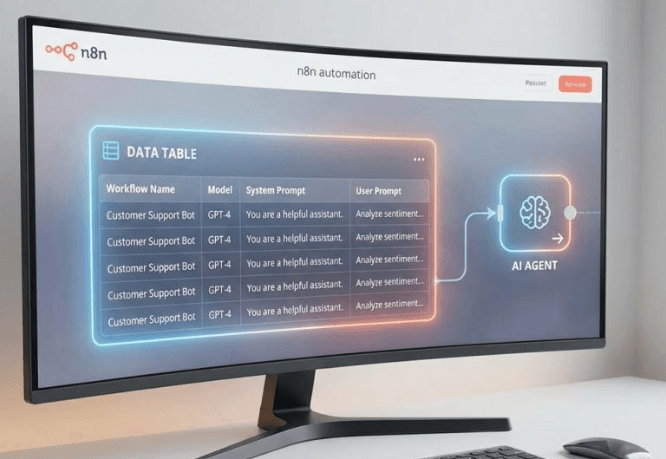
n8n’s new native data tables completely change how you design AI workflows.
Until now, storing or updating data inside n8n always required external tools like Google Sheets, Airtable, or custom APIs.
But with Data Tables, you can:
- Store prompts, models, variables
- Feed data directly into AI agents
- Log every action an agent takes
- Run evaluations on your agents
- Sync with external sources
- Treat n8n like a mini internal database
This guide breaks down the 3 major hacks that unlock their real power.
🔷 HACK 1 — Use Data Tables as a Control Center for Prompts, Models & Dynamic Agent Behavior
Instead of hard-coding system prompts or model names inside workflows, you can now store them in a data table and inject them dynamically.
Why this matters
- You can update an agent’s prompt without opening the workflow.
- You can safely give clients access to control parameters without exposing the actual workflow logic.
- You can securely share workflow templates without sharing your proprietary system prompts.
- You can change models on the fly (GPT-5 → Claude Sonnet → whatever).
How it works
Create a table like:
| workflow | chatModel | systemPrompt | userPrompt |
|---|---|---|---|
| research-agent | gpt-5 | {system prompt} | {user prompt for industry research} |
Inside your workflow:
- Add a Data Table “Get Row” filtered by workflow name.
- Drag:
- systemPrompt → agent’s system prompt field
- userPrompt → the agent’s query
- chatModel → the LLM node or router model input
Now changing values in the table instantly updates all dependent agents.
Real example from the workflow
- Original tool: Perplexity
- Change to: Tavily
- Original model: GPT-5
- Change to: Claude 3.7 Sonnet
Result?
The agent instantly switches tools + model without touching the workflow.
Bonus: Dynamic Workflows (Newsletter Example)
You can also use tables to dynamically control multi-step automations:
- Newsletter research agent
- Newsletter planning agent
- Newsletter editor agent
Each can pull:
- the topic
- the user prompt
- the system prompt
- the chosen model
This makes the entire content pipeline configurable from a single table.
🔷 HACK 2 — Use Data Tables as Full Agent Log Storage (Actions, Tokens, Intermediate Steps)
If you want scalable autonomous agents, you MUST track:
- Errors
- Intermediate tool steps
- Token usage
- Inputs/outputs per run
- Overall performance
Before Data Tables, most people logged this in Google Sheets.
Now you can store everything inside n8n itself.
What you need to enable
Inside your AI agent node:
→ Add Option → Return Intermediate Steps → ON
This exposes:
- Think steps
- Tool calls
- Raw inputs to tools
- Raw outputs from tools
- Token count per segment
- Total tokens
What the logs look like
A log entry includes:
- Timestamp
- Workflow name
- Input question
- Output result
- Tools used (think → contact agent → calendar agent)
- Token usage
- Execution time
This allows you to:
- Detect failure patterns
- Improve system prompts intelligently
- Benchmark different models
- Debug agent behavior without guessing
- Build guardrails to prevent known failure cases
Error Logging Bonus
You can store errors in a “error-logger” Data Table:
Columns:
- date
- time
- workflow
- errorNode
- errorMessage
- executionID
You can also push these to Slack/Telegram alerts.
🔷 HACK 3 — Run Agent Evaluations (Evals) Inside n8n Using Data Tables
Evaluations let you test agents systematically:
- Input → expected output → actual output → score
- Track performance across model changes
- Detect regressions
- Compare prompts
- Benchmark tool usage
Before: required a Google Sheet
Now: Data Tables do it natively.
How evals work
Your eval table contains:
| input | expectedAnswer | actualAnswer | score |
n8n:
- Reads each row
- Sends “input” to your agent
- Agent produces “actualAnswer”
- Compare actual vs expected using similarity scoring
- Writes back results + correctness score
What you learn from evals
- Did the prompt update improve quality?
- Is Claude better at this workflow than GPT-5?
- Does adding/removing a tool help?
- Did changing the system prompt break something?
You MUST change only one variable per run, or you can’t measure the effect.
Metrics n8n gives you
- Average tokens
- Average response time
- Score per test input
- High-level pass/fail
- Score trends across versions
This is crucial for building reliable autonomous agents or RAG systems.
🔷 Bonus — Syncing Data Tables With Google Sheets
Since Data Tables lack:
- Copy/paste bulk input
- Dropdowns
- Advanced validation
You can sync them with Google Sheets:
Two-way sync options
Option A: Data Table → Google Sheet
Daily:
- Pull entire table
- Clear sheet
- Rewrite everything into Google Sheets
Option B: Google Sheet → Data Table
If Sheets is your “front-end”:
- Pull from Sheets
- Clear Data Table
- Rewrite into Data Table
This keeps both perfectly aligned.
🔷 WHY ALL OF THIS MATTERS
Data Tables turn n8n into a lightweight database + configuration layer + analytics engine.
You can now:
- Treat n8n like a unified control system
- Build scalable, maintainable AI agents
- Share workflows securely without exposing IP
- Debug and improve agents systematically
- Store logs, errors, prompts, evals — all in one place
- Remove dependency on external Sheets/APIs
- Increase speed, reduce costs
This is a massive upgrade for building autonomous AI systems.
🔷 Final Takeaway
If you’re using n8n for:
- RAG
- Autonomous agents
- AI-driven automation
- Client dashboards
- System design
…Data Tables should be at the core of your architecture.
They make agents smarter, safer, cheaper to run, and dramatically easier to scale.
