
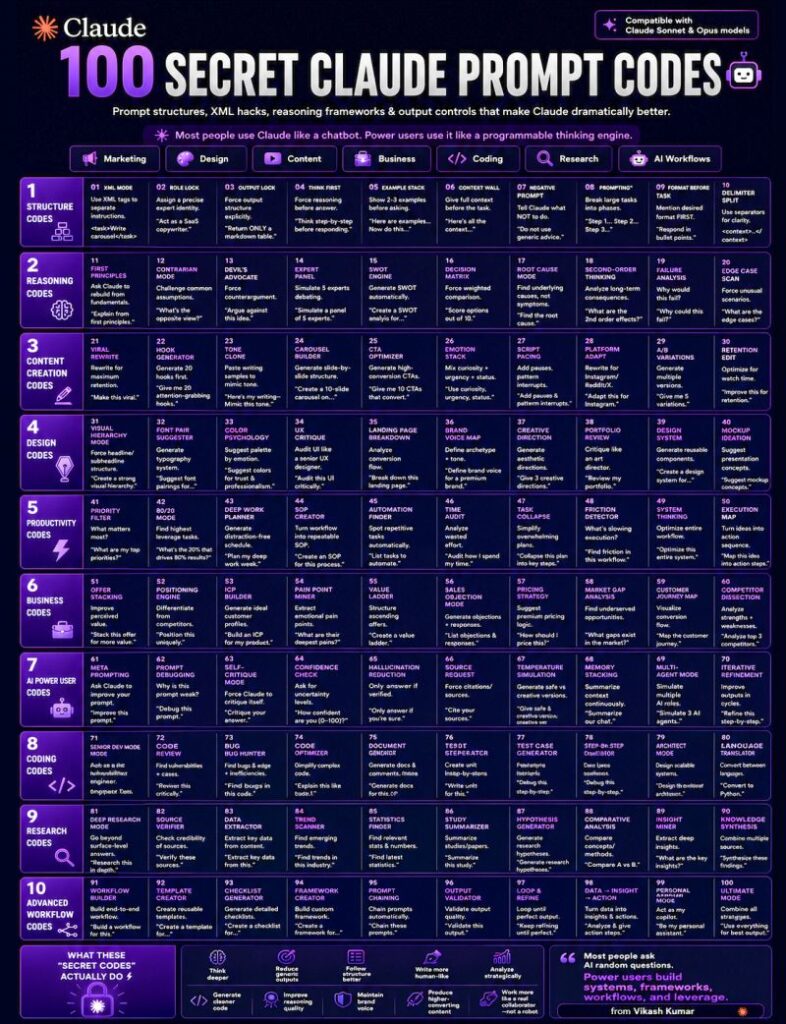
The Real CLAUDE PROMPT Systems I Use To Get Better Outputs
Most people use Claude like a basic chatbot.
That’s why their outputs still sound generic.
Claude Prompt performs best when:
- Claude Prompts are structured
- reasoning is guided
- context is layered properly
- outputs are controlled
- constraints are clear
This guide is not random “AI hacks.”
These are practical Claude Prompt systems that materially improve:
- writing
- strategy
- research
- content creation
- design direction
- workflows
- automation
- execution quality
No fluff.Only techniques that actually improve outputs.
WHO THIS GUIDE IS FOR
Useful for:
- creators
- designers
- marketers
- founders
- freelancers
- agency owners
- developers
- strategists
- students
- AI automation builders
- researchers
- copywriters
Especially if:
- outputs still sound generic
- AI loses context
- prompts feel inconsistent
- ideas feel shallow
- content lacks originality
- workflows are messy
SECTION 1 — STRUCTURE CODES
01 — XML STRUCTURING
Use XML tags to separate instructions clearly.
02 — ROLE LOCKING
Assign Claude a precise expert identity.
03 — OUTPUT LOCKING
Define exact output format upfront.
04 — THINK STEP-BY-STEP
Force reasoning before answers.
05 — EXAMPLE STACKING
Provide 2–3 examples before prompting.
06 — CONTEXT LOADING
Give detailed background and goals.
07 — NEGATIVE PROMPTING
Specify what Claude should avoid.
08 — CHAIN PROMPTING
Break tasks into sequential stages.
09 — FORMAT FIRST
Mention format before instructions.
10 — DELIMITER SPLITTING
Separate sections clearly using tags.
SECTION 2 — REASONING CODES
11 — FIRST PRINCIPLES THINKING
Rebuild ideas from fundamentals.
12 — CONTRARIAN MODE
Challenge common assumptions.
13 — DEVIL’S ADVOCATE
Force counterarguments.
14 — EXPERT PANEL
Simulate multiple expert viewpoints.
15 — SWOT ANALYSIS
Generate strengths, weaknesses, opportunities, threats.
16 — DECISION MATRIX
Score options using weighted logic.
17 — ROOT CAUSE ANALYSIS
Identify underlying problems.
18 — SECOND-ORDER THINKING
Analyze long-term consequences.
19 — FAILURE ANALYSIS
Ask why execution could fail.
20 — EDGE CASE DETECTION
Identify unusual scenarios and risks.
SECTION 3 — CONTENT CREATION CODES
21 — VIRAL REWRITING
Optimize for retention and shareability.
22 — HOOK GENERATION
Generate multiple hook variations.
23 — TONE CLONING
Match exact writing style examples.
24 — CAROUSEL STRUCTURING
Build slide-by-slide content flow.
25 — CTA OPTIMIZATION
Generate multiple CTA styles.
26 — EMOTION STACKING
Combine curiosity, urgency, aspiration, status.
27 — SCRIPT PACING
Improve rhythm and flow.
28 — PLATFORM ADAPTATION
Rewrite for different platforms.
29 — A/B VARIATIONS
Generate multiple content versions.
30 — RETENTION OPTIMIZATION
Improve watch time and engagement.
SECTION 4 — DESIGN CODES
31 — VISUAL HIERARCHY
Structure information visually.
32 — FONT PAIRING
Generate typography systems.
33 — COLOR PSYCHOLOGY
Create palettes based on emotion.
34 — UX CRITIQUE
Audit interfaces like a senior UX designer.
35 — LANDING PAGE ANALYSIS
Identify conversion bottlenecks.
36 — BRAND VOICE MAPPING
Define tone and archetype.
37 — CREATIVE DIRECTION
Generate aesthetic concepts.
38 — PORTFOLIO REVIEW
Analyze presentation quality.
39 — DESIGN SYSTEM THINKING
Create reusable design systems.
40 — MOCKUP IDEATION
Generate showcase and mockup ideas.
SECTION 5 — PRODUCTIVITY CODES
41 — PRIORITY FILTERING
Identify highest-impact actions.
42 — 80/20 ANALYSIS
Find highest leverage tasks.
43 — DEEP WORK PLANNING
Build distraction-free schedules.
44 — SOP GENERATION
Turn workflows into repeatable systems.
45 — AUTOMATION DETECTION
Identify repetitive tasks.
46 — TIME AUDITING
Analyze time inefficiencies.
47 — TASK SIMPLIFICATION
Reduce complexity in execution.
48 — FRICTION DETECTION
Identify bottlenecks slowing progress.
49 — SYSTEM THINKING
Optimize entire workflows.
50 — EXECUTION ROADMAPPING
Convert ideas into actionable phases.
SECTION 6 — BUSINESS CODES
51 — POSITIONING ENGINE
Differentiate from competitors.
52 — ICP GENERATION
Build detailed ideal customer profiles.
53 — OFFER STACKING
Increase perceived value.
54 — PAIN POINT MINING
Extract emotional pain points.
55 — VALUE LADDER DESIGN
Structure ascending offers.
56 — SALES OBJECTION HANDLING
Generate objections and responses.
57 — PREMIUM PRICING STRATEGY
Improve pricing perception.
58 — MARKET GAP ANALYSIS
Find underserved opportunities.
59 — CUSTOMER JOURNEY MAPPING
Visualize conversion stages.
60 — COMPETITOR DISSECTION
Analyze strengths and weaknesses.
SECTION 7 — AI POWER USER CODES
61 — META PROMPTING
Ask Claude to improve prompts.
62 — PROMPT DEBUGGING
Identify weak prompt areas.
63 — SELF-CRITIQUE MODE
Force Claude to critique outputs.
64 — CONFIDENCE CHECKING
Ask for uncertainty levels.
65 — HALLUCINATION REDUCTION
Restrict unverifiable answers.
66 — SOURCE REQUESTING
Force citations and references.
67 — CREATIVE VS SAFE OUTPUTS
Generate conservative and creative versions.
68 — MEMORY STACKING
Continuously summarize context.
69 — MULTI-AGENT SIMULATION
Simulate multiple AI roles.
70 — ITERATIVE REFINEMENT
Improve outputs repeatedly.
SECTION 8 — CODING CODES
71 — SENIOR ENGINEER MODE
Generate production-level solutions.
72 — CODE REVIEWING
Analyze vulnerabilities and inefficiencies.
73 — BUG HUNTING
Debug systematically.
74 — REFACTORING
Improve readability and performance.
75 — DOCUMENTATION GENERATION
Explain code clearly.
76 — API DESIGN
Generate scalable endpoints.
77 — TEST CASE GENERATION
Create edge-case testing.
78 — SECURITY AUDITING
Check exploit vulnerabilities.
79 — CLEAN ARCHITECTURE
Improve code organization.
80 — BUILD ROADMAPPING
Generate phased implementation plans.
SECTION 9 — RESEARCH CODES
81 — PAPER SUMMARIZATION
Simplify academic papers.
82 — DATA EXTRACTION
Pull insights from large documents.
83 — TREND ANALYSIS
Identify emerging patterns.
84 — SIGNAL VS NOISE
Separate valuable information.
85 — KNOWLEDGE MAPPING
Visualize topic relationships.
86 — ARGUMENT BREAKDOWN
Analyze logic quality.
87 — BIAS DETECTION
Identify hidden biases.
88 — FACT CHECKING
Verify questionable claims.
89 — SYNTHESIS MODE
Combine multiple sources into insights.
90 — SIMPLE TEACHING MODE
Explain complex ideas simply.
SECTION 10 — ADVANCED SECRET CODES
91 — PLAN → VERIFY → REVISE
Use 3-pass refinement workflows.
92 — RESPONSE PREFILLING
Start Claude’s response yourself.
93 — SCORING RUBRICS
Define evaluation criteria first.
94 — OUTPUT EXAMPLES
Show exact desired outputs.
95 — THINKING TAGS
Use dedicated reasoning tags.
96 — STYLE CONSTRAINTS
Force strict writing rules.
97 — TOKEN EFFICIENCY
Keep prompts modular and concise.
98 — CONTEXT COMPRESSION
Summarize long conversations efficiently.
99 — PROMPT-AS-SYSTEM
Treat prompts like operating systems.
100 — THE Claude Prompt OPERATING SYSTEM
Combine:
- role
- context
- examples
- reasoning
- constraints
- output structure
into one master framework.
THE MASTER Claude Prompt FRAMEWORK
<role>
Who Claude should act as
</role>
<context>
Relevant information
</context>
<goal>
Desired outcome
</goal>
<constraints>
What to avoid
</constraints>
<examples>
Reference examples
</examples>
<output>
Exact output structure
</output>
This framework alone performs better than most random prompts people use daily.
What you just saw is not a prompt cheat sheet.
It’s a system for turning Claude into an actual AI execution engine.
Most people still use Claude one prompt at a time:asking random questions,rewriting instructions repeatedly,and manually doing work AI should already be systemizing.
That approach is slow and impossible to scale.
Power users build systems instead:
- reusable workflows
- persistent context
- automation pipelines
- AI-assisted operations
- repeatable execution frameworks
That’s where the real advantage comes from.
The goal is not just:“Get better responses.”
The goal is to build a setup that can:
- think
- organize
- generate
- analyze
- execute
- scale with you
Once you understand workflow architecture, context systems, and Claude Prompt structuring, Claude stops behaving like a chatbot and starts working like an operating system for your content, business, and execution.
Most users stay at:“Write this for me.”
Power users move toward:“Build me a repeatable system that produces high-quality outputs with minimal manual work.”
That shift changes everything.
Want Claude working inside your actual business processes, not just your browser? BULDRR AI builds custom AI automations tailored to how your team works. See how BULDRR AI works.
