
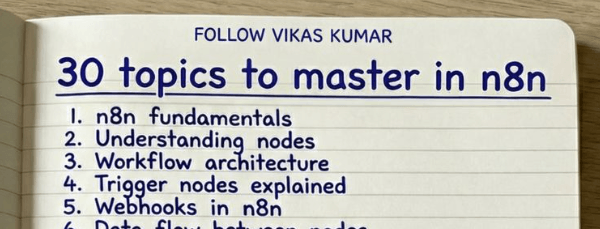
Stage 1. Core Foundations
Before building workflows, understand how n8n works internally.
1. n8n Fundamentals
Learn what n8n is and how workflow automation works.
Focus on:
- Workflow based automation
- Node based architecture
- Event driven systems
- Data passing between nodes
Outcome
You understand how an automation platform operates.
2. n8n Interface and Workflow Builder
Understand the editor environment.
Practice:
- Creating workflows
- Adding nodes
- Connecting nodes
- Running manual executions
- Reading execution logs
Outcome
You navigate the builder quickly and debug basic issues.
3. Nodes and Workflow Structure
Every workflow is built with nodes.
Learn:
- Trigger nodes
- Action nodes
- Utility nodes
- Data nodes
Practice:
- Build simple 3 node workflows
- Pass data between nodes
Outcome
You understand workflow architecture.
4. Trigger Nodes
Triggers start workflows.
Important triggers:
- Webhook trigger
- Schedule trigger
- Email trigger
- App triggers
Practice:
- Schedule a daily workflow
- Trigger workflow from webhook
Outcome
You understand event based automation.
5. Webhooks
Webhooks connect external apps.
Learn:
- Incoming webhooks
- HTTP requests
- API payloads
- Authentication headers
Practice:
- Send webhook from Postman
- Trigger workflow from form submission
Outcome
You connect n8n to external systems.
6. Data Flow Between Nodes
Data moves through nodes as JSON.
Learn:
- Input data
- Output data
- Item structure
- Array handling
Practice:
- Inspect execution data
- Modify node outputs
Outcome
You understand how information moves inside workflows.
7. Expressions and Variables
Expressions allow dynamic automation.
Learn:
- {{ }} expressions
- Referencing previous nodes
- Dynamic fields
- Environment variables
Practice:
- Extract values from earlier nodes
- Create dynamic messages
Outcome
You create flexible workflows.
8. JSON Handling
Most APIs return JSON.
Learn:
- JSON structure
- Nested objects
- Arrays
- Parsing JSON responses
Practice:
- Extract fields
- Modify JSON payloads
Outcome
You manipulate API data correctly.
9. HTTP Request Node
This is the most powerful node.
Learn:
- GET requests
- POST requests
- Headers
- Query parameters
- Authentication methods
Practice:
- Call a public API
- Send data to a webhook
Outcome
You integrate any external API.
10. API Integrations
Connect real applications.
Practice integrations with:
- Google APIs
- Slack
- Notion
- Airtable
- CRM systems
Outcome
You build practical automations.
Stage 2. Workflow Logic
Once foundations are clear, learn automation logic.
11. Conditional Logic
Automations need decisions.
Learn:
- IF node
- Boolean logic
- Multi condition checks
Practice:
- Route emails based on content
- Filter leads
Outcome
Workflows become intelligent.
12. Switch Nodes
Handle multiple conditions.
Learn:
- Multi path routing
- Data based switching
Practice:
- Classify inputs into categories
Outcome
You design scalable workflows.
13. Error Handling
Automations fail. Handle failures.
Learn:
- Error workflows
- Retry strategies
- Logging
Practice:
- Create fallback notifications
Outcome
Reliable automation systems.
14. Loops and Iterations
Automate bulk operations.
Learn:
- Split in batches
- Loop over arrays
- Process multiple items
Practice:
- Process lists of leads
- Send multiple API requests
Outcome
Automation works with large datasets.
15. Data Transformation
Data often needs restructuring.
Learn:
- Set node
- Function node
- Mapping fields
Practice:
- Clean API responses
- Format outputs
Outcome
Data flows correctly between tools.
16. Authentication and Credentials
Secure API access.
Learn:
- API keys
- OAuth
- Bearer tokens
Practice:
- Authenticate Google API
- Connect Slack bot
Outcome
Secure integrations.
Stage 3. Real Automation Systems
Now build practical workflows.
17. Scheduling Workflows
Automate recurring tasks.
Practice:
- Daily report generator
- Weekly CRM sync
- Monthly analytics export
Outcome
Time based automation.
18. Database Integrations
Store and retrieve data.
Practice with:
- PostgreSQL
- MySQL
- Airtable
Projects:
- Lead database
- Automation logs
Outcome
Data persistence.
19. Google Sheets Automation
Sheets are common automation databases.
Build workflows for:
- Lead capture
- Data enrichment
- Report generation
Outcome
Spreadsheet automation.
20. Email Automation
Automate communication.
Examples:
- Send onboarding emails
- Trigger support notifications
- Send reports
Outcome
Automated messaging systems.
21. AI Agents in n8n
Use AI inside workflows.
Learn:
- AI powered classification
- Data summarization
- Content generation
Outcome
Intelligent automations.
22. OpenAI Integrations
Use AI models in workflows.
Examples:
- Email summarization
- Lead scoring
- Content generation
- Customer support automation
Outcome
AI driven workflows.
23. Self Hosting with Docker
Run n8n locally or on servers.
Learn:
- Docker setup
- Volume storage
- Environment variables
- Reverse proxies
Outcome
Full control over automation infrastructure.
24. Production Automation Systems
Move from simple workflows to systems.
Learn:
- Modular workflows
- Reusable components
- Monitoring
Outcome
Enterprise grade automation.
25. Workflow Optimization
Improve performance.
Focus on:
- Reduce API calls
- Parallel workflows
- Efficient node usage
Outcome
Faster workflows.
Stage 4. Advanced Automation
Now build large automation systems.
26. Lead Generation Systems
Automate lead pipelines.
Example system:
- Scrape leads
- Enrich data
- Score leads
- Send outreach
27. AI Content Pipelines
Automate content creation.
Workflow example:
Topic research → AI writing → Formatting → Publishing.
28. CRM Automation Systems
Automate sales workflows.
Examples:
- Lead scoring
- Follow up automation
- Pipeline updates
29. Multi App Automation
Connect many tools together.
Example stack:
Form → n8n → CRM → Email → Slack.
30. Full Business Automation
Build complete systems.
Examples:
- AI support automation
- Sales pipelines
- Marketing automation
- Internal operations automation
Outcome
You design automation infrastructure.
Final Skill Level
When you complete this roadmap you should be able to:
- Build complex n8n workflows
- Integrate APIs
- Automate business processes
- Deploy production automations
- Build AI powered automation systems
At this level, n8n stops being a tool.
It becomes automation infrastructure for businesses.
