
How to Reduce Manual Work with Workflow Automation | BULDRR AI

Workflow Automation
Updated: July 29, 2026

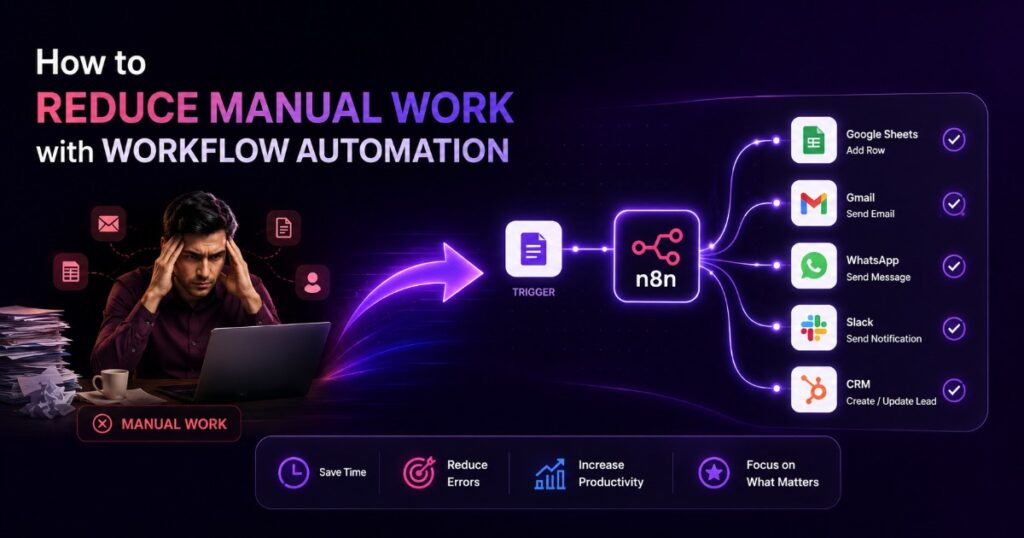
Every business owner reaches a point where manual work starts eating into growth. You spend hours copying data between spreadsheets, replying to the same customer questions, following up on leads one by one, and posting content manually across platforms. This is exactly where workflow automation becomes a game-changer.

If you are still doing repetitive tasks by hand, you are not just losing time you are losing money, focus, and opportunities to grow. In this blog, we will break down how workflow automation helps you reduce manual work, which processes you should automate first, and how a well-built automation system can save 10+ hours every week.

What is Workflow Automation?

Workflow automation is the process of using software and AI-powered tools to complete repetitive, rule-based tasks without human intervention. Instead of manually entering data, sending follow-up emails, or replying to every lead, workflow automation lets a system handle it automatically — accurately, instantly, and 24/7.

In simple words, workflow automation takes the tasks that follow a pattern (if this happens, then do that) and hands them over to a smart system. This is the same idea behind tools like n8n, which connects your apps and automates the flow of information between them.

Why Manual Work is Costing Your Business More Than You Think

Before we talk about how to reduce manual work with workflow automation, it’s important to understand why manual processes are so expensive:

  • Time loss – Every hour spent on repetitive tasks is an hour not spent on growth, sales, or strategy.
  • Human error – Manual data entry and follow-ups are prone to mistakes, missed leads, and delays.
  • Slow response time – Customers and leads expect instant replies. Manual processes can’t keep up.
  • Team burnout – Repetitive work drains employee motivation and productivity.
  • Scaling problems – As your business grows, manual work grows with it, but your team size can’t always keep up.

This is exactly why more businesses are shifting toward workflow automation to handle daily operations.

Key Areas Where Workflow Automation Reduces Manual Work

1. Lead Capture and Follow-Up

When someone fills out a form or shows interest in your business, speed matters. With workflow automation, the lead is captured instantly, added to your CRM, and followed up automatically — so no lead is ever missed, even when your team is offline.

2. Social Media and Content Publishing

Posting daily on LinkedIn, Instagram, or other platforms manually is time-consuming. Workflow automation can plan, create, and publish posts automatically across multiple platforms from a single setup, keeping your brand active without daily manual effort.

3. Customer Support and WhatsApp/Telegram Automation

Instead of manually replying to every support query, an AI-powered automation agent can handle FAQs, support tickets, and WhatsApp conversations automatically, freeing your team to focus on complex issues only.

4. Order and Payment Management

For eCommerce businesses, handling orders manually often leads to errors and delays. Automating order confirmations, payment updates, and inventory sync ensures your store runs smoothly even during high order volume.

5. Meeting Scheduling

Booking meetings through long email threads wastes time. Workflow automation allows leads and clients to book time directly on your calendar, with automatic confirmations and reminders — no manual coordination required.

6. Data Entry Between Apps (Sheets, CRM, Notion, Airtable)

One of the biggest manual time-sinks is copying data from one app to another. With workflow automation, tools like Google Sheets, Airtable, Notion, and CRMs sync automatically, eliminating repetitive data entry completely.

How to Reduce Manual Work with Workflow Automation: Step-by-Step

  1. Identify repetitive tasks – List every task your team does daily or weekly that follows a fixed pattern.
  2. Prioritize high-impact processes – Start with tasks that consume the most time or cause the most errors (lead follow-ups, data entry, support replies).
  3. Choose the right automation tool – Platforms like n8n allow you to build powerful, flexible workflow automation without heavy coding.
  4. Connect your existing apps – Link your CRM, Google Sheets, WhatsApp, email, and social platforms into one automated system.
  5. Test and refine – Run the automation, monitor results, and adjust the workflow for accuracy.
  6. Scale gradually – Once one process is automated successfully, move to the next manual task on your list.

This is exactly the process BULDRR AI follows when building custom automation systems for businesses — starting small, proving results, then scaling workflow automation across the entire business.

Benefits of Reducing Manual Work Through Workflow Automation

  • Saves 10+ hours per week on repetitive tasks
  • Reduces human error in data handling and follow-ups
  • Improves response time for leads and customers
  • Frees your team to focus on strategy instead of repetitive work
  • Makes your business scalable without hiring more staff for routine tasks
  • Keeps your brand consistently active across platforms

Why Businesses Choose BULDRR AI for Workflow Automation

Not every business has the time or technical know-how to build workflow automation from scratch — and that’s where BULDRR AI comes in. BULDRR AI specializes in building custom n8n workflows, AI automation agents, and smart automation systems designed specifically around your business processes.

Instead of generic templates, BULDRR AI studies your existing process and turns it into a working automation agent — whether that’s lead follow-up, social media publishing, WhatsApp support, order management, or CRM syncing. The result is simple: less manual work, fewer errors, and more time for your team to focus on growth.

If you’re still spending hours every week on tasks that a workflow automation system could handle in seconds, it’s time to explore what BULDRR AI can automate for your business.

Conclusion

Manual work might feel manageable today, but it quietly limits how fast your business can grow. Workflow automation is no longer a “nice to have” — it’s becoming the standard way businesses save time, cut errors, and scale operations without constantly adding more manual effort or headcount. From lead follow-ups to social media publishing, customer support, and order management, workflow automation can take over the repetitive tasks that slow your team down.

If you’re ready to reduce manual work and see exactly which of your daily tasks can be automated, BULDRR AI can help you build a custom workflow automation system — powered by n8n and AI — tailored to how your business actually works. Book a free strategy session with BULDRR AI and find out what your manual work is really costing you.

FAQs

1. What is workflow automation in simple terms? Workflow automation means using software or AI tools to complete repetitive, rule-based tasks automatically, without needing a person to do them manually every time.

2. How does workflow automation help reduce manual work? It takes over repetitive tasks like data entry, lead follow-ups, social media posting, and customer replies, handling them instantly and accurately so your team doesn’t have to do them by hand.

3. Which business tasks can be automated first? Start with the most repetitive and time-consuming tasks — lead capture and follow-up, data entry between apps, customer support replies, and social media publishing are usually the best starting points.

4. Is workflow automation only for large businesses? No. Workflow automation works for businesses of all sizes. Small businesses often benefit the most since automation lets a small team handle tasks that would normally require extra hires.

5. What tools are used for workflow automation? Popular tools include n8n, Zapier, and Make.com. Many businesses prefer n8n because it’s flexible, cost-effective, and can connect with almost any app including CRMs, Google Sheets, WhatsApp, and social platforms.

6. How can BULDRR AI help with workflow automation? BULDRR AI builds custom n8n workflows and AI automation agents tailored to your specific business processes — from lead management to customer support — helping you reduce manual work and save hours every week.

7. How much time can workflow automation actually save? Depending on the processes automated, businesses commonly save 10 or more hours per week that would otherwise go into manual, repetitive tasks.

Every business owner reaches a point where manual work starts eating into growth. You spend hours copying data between spreadsheets, replying to the same customer questions, following up on leads one by one, and posting content manually across platforms. This is exactly where workflow automation becomes a game-changer.

If you are still doing repetitive tasks by hand, you are not just losing time you are losing money, focus, and opportunities to grow. In this blog, we will break down how workflow automation helps you reduce manual work, which processes you should automate first, and how a well-built automation system can save 10+ hours every week.

What is Workflow Automation?

Workflow automation is the process of using software and AI-powered tools to complete repetitive, rule-based tasks without human intervention. Instead of manually entering data, sending follow-up emails, or replying to every lead, workflow automation lets a system handle it automatically — accurately, instantly, and 24/7.

In simple words, workflow automation takes the tasks that follow a pattern (if this happens, then do that) and hands them over to a smart system. This is the same idea behind tools like n8n, which connects your apps and automates the flow of information between them.

Why Manual Work is Costing Your Business More Than You Think

Before we talk about how to reduce manual work with workflow automation, it’s important to understand why manual processes are so expensive:

  • Time loss – Every hour spent on repetitive tasks is an hour not spent on growth, sales, or strategy.
  • Human error – Manual data entry and follow-ups are prone to mistakes, missed leads, and delays.
  • Slow response time – Customers and leads expect instant replies. Manual processes can’t keep up.
  • Team burnout – Repetitive work drains employee motivation and productivity.
  • Scaling problems – As your business grows, manual work grows with it, but your team size can’t always keep up.

This is exactly why more businesses are shifting toward workflow automation to handle daily operations.

Key Areas Where Workflow Automation Reduces Manual Work

1. Lead Capture and Follow-Up

When someone fills out a form or shows interest in your business, speed matters. With workflow automation, the lead is captured instantly, added to your CRM, and followed up automatically — so no lead is ever missed, even when your team is offline.

2. Social Media and Content Publishing

Posting daily on LinkedIn, Instagram, or other platforms manually is time-consuming. Workflow automation can plan, create, and publish posts automatically across multiple platforms from a single setup, keeping your brand active without daily manual effort.

3. Customer Support and WhatsApp/Telegram Automation

Instead of manually replying to every support query, an AI-powered automation agent can handle FAQs, support tickets, and WhatsApp conversations automatically, freeing your team to focus on complex issues only.

4. Order and Payment Management

For eCommerce businesses, handling orders manually often leads to errors and delays. Automating order confirmations, payment updates, and inventory sync ensures your store runs smoothly even during high order volume.

5. Meeting Scheduling

Booking meetings through long email threads wastes time. Workflow automation allows leads and clients to book time directly on your calendar, with automatic confirmations and reminders — no manual coordination required.

6. Data Entry Between Apps (Sheets, CRM, Notion, Airtable)

One of the biggest manual time-sinks is copying data from one app to another. With workflow automation, tools like Google Sheets, Airtable, Notion, and CRMs sync automatically, eliminating repetitive data entry completely.

How to Reduce Manual Work with Workflow Automation: Step-by-Step

  1. Identify repetitive tasks – List every task your team does daily or weekly that follows a fixed pattern.
  2. Prioritize high-impact processes – Start with tasks that consume the most time or cause the most errors (lead follow-ups, data entry, support replies).
  3. Choose the right automation tool – Platforms like n8n allow you to build powerful, flexible workflow automation without heavy coding.
  4. Connect your existing apps – Link your CRM, Google Sheets, WhatsApp, email, and social platforms into one automated system.
  5. Test and refine – Run the automation, monitor results, and adjust the workflow for accuracy.
  6. Scale gradually – Once one process is automated successfully, move to the next manual task on your list.

This is exactly the process BULDRR AI follows when building custom automation systems for businesses — starting small, proving results, then scaling workflow automation across the entire business.

Benefits of Reducing Manual Work Through Workflow Automation

  • Saves 10+ hours per week on repetitive tasks
  • Reduces human error in data handling and follow-ups
  • Improves response time for leads and customers
  • Frees your team to focus on strategy instead of repetitive work
  • Makes your business scalable without hiring more staff for routine tasks
  • Keeps your brand consistently active across platforms

Why Businesses Choose BULDRR AI for Workflow Automation

Not every business has the time or technical know-how to build workflow automation from scratch — and that’s where BULDRR AI comes in. BULDRR AI specializes in building custom n8n workflows, AI automation agents, and smart automation systems designed specifically around your business processes.

Instead of generic templates, BULDRR AI studies your existing process and turns it into a working automation agent — whether that’s lead follow-up, social media publishing, WhatsApp support, order management, or CRM syncing. The result is simple: less manual work, fewer errors, and more time for your team to focus on growth.

If you’re still spending hours every week on tasks that a workflow automation system could handle in seconds, it’s time to explore what BULDRR AI can automate for your business.

Conclusion

Manual work might feel manageable today, but it quietly limits how fast your business can grow. Workflow automation is no longer a “nice to have” — it’s becoming the standard way businesses save time, cut errors, and scale operations without constantly adding more manual effort or headcount. From lead follow-ups to social media publishing, customer support, and order management, workflow automation can take over the repetitive tasks that slow your team down.

If you’re ready to reduce manual work and see exactly which of your daily tasks can be automated, BULDRR AI can help you build a custom workflow automation system — powered by n8n and AI — tailored to how your business actually works. Book a free strategy session with BULDRR AI and find out what your manual work is really costing you.

FAQs

1. What is workflow automation in simple terms? Workflow automation means using software or AI tools to complete repetitive, rule-based tasks automatically, without needing a person to do them manually every time.

2. How does workflow automation help reduce manual work? It takes over repetitive tasks like data entry, lead follow-ups, social media posting, and customer replies, handling them instantly and accurately so your team doesn’t have to do them by hand.

3. Which business tasks can be automated first? Start with the most repetitive and time-consuming tasks — lead capture and follow-up, data entry between apps, customer support replies, and social media publishing are usually the best starting points.

4. Is workflow automation only for large businesses? No. Workflow automation works for businesses of all sizes. Small businesses often benefit the most since automation lets a small team handle tasks that would normally require extra hires.

5. What tools are used for workflow automation? Popular tools include n8n, Zapier, and Make.com. Many businesses prefer n8n because it’s flexible, cost-effective, and can connect with almost any app including CRMs, Google Sheets, WhatsApp, and social platforms.

6. How can BULDRR AI help with workflow automation? BULDRR AI builds custom n8n workflows and AI automation agents tailored to your specific business processes — from lead management to customer support — helping you reduce manual work and save hours every week.

7. How much time can workflow automation actually save? Depending on the processes automated, businesses commonly save 10 or more hours per week that would otherwise go into manual, repetitive tasks.

Author
Written By
Ankit Sharma
Ask more Questions about this Blog with AI:

Our AI Articles

Learn from our AI Articles to excel in your profession ;)

Automating the Contact List Cleanup You’ve Been Putting Off

A CRM full of duplicate contacts isn't just messy, it costs real money in wasted outreach and confused service calls....

Automating Contracts and Proposals So You Stop Retyping the Same Fields

Automated contract and proposal generation pulls client details straight from your CRM into a pre-approved template, cutting a 20-40 minute...

One Trigger, Three Channels: Automating Alerts So Nothing Gets Missed

Missed alerts are a routing problem, not a tooling one. See how n8n + Claude fan out one trigger to...

Automating the Review Request Most Businesses Forget to Send

Vintage halftone duotone illustration of a figure releasing a glowing asterisk-shaped lantern, representing automated review request workflow timing....

Why AI Keeps Quoting Reddit Instead of Your Website

Reddit shows up constantly in ChatGPT and AI Overview answers. See why AI trusts forums over business sites, and what...

Why AI Search Gets Confused When You Have Five Locations (And How to Fix It)

Why AI search tools sometimes recommend one location and skip another, and how inconsistent NAP data and templated location pages...

Automating the Monday Report Nobody Wants to Build by Hand

How to automate the weekly business report - pulling sales, cash, ad spend, and support numbers from separate tools into...

Getting Cited by AI When You Don’t Have a Storefront to Point To

How service-area businesses without a storefront should set up their Google Business Profile and website to earn AI search citations,...

What Is OpenRouter? The Complete Beginner’s Guide (2026)

OpenRouter gives beginners one simple way to access hundreds of AI models with a single API key. Here's what it...

Jacksonville SEO Consultant vs. Agency: Which Fits a Small Business

SEO consultant vs agency: compare cost, services, expertise, and scalability to find the right fit for your business and marketing...

Calendar Booking Automation for Jacksonville Service Businesses (Stop Playing Phone Tag)

Calendar booking automation helps Jacksonville service businesses reduce no-shows, automate reminders, enable self-service rescheduling, and stop losing jobs to missed...

Small Business SEO Cost in Jacksonville, FL: Real Numbers

Jacksonville SEO pricing guide showing local SEO costs, packages, hourly rates, and services for small businesses....
1:1 Free Strategy Session
Your competitors are already automating. Are you still paying for it manually?

Do you want to adopt AI Automation?

Every hour your team does repetitive work, you're burning real money.
While you wait, faster businesses are cutting costs and moving quicker.
AI and automations aren't the future anymore — they're the present.

Book a live 1-on-1 session where we show you exactly which of your daily tasks can be automated — and what it’s costing you not to.