
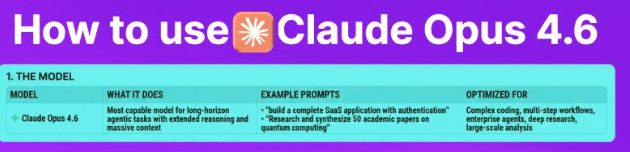
Claude Opus 4.6 Prompt Patterns

1. CREATE ARTIFACTS

Pattern: “Create a [specific thing with details]” Builds interactive apps, dashboards, or documents you can edit in real-time.

Example: “Create a budget tracker with income/expense categories and monthly charts”


2. TRIGGER WEB SEARCH

Pattern: “Latest on [current topic]?” Gets current information and recent news beyond Claude’s training data.

Example: “Latest developments in AI reasoning models?”


3. USE ANALYSIS TOOL

Pattern: “Analyze this [data]” + upload file Processes data files, runs calculations, and creates visualizations.

Example: “Analyze these sales trends and forecast Q2 revenue”


4. START RESEARCH

Pattern: “Research [topic] comprehensively” Conducts deep multi-step research with synthesis across sources.

Example: “Research enterprise AI deployment best practices comprehensively”


5. GET CODING HELP

Pattern: “Help me [task] in [language/framework]” Assists with development, debugging, and refactoring code.

Example: “Help me build a REST API with authentication in Python Flask”


6. GENERATE CONTENT

Pattern: “Write a [type] about [topic] for [audience]” Creates tailored content for your specific audience and purpose.

Example: “Write a technical whitepaper on AI agents for CTOs”


7. PROCESS FILES

Pattern: Upload + “Extract/Summarize/Analyze this” Extracts information and insights from uploaded documents.

Example: “Extract key findings from this 200-page audit report”


8. USE PROJECTS

Pattern: “I’m working on [project goal]” Maintains context across multiple sessions for long-term work.

Example: “I’m building a customer analytics SaaS platform”


9. USE AGENT TEAMS

Pattern: “Build [complex deliverable] with [components]” Coordinates multiple Claude instances for complex development tasks.

Example: “Build a compiler with test suite and documentation” Requires Claude Code (Max plan)


10. USE COWORK

Pattern: “Organize/Sort [files] by [criteria]” Automates file management and batch operations.

Example: “Sort my Downloads by project and archive old files” Requires Claude Cowork (Max plan)


11. BE SPECIFIC

Pattern: Add details, constraints, and requirements Improves output quality by providing clear specifications.

Example: “Create a React dashboard with dark mode, TypeScript, and Tailwind”


12. ITERATE & REFINE

Pattern: “Make it more [improvement]” or “Add [feature]” Refines existing outputs with targeted improvements.

Example: “Make it more production-ready with error handling”


PRO TIPS:

  • Combine patterns for complex tasks
  • Start broad, then iterate
  • Provide examples of what you want
  • Add context about your use case

1. CREATE ARTIFACTS

Pattern: “Create a [specific thing with details]” Builds interactive apps, dashboards, or documents you can edit in real-time.

Example: “Create a budget tracker with income/expense categories and monthly charts”


2. TRIGGER WEB SEARCH

Pattern: “Latest on [current topic]?” Gets current information and recent news beyond Claude’s training data.

Example: “Latest developments in AI reasoning models?”


3. USE ANALYSIS TOOL

Pattern: “Analyze this [data]” + upload file Processes data files, runs calculations, and creates visualizations.

Example: “Analyze these sales trends and forecast Q2 revenue”


4. START RESEARCH

Pattern: “Research [topic] comprehensively” Conducts deep multi-step research with synthesis across sources.

Example: “Research enterprise AI deployment best practices comprehensively”


5. GET CODING HELP

Pattern: “Help me [task] in [language/framework]” Assists with development, debugging, and refactoring code.

Example: “Help me build a REST API with authentication in Python Flask”


6. GENERATE CONTENT

Pattern: “Write a [type] about [topic] for [audience]” Creates tailored content for your specific audience and purpose.

Example: “Write a technical whitepaper on AI agents for CTOs”


7. PROCESS FILES

Pattern: Upload + “Extract/Summarize/Analyze this” Extracts information and insights from uploaded documents.

Example: “Extract key findings from this 200-page audit report”


8. USE PROJECTS

Pattern: “I’m working on [project goal]” Maintains context across multiple sessions for long-term work.

Example: “I’m building a customer analytics SaaS platform”


9. USE AGENT TEAMS

Pattern: “Build [complex deliverable] with [components]” Coordinates multiple Claude instances for complex development tasks.

Example: “Build a compiler with test suite and documentation” Requires Claude Code (Max plan)


10. USE COWORK

Pattern: “Organize/Sort [files] by [criteria]” Automates file management and batch operations.

Example: “Sort my Downloads by project and archive old files” Requires Claude Cowork (Max plan)


11. BE SPECIFIC

Pattern: Add details, constraints, and requirements Improves output quality by providing clear specifications.

Example: “Create a React dashboard with dark mode, TypeScript, and Tailwind”


12. ITERATE & REFINE

Pattern: “Make it more [improvement]” or “Add [feature]” Refines existing outputs with targeted improvements.

Example: “Make it more production-ready with error handling”


PRO TIPS:

  • Combine patterns for complex tasks
  • Start broad, then iterate
  • Provide examples of what you want
  • Add context about your use case
Author

Written By

Vikash Kumar

Building AI agents, n8n workflows and end-to-end automation for 30+ Brands across India, the US, Europe, Dubai & Australia. 7+ years of Experience saving founders real hours every week - no code required.

Ask more Questions about this Blog with AI:

Our AI Articles

Learn from our AI Articles to excel in your profession ;)

Complete Guide To Claude Code Agent Teams

Agent Teams are one of the most advanced features inside Claude Code. Instead of using one AI agent to complete...

How To Build Realistic AI Voice Agents With 11Labs + Make.com

How Agent Teams turn Claude Code into a collaborative AI workforce for building complex systems....

100 SECRET CLAUDE PROMPT CODES

Practical Claude prompt systems that improve writing, research, strategy, automation, and workflows....

The Real Claude AI Business Guide for 2026

5 Claude AI business models solving expensive problems businesses already pay for in 2026....

Complete Guide: How To Build A Claude Skill For SEO Content Writing

Reusable Claude workflows that turn generic AI writing into personalized, scalable SEO systems....

Complete Breakdown: How To Build AI Backlink Systems Using Claude Skills + Automation

Complete Breakdown: How To Build AI Backlink Systems Using Claude Skills + Automation...

Claude AI SEO Automation Guide

This AI SEO workflow automates content creation, optimization, publishing, and indexing at scale....

Complete AI Lead Generation Workflow Using Claude AI + ChatGPT

AI workflow to automate lead generation, outreach emails, and scalable client acquisition....

Use Amazon Bedrock To Try Claude, OpenAI, DeepSeek, And More

Beginner guide to using Amazon Bedrock with Claude, OpenAI, DeepSeek, APIs, and AI workflows....

Build n8n Automations With Claude Code

This guide shows how to build AI automation systems using Cursor, Claude Code, n8n, MCP, and agents....
1:1 Free Strategy Session
Your competitors are already automating. Are you still paying for it manually?

Do you want to adopt AI Automation?

Every hour your team does repetitive work, you're burning real money.
While you wait, faster businesses are cutting costs and moving quicker.
AI and automations aren't the future anymore — they're the present.

Book a live 1-on-1 session where we show you exactly which of your daily tasks can be automated — and what it’s costing you not to.