Your weekend build → Monday pipeline filler
🎁 Sign up for La Growth Machine now with this magical link
and get 30 days free instead of 14 days. No credit card needed.
→ Build Multichannel Funnels Today
❌ Why Most Outreach Stacks Are Broken
| $300/month | For data enrichment |
|---|---|
| $400/month | For email sequencing |
| $150/month | To sync your CRM |
And you’re still copying LinkedIn URLs manually.
The worst part?
You’re doing half the work that should’ve been automated 2 years ago.
✅ What This System Does Differently
This isn’t another cold email playbook.
This is a fully autonomous multichannel outbound engine — powered by AI agents, stitched together by n8n, and deployed through La Growth Machine.

- It finds leads.
- It qualifies them with GPT.
- It personalizes every message.
- Then it launches multichannel campaigns across LinkedIn, Email, Voice, Video, X, and even Calls.
No reps. No tabs. No missed replies.
🧠 The Outreach Engine Behind the Scenes
Here’s how it works under the hood:

🛠️ Tools You’ll Need (All Plug-and-Play)
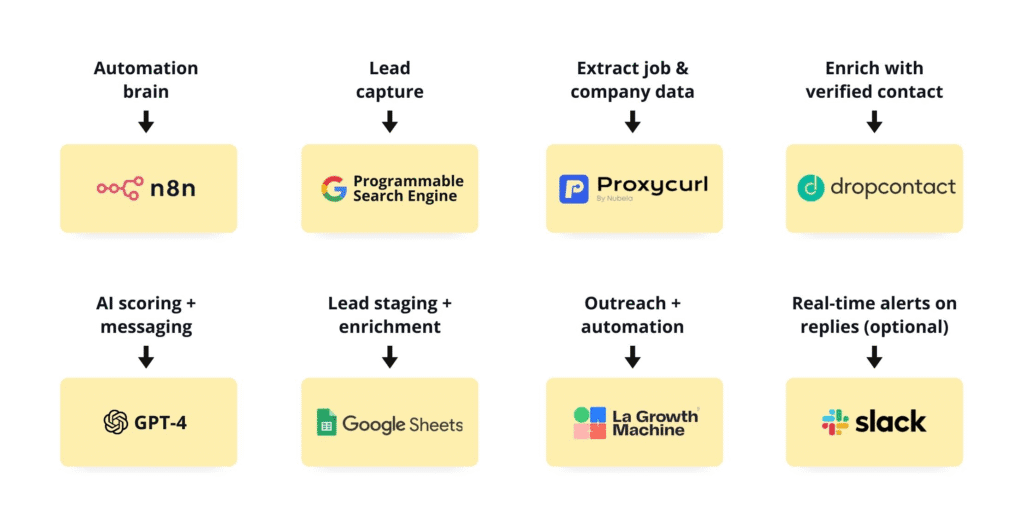
- n8n ⟶ Automation brain
- Google Programmable Search ⟶ Lead capture
- Proxycurl API ⟶ Extract job & company data
- Dropcontact ⟶ Enrich with verified emails + phones
- GPT-4 API ⟶ AI scoring + messaging
- Google Sheets ⟶ Lead staging + enrichment
- La Growth Machine ⟶ Building lead lists, multichannel sequencing, follow-ups, unlimited enrichment (after campaign’s launch), unified inbox + automation
- Slack (optional) ⟶ Real-time alerts on replies
⚙️ Why This System Exists?
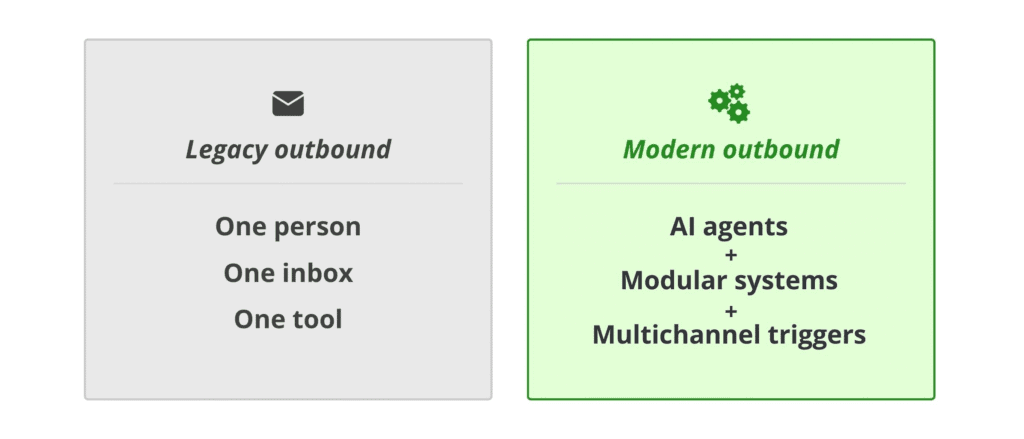
Legacy outbound = One person, One inbox, One tool.
Modern outbound = AI agents + modular systems + intelligent multichannel triggers.
The goal of this workflow is simple:
Automate every single step from lead sourcing → targeting → qualification → personalization… before you ever hit send.
By combining:
- Web scraping
- API enrichment
- Language model reasoning
- Intent detection
- and multichannel sequencing
You create a machine that can scale outbound like a team of SDRs — without actually hiring them.
STEP 1: Lead Discovery via Programmable Google Search
Extract LinkedIn URLs of potential prospects based on niche signals (e.g., titles, geography, company type).
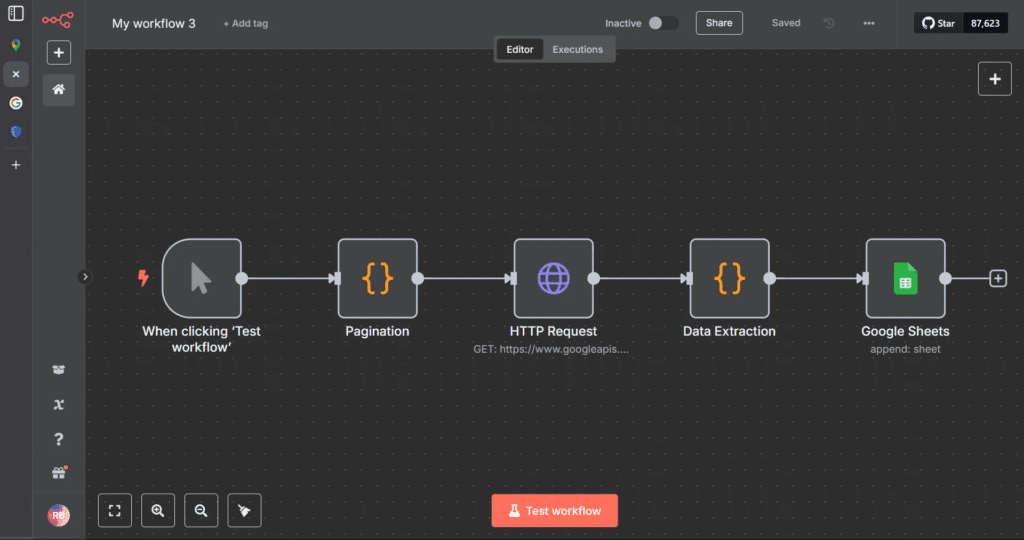
🟡 Tools:
- Google Programmable Search Engine (CSE)
- Google Search API (via Google Cloud)
- n8n (to automate and orchestrate)
- Google Sheets (to capture and store results)
🔵 Setup:
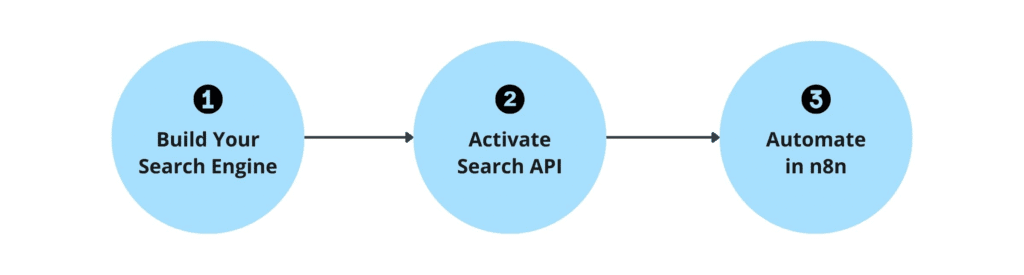
A. Build Your Search Engine
- Go to: programmablesearchengine.google.com Create a search engine that only indexes:
bash CopyEdit site:linkedin.com/in - Enable “Image Search” (helps improve relevance)
- Save your CSE ID
B. Activate Search API in Google Cloud
- Go to console.cloud.google.com
- Enable Programmable Search API
- Create credentials → Save your API key
C. Build in n8n:
- HTTP Request node → Calls Search API with your query:
bash CopyEdit site:linkedin.com/in "Founder" "SaaS" "New York" - Loop node → Uses pagination to get more than 10 results
- Wait node → Introduce delay (1-2s) to avoid rate limit
- Set node → Clean data, extract URLs
- Google Sheets node → Push URLs into your master lead sheet
| HTTP Request node |
bash
CopyEdit
site:linkedin.com/in “Founder” “SaaS” “New York”
💡You now have 100+ real-time LinkedIn URLs from public data.
STEP 2: Enrichment Layer — Convert URLs to Full Profiles
Now that you’ve collected raw LinkedIn URLs, the next task is to enrich those leads with actionable data — names, titles, companies, emails, and phone numbers.
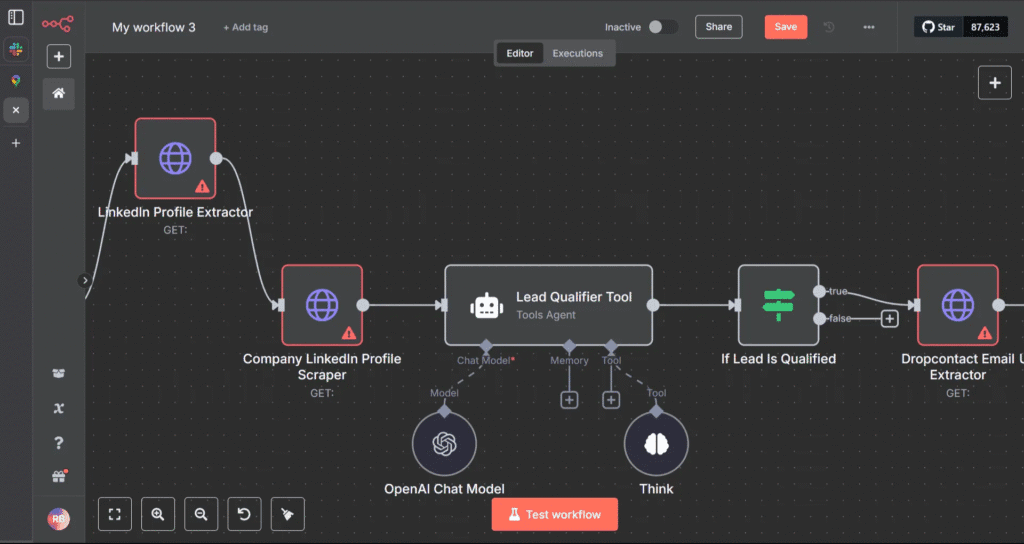
🟡 Tools:
- Proxycurl (scrapes public LinkedIn info)
- Dropcontact (email and phone enrichment)
- Google Sheets
- n8n
🔵 Workflow:

A. Proxycurl API Integration
- Input: LinkedIn profile URL
- Output:
- First Name
- Last Name
- Title
- Company Name
- Company Website
- LinkedIn Handle
- In n8n:
- Use HTTP node with Proxycurl API key
- Parse JSON response and extract the above fields
- Append to the same row in Google Sheets
B. Dropcontact API Integration
- Input: Full Name + Company Domain
- Output:
- Work Email
- Personal Email (if available)
- Mobile Number
- Verification Status
- In n8n:
- Send each contact’s data to Dropcontact
- Clean and normalize phone number formatting
- Filter out bounced/unverified records
🧠 At this stage, you’ve built a dynamic, real-time database of enriched leads — verified and sales-ready.
STEP 3: AI-Based Lead Qualification (Using GPT)
Not every lead deserves to enter your campaign.
Instead of scoring manually or using dumb filters (like job title contains “founder”), we use GPT as a reasoning engine.
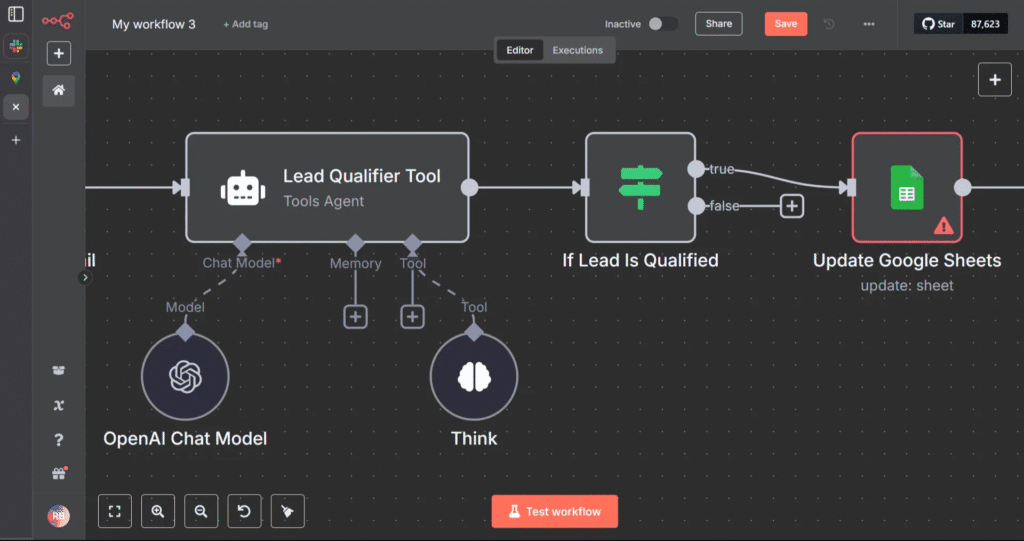
🟡 Tools:
- GPT-4 API (OpenAI or Claude via API)
- n8n
- Google Sheets
🧠 What the AI Should Do:
- Read job title, company type, industry, and funding history (if available)
- Compare it to your Ideal Customer Profile
- Return:
- A score (1–10)
- A match status (High, Medium, Low)
- A justification (1-sentence reasoning)
🔵 Prompt Design:
You’re a sales assistant for a B2B SaaS company.
Our ICP is:
- Founders or GTM leads
- SaaS companies
- <$10M in revenue
- Based in the US/Canada
- Hiring SDRs or running outbound
Does this lead fit?
{lead_info_here}
Respond as JSON like this:
{
“score”: 8.7,
“match”: “High”,
“why”: “SaaS founder hiring for sales in NY”
}
In n8n:

- Set up an OpenAI API node
- Dynamically insert enriched data into the prompt
- Parse the JSON result
- Store values in the sheet (in columns: match_score, match_reason)
🎯 Now, every lead has an intelligent score — not based on filters, but on context.
STEP 4: Icebreaker Personalization at Scale (Using GPT)
Most outreach tools allow variables and custom attributes. Few generate human lines that stand out.
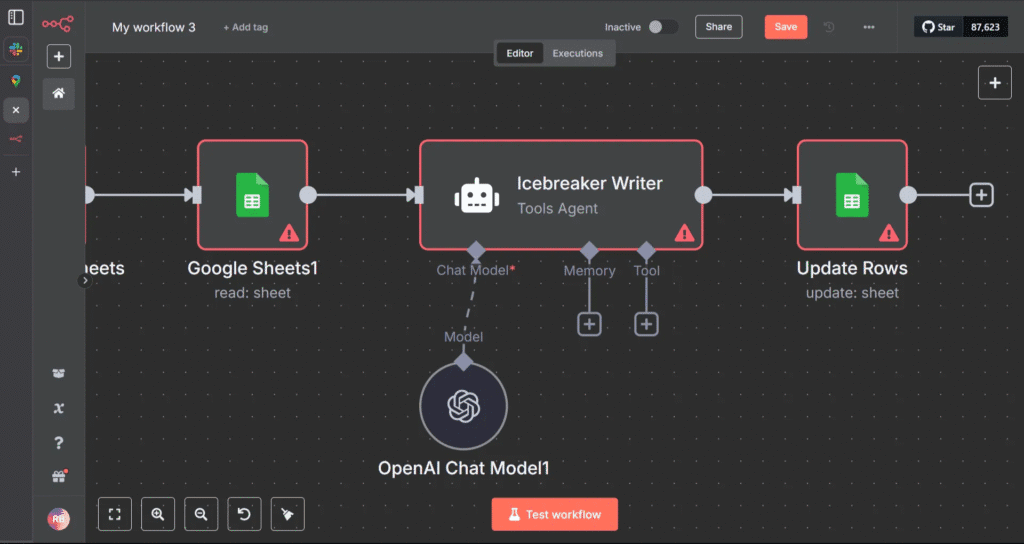
The Goal:
Create contextual, relevant intros for each lead’s first message — auto-generated via GPT.
🟡 Tools:
- GPT-4 API
- n8n
- Company website (from Proxycurl)
🔵 Prompt:
Go to this company website: https://{company_url}
Write a 1-line cold email intro that feels natural, personal, and relevant.
Reference tone, copy, value prop, or design. Avoid generic compliments.
Output:
“Loved how you called your product the ‘Notion for IT teams’ — clean, smart positioning.”
Add this icebreaker into a new {icebreaker_line} column in your Google Sheet.
📦 End of Part 1 Summary
At this point, you’ve built:
✅ A Google Search + n8n lead extractor
✅ A GPT-4-powered lead qualifier
✅ A Proxycurl + Dropcontact enrichment engine
✅ A dynamic personalization machine
All of this runs on autopilot and outputs a neatly organized Google Sheet with:

AI-first pre-pipeline engine that:
- Finds leads based on intent or role signals
- Enriches and verifies them
- Qualifies them using GPT
- Crafts icebreaker messages tailored to each lead
Now it’s time to deploy them into battle using La Growth Machine’s full stack — from first touch to multi-stage follow-up to dynamic optimization.
🔍 Full Walkthrough: How to Deploy Campaigns in La Growth Machine
1. Campaign Architecture: How LGM Thinks (Deep Dive) 🧱
La Growth Machine (LGM) runs campaigns as modular, multistep workflows—giving you total control and flexibility to design the perfect sequence for your market and channel mix.
Each campaign is built as a series of “steps” with four key attributes:
A. Channel-Specific Steps
Each step can target a unique channel:
| Profile Visits, Follows, Post Likes, Connection Requests, Direct Messages with Chat Mode, Voice Notes, A/B tests & spintax | |
|---|---|
| Cold emails, Rotation Inbox, follow-ups, A/B tests & spintax | |
| X (Twitter) | Follows, DMs |
| Calls | Manual or automated call tasks, Scripts |
| Voice | LinkedIn Voice Messages, optional AI-cloned voice for custom “Hey {{Firstname}}” |
| Video | Personalized video prospecting (via Sendspark, Weezly) |
C. Time-Controlled Logic
Delay logic is set between each step:
- It prevents your messages and actions from coming across as automated or spammy. </aside>
- You can set delays like “+3 hours after previous step,” “+1 day after DM,” or “+2 days if no reply.” </aside>
D. Data-Enriched Personalization
- Every action can use dynamic variables imported with your leads (e.g., {{firstName}}, {{company}}, {{role}}, {{icebreaker}}, {{score}}).
- Personalization can be injected into any message, follow, or touch, making every interaction contextually relevant and unique to each lead.
- Real-time data updates: variables can be edited mid-campaign as new info or responses are gathered.
E. Example Sequence (Showing Step-by-Step Flow)
| Profile Visit
| (auto) | Instant awareness, zero friction. |
|---|---|
| Profile Follow | |
| (auto, +3h) | Signal ongoing interest. |
| Post Like | |
| (auto, +2h) | Social warming—shows up in notifications, builds trust and subconscious rapport. |
| Wait | |
| (+1 day) | Natural timing, prevents message overload. |
| Message 1: Connection Request or DM | Personalized with {{firstName}}, {{company}}, {{icebreaker}}. |
| Wait (+2 days) | |
| Message 2: Follow-Up or Email | Can be a reminder, a Voice note, a CTA, or sharing a resource—again, fully personalized. |
| Manual Task | Example: Call high-scoring leads, or research for deeper personalization in a custom message. |
| Branch/Conditional Logic | If a lead replies, trigger new sequence or alert the team. If no reply, continue sequence. |
With LGM’s modular campaign builder, you can design, test, and optimize any sequence—automating the routine, humanizing the critical, and driving replies at scale.
2. Set Up Your Campaign Workspace 🗂
A. Build Your Audience List
LGM gives you multiple ways to get leads into your campaign. Choose the method that matches your workflow or target audience:
1. Manual Import
- Upload a CSV file
- Ideal for leads you’ve already processed via your AI pipeline (e.g., Proxycurl + GPT-enriched)
- You can also import leads in LGM from a LinkedIn search (Basic or Sales Navigator)
2. CRM Sync
- Auto-import leads directly from any CRM or Databases via LGM native integrations (Pipedrive, HubSpot, Breakcold, Clay, PersanaAI, Phantombuster…) or custom connectors (Zapier, Make, n8n)
- It keeps your outreach aligned with your existing CRM lists and workflows
3. LGM Database & Lookalike
- Use the LGM Database to identify in one click companies that match your ideal client profile with a turnkey ABM solution
- Find new leads with the LGM Lookalike Engine: name your best client, and it finds the next ones for you based on your criteria and similarity score. But that’s not all — whenever a prospect responds positively, the tool suggests you similar companies to fill your pipeline.
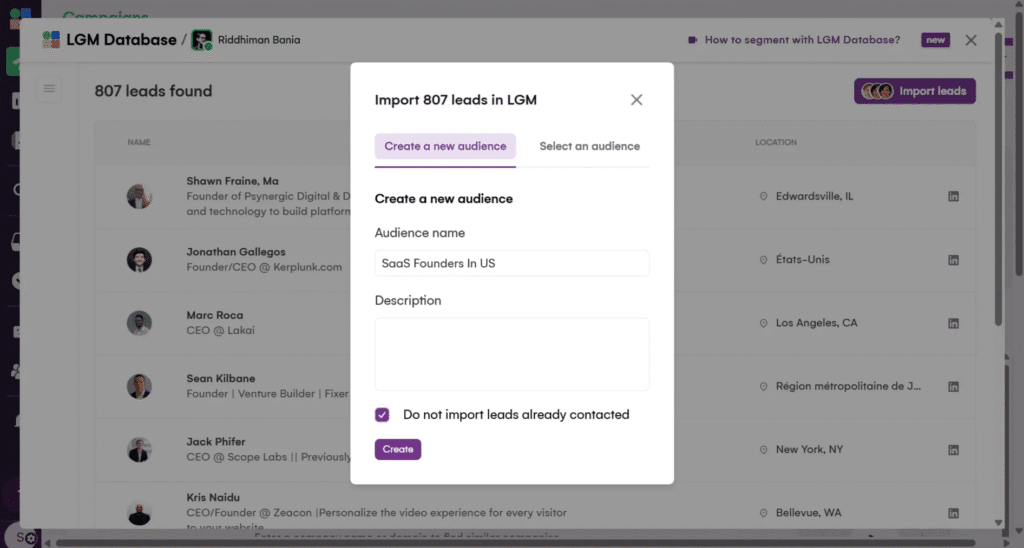
4. Intent-Based Triggers
Dynamically pull in contacts who have shown engagement signals on LinkedIn.
You can target:
👍 Anyone who commented or liked any LinkedIn post (yours or your competitors’)
📅 Anyone who registered for any LinkedIn event (yours or your competitors’)
💻 Your company page followers (great for warm outbound or community nurturing)
Pro tip:
If you’re just getting started, we recommend beginning with a CSV import from your AI-powered pipeline once you’ve mastered your workflow, layer in CRM sync and intent-based triggers to capture more opportunities and warmer leads.
Good To Know: LGM enriches leads automatically after your campaign is launched and it’s unlimited (no token or credit): work emails powered by waterfall enrichment ****(7 providers), personal emails, phones, LinkedIn and X profiles are found.
B. Create a New Campaign
Give it a name using the syntax:
[Persona]-[Offer]-[Channel]-[Quarter]
Examples:
- Founders-OutboundPlaybook-MULTI-Q2
- HiringCMOs-VoiceIntro-EmailOnly-Q3 </aside>
This helps later with testing and dashboard tracking.
3. Define Step-by-Step Sequences (Exact Breakdown) 🧩
Below is a proven 10-day multichannel sequence inside La Growth Machine.
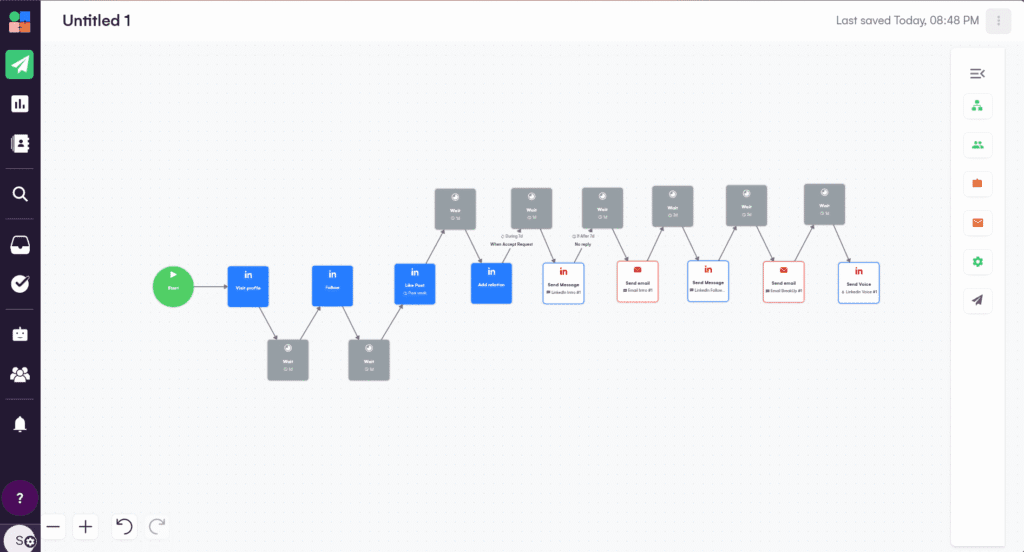
Each step is designed for maximum engagement and reply rates:
Step 1: LinkedIn Profile Visit
- Type: Auto-action
- Goal: Passive touch—show up in prospect’s “Who viewed your profile” notifications
- Delay: 0h (immediate)
- Personalization: None
- Why: Warms up lead before any messaging
Step 2: LinkedIn Follow
- Type: Auto-action
- Goal: Increase future DM and connection request acceptance rate
- Delay: +3 hours after profile visit
- Personalization: None
- Why: Builds passive familiarity
- Pro Tip: Also triggers notification, subtly signaling your interest
Step 3: Social Warming — Like a Recent Post
- Type: Auto-action
- Goal: Appear in the prospect’s notifications with a relevant, value-aligned action
- Delay: +2 hours after follow
- Personalization: Like their latest post
- Why: Most people check “who liked my post”—your name now appears for a third time
- Bonus Move: Like a post on a mutual connection’s timeline or one of their company’s announcements (shows research and intent)
Step 4: LinkedIn Message 1 — Connection Request (with Personalization)
- Type: Connection request message
- Dynamic fields:
- {{firstName}}
- {{company}}
- {{icebreaker}} (GPT-powered, unique to each lead)
- Delay: +1 day after like
- CTA: Subtle offer or open-ended “curiosity” nudge
- Example: <aside> “Hey {{firstName}}, came across {{company}} — super interesting space. Curious if you’re testing outbound workflows internally or still refining? I have something you might find useful if you’re open to it.” </aside>
- Out-of-Box Option:
- Mention something specific from the post you liked (e.g., “Saw your take on outbound automation in your last post—really aligned with how we’re thinking about scaling sales teams.”)
Step 5: LinkedIn Message 2 — “Thank You”/First DM
- Type: DM after connection accepted
- Goal: Open a real conversation (not a pitch)
- Delay: +1 day after accepted connection
- Personalization: Reference the post or icebreaker again
- Example: <aside> “Thanks for connecting, {{firstName}}! Quick one: saw you recently posted about {{topic}}. Curious—what’s your #1 focus in outbound right now?” </aside>
- Pro Tip: Use the LGM Chat Mode to mimics human behaviour. It splits your long message into short messages spaced out naturally, just like a natural chat.
Step 6: Email #1 (Multichannel Touch)
- Type: Personalized cold email
- Delay: +1 day after first DM
- Dynamic fields:
- {{firstName}}, {{company}}, {{role}}, {{icebreaker}}
- Subject Line Tip: Use an A/B test (e.g., “Quick idea for {{company}}” vs. “{{company}} + AI-powered outbound?”)
- Body Example: <aside> “Saw what you’re building at {{company}}—especially liked your approach to {{icebreaker}}. We recently helped a team in your space triple their reply rates using a multichannel AI workflow. Worth a look?” </aside>
Step 7: LinkedIn Message 3 (Follow-Up/Value Add)
- Type: Follow-up DM
- Delay: +2 days after initial email
- Goal: Add a resource, mini-case study, or just a soft bump
- Example: <aside> “Just sharing this playbook we used with {{otherCompany}}—happy to send details if helpful for you!” </aside>
Step 8: Email #2 (Follow-Up/Content Drop)
- Type: Follow-up email
- Delay: +2 days after LinkedIn follow-up
- Goal: Share a relevant article, teardown, or video—positioned as helpful, not salesy
- Bonus: Reference a unique signal you spotted in their posts or company news
Step 9: LinkedIn Voice Note (Optional but Powerful)
- Type: With or without AI-cloned voice
- Delay: +1 day after follow-up
- Goal: Stand out from text-based noise
- Content: <aside> “Hey {{firstName}}, wanted to share a quick voice note—loved your recent post on {{topic}}. Thought this might be a fit for {{company}}…” </aside>
Step 10: Call Task/Manual Touch
- Type: Manual task assigned in LGM
- Delay: +2 days after voice note
- Goal: Call only high-scoring or engaged leads
- Tip: Include quick context and last touchpoint in your notes
Bonus/Out-of-the-Box Unique Steps:
👉 Send a relevant podcast episode or invite to a community
“Saw you’re scaling {{company}}’s GTM. If you’re into growth ops, we host a monthly founder roundtable—DM me if you want an invite!”
👉 Share a short loom/teardown video personalized to their company/website “Recorded a quick breakdown on how we’ve automated LinkedIn + email for similar teams—here’s the 2-minute clip.”
👉 Trigger intent retargeting (using LGM’s Lookalike Engine) After a positive reply, instantly queue up a new campaign for similar companies or buyer personas.
4. Variable Mapping & Personalization in LGM 🔗
In LGM’s import sheet, define the following columns:
| Column Header | Purpose |
|---|---|
| firstName | Greeting |
| company | Relevance |
| role | Segmenting context |
| icebreaker | Custom intro |
| website | GPT prompt input |
| score | Custom scoring via GPT |
| status | Used for smart routing, filters |
These variables and custom attributes are usable across all steps and can be updated mid-campaign if needed.
5. Automation Settings & Optimization Features ⚙️
✅ Inbox Rotation
🧊 OOO Detection
🔬 A/B Testing (Built-in)
6. Real-Time Monitoring with LGM Inbox 📬
LGM’s Unified Inbox lets you:
✅ View all conversations across channels
✅ See previous touchpoints in timeline view
✅ Reply manually or trigger automated sequences
✅ Use response templates (customize per campaign)
✅ Qualify leads instantly (mark as Interested, Follow up, Not a fit)
You can even assign leads to teammates with comments.
7. Auto-Pipeline Expansion with Lookalike Engine 🧬
When a lead responds positively:
- LGM identifies similar companies based on:
- Industry
- Keywords
- Headcount
- Tech Stack
- Suggests new leads in-app
- You can one-click import them into new or existing campaigns
8. Campaign Duplication for Scaling 📦
Once a campaign hits product-market resonance:
- Clone it
- Change:
- Persona
- Geography
- Offer positioning
- Copy angle
Each LGM campaign becomes a sales asset that can be redeployed with small changes to hit new verticals.
🧠 Final Recap: What You’ve Built
You now know how to:
Architect and deploy a full multichannel campaign in LGM
Optimize sequences via testing, enrichment, and personalization
Reactivate and expand using LGM’s lookalike engine
Map enriched AI-generated data into scalable outreach flows
Manage replies across all channels in one place with the LGM inbox
⚡ Ready to Build Your Own Multichannel SDR Machine?
You’ve just walked through a playbook that replaces $1,000+/mo in tools and hours of SDR grunt work — with one lean, AI-enhanced system.
Now you can:
✅ Find leads from anywhere
✅ Enrich them with verified data
✅ Personalize messages at scale
✅ Reach them across LinkedIn, Email, Voice, Video, X and Call
✅ Optimize replies with GPT-powered learning
✅ Expand your TAM with Lookalike triggers
All from a single dashboard. No switching tools. No duct-tape workflows.
Stop wasting leads.
Start running outbound that gets replies.
<aside>
🎁 Sign up for La Growth Machine now with this magical link
and get 30 days free instead of 14 days. No credit card needed.