
How to Automate Lead Follow-Up Calls with AI: A Step-by-Step Guide

Automate Lead Follow-Up Calls with AI
Updated: August 5, 2026

Here is a number that should worry every business owner: leads that are called within five minutes of showing interest are dramatically more likely to convert than leads called even thirty minutes later. Yet most businesses take hours, sometimes days, to follow up. Not because they do not care, but because their team is busy, calls get missed, and follow-up quietly falls through the cracks.

Every missed or delayed call is not just an inconvenience. It is a lead that most likely goes to a competitor who responded faster. This is exactly the problem AI-powered lead follow-up automation is built to solve.

Why Lead Follow-Up Calls Get Missed in the First Place

Before automating anything, it helps to understand why this problem exists so consistently:

  • Sales teams are reactive, not proactive. They respond to whatever is in front of them, and new leads often arrive at inconvenient times.
  • Manual dialing does not scale. A human calling team can only make so many calls in a day, and leads that come in after hours simply wait until morning.
  • No system tracks follow-up attempts consistently. Leads that do not answer the first call often never get a second or third attempt.
  • Human bandwidth is limited, especially for small and mid-sized businesses that do not have a dedicated calling team.

The result is a leaky funnel where perfectly good leads are lost, not because the offer was wrong, but because nobody reached them in time.

What Does “Automating Lead Follow-Up Calls with AI” Mean?

This is not about replacing your sales team. It is about making sure no lead is ever left waiting, using a system that automatically:

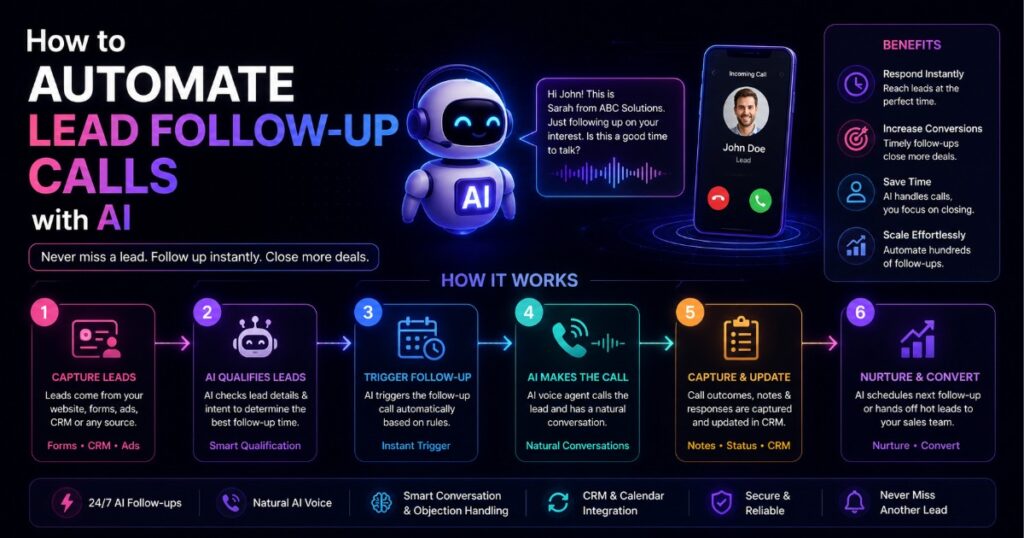
  1. Detects a new lead the moment they show interest
  2. Initiates a call using an AI voice agent, often within seconds or minutes
  3. Has a natural conversation to qualify the lead, answer basic questions, or book a meeting
  4. Follows up automatically if the lead does not answer the first time
  5. Logs the outcome into your CRM so your human team always has full context

The AI does the repetitive, time-sensitive part. Your human team steps in for the conversations that actually need a person, such as closing a serious deal.

Step-by-Step: How to Automate Lead Follow-Up Calls with AI

Step 1: Capture the Lead Instantly

Every automation starts with a trigger. This could be a form submission on your website, a new entry in your CRM, a WhatsApp inquiry, or a missed call. The workflow needs to detect this the moment it happens, not on a delay.

Step 2: Trigger the AI Call Automatically

As soon as the lead is captured, the workflow triggers an AI voice agent to call the lead, ideally within minutes. This single step is often the biggest driver of improved conversion rates, since speed of response matters more than almost anything else in the early stage of a lead’s journey.

Step 3: Let the AI Agent Qualify or Book the Lead

A well-built AI voice agent does not just read a script. It can:

  • Confirm interest and gather basic qualifying information
  • Answer common questions about pricing, availability, or services
  • Offer to book a meeting directly into your calendar
  • Detect when a conversation needs a human and flag it for handoff

The goal is not to fool the lead into thinking they are speaking to a human. Most people are comfortable with AI assistance today as long as it is helpful, fast, and respectful of their time.

Step 4: Automate Retry Attempts for Missed Calls

If the lead does not answer, the workflow does not just give up. It automatically schedules a follow-up attempt, often through a different channel, such as a text message or email, and tries calling again after a set interval. This persistence is exactly what most manual sales processes fail to maintain consistently.

Step 5: Log Everything Back into Your CRM

Every call outcome, whether qualified, not interested, booked a meeting, or needs a human follow-up, is automatically recorded in your CRM. Your sales team always walks into the conversation with full context instead of starting from zero.

Step 6: Route Hot Leads to a Human Instantly

The moment a lead shows strong buying intent, the workflow can immediately alert a human team member through Slack, WhatsApp, or email, so a real person can step in at exactly the right moment, when the lead is most engaged.

What You Need to Build This

  • An automation platform like n8n to orchestrate the entire process
  • An AI voice or calling integration
  • A CRM or spreadsheet where leads are stored and updated
  • A notification channel (Slack, WhatsApp, or email) for handoffs to your human team

Common Mistakes Businesses Make

  • Only automating the first call. The real value comes from consistent, automated retries for leads who do not answer the first time.
  • Not defining a clear handoff point. If the AI does not know when to bring in a human, hot leads can sit in an automated loop for too long.
  • Treating this as “set it and forget it.” Call scripts and qualifying questions should be reviewed and improved regularly based on real outcomes.
  • Ignoring compliance. Calling automation should always respect consent, time-of-day regulations, and opt-out requests depending on your region.

Is This Only for Sales Teams?

No. The same approach applies to appointment reminders, service follow-ups, customer re-engagement campaigns, and even recruitment, anywhere a fast, consistent call matters and a human team cannot realistically keep up with volume alone.

Final Thoughts

Every hour a lead waits for a call back is an hour they are considering someone else. AI-powered follow-up automation closes that gap, making sure every single lead gets immediate attention, without needing to hire and manage a full-time calling team.

This is precisely the kind of automation Buldrr builds for businesses that are tired of watching good leads slip away. We start by understanding exactly how your sales process works today, then build an AI-driven follow-up system around it, not a generic script, but one that reflects how your business actually sells.


FAQs

Q1. Can AI really have a natural phone conversation with a lead? Yes. Modern AI voice agents can hold natural, context-aware conversations, answer common questions, and detect when a human needs to step in.

Q2. Will leads know they are talking to an AI? Depending on setup, some businesses disclose this upfront, and most leads respond well as long as the interaction is fast, helpful, and respectful of their time.

Q3. Does automating follow-up calls replace my sales team? No. It handles the repetitive, time-sensitive first response and qualification, freeing your human team to focus on serious, high-intent conversations.

Q4. How fast can an AI call a new lead after they show interest? With a properly built automation, calls can be triggered within minutes, sometimes seconds, of a lead submitting a form or showing interest.

Q5. What happens if the AI cannot answer a lead’s question? A well-designed workflow detects this and automatically routes the conversation or lead to a human team member instead of leaving the customer stuck.

Q6. What tools are needed to set this up? An automation platform such as n8n, an AI calling integration, a CRM to store lead data, and a notification channel for human handoffs.

Here is a number that should worry every business owner: leads that are called within five minutes of showing interest are dramatically more likely to convert than leads called even thirty minutes later. Yet most businesses take hours, sometimes days, to follow up. Not because they do not care, but because their team is busy, calls get missed, and follow-up quietly falls through the cracks.

Every missed or delayed call is not just an inconvenience. It is a lead that most likely goes to a competitor who responded faster. This is exactly the problem AI-powered lead follow-up automation is built to solve.

Why Lead Follow-Up Calls Get Missed in the First Place

Before automating anything, it helps to understand why this problem exists so consistently:

  • Sales teams are reactive, not proactive. They respond to whatever is in front of them, and new leads often arrive at inconvenient times.
  • Manual dialing does not scale. A human calling team can only make so many calls in a day, and leads that come in after hours simply wait until morning.
  • No system tracks follow-up attempts consistently. Leads that do not answer the first call often never get a second or third attempt.
  • Human bandwidth is limited, especially for small and mid-sized businesses that do not have a dedicated calling team.

The result is a leaky funnel where perfectly good leads are lost, not because the offer was wrong, but because nobody reached them in time.

What Does “Automating Lead Follow-Up Calls with AI” Mean?

This is not about replacing your sales team. It is about making sure no lead is ever left waiting, using a system that automatically:

  1. Detects a new lead the moment they show interest
  2. Initiates a call using an AI voice agent, often within seconds or minutes
  3. Has a natural conversation to qualify the lead, answer basic questions, or book a meeting
  4. Follows up automatically if the lead does not answer the first time
  5. Logs the outcome into your CRM so your human team always has full context

The AI does the repetitive, time-sensitive part. Your human team steps in for the conversations that actually need a person, such as closing a serious deal.

Step-by-Step: How to Automate Lead Follow-Up Calls with AI

Step 1: Capture the Lead Instantly

Every automation starts with a trigger. This could be a form submission on your website, a new entry in your CRM, a WhatsApp inquiry, or a missed call. The workflow needs to detect this the moment it happens, not on a delay.

Step 2: Trigger the AI Call Automatically

As soon as the lead is captured, the workflow triggers an AI voice agent to call the lead, ideally within minutes. This single step is often the biggest driver of improved conversion rates, since speed of response matters more than almost anything else in the early stage of a lead’s journey.

Step 3: Let the AI Agent Qualify or Book the Lead

A well-built AI voice agent does not just read a script. It can:

  • Confirm interest and gather basic qualifying information
  • Answer common questions about pricing, availability, or services
  • Offer to book a meeting directly into your calendar
  • Detect when a conversation needs a human and flag it for handoff

The goal is not to fool the lead into thinking they are speaking to a human. Most people are comfortable with AI assistance today as long as it is helpful, fast, and respectful of their time.

Step 4: Automate Retry Attempts for Missed Calls

If the lead does not answer, the workflow does not just give up. It automatically schedules a follow-up attempt, often through a different channel, such as a text message or email, and tries calling again after a set interval. This persistence is exactly what most manual sales processes fail to maintain consistently.

Step 5: Log Everything Back into Your CRM

Every call outcome, whether qualified, not interested, booked a meeting, or needs a human follow-up, is automatically recorded in your CRM. Your sales team always walks into the conversation with full context instead of starting from zero.

Step 6: Route Hot Leads to a Human Instantly

The moment a lead shows strong buying intent, the workflow can immediately alert a human team member through Slack, WhatsApp, or email, so a real person can step in at exactly the right moment, when the lead is most engaged.

What You Need to Build This

  • An automation platform like n8n to orchestrate the entire process
  • An AI voice or calling integration
  • A CRM or spreadsheet where leads are stored and updated
  • A notification channel (Slack, WhatsApp, or email) for handoffs to your human team

Common Mistakes Businesses Make

  • Only automating the first call. The real value comes from consistent, automated retries for leads who do not answer the first time.
  • Not defining a clear handoff point. If the AI does not know when to bring in a human, hot leads can sit in an automated loop for too long.
  • Treating this as “set it and forget it.” Call scripts and qualifying questions should be reviewed and improved regularly based on real outcomes.
  • Ignoring compliance. Calling automation should always respect consent, time-of-day regulations, and opt-out requests depending on your region.

Is This Only for Sales Teams?

No. The same approach applies to appointment reminders, service follow-ups, customer re-engagement campaigns, and even recruitment, anywhere a fast, consistent call matters and a human team cannot realistically keep up with volume alone.

Final Thoughts

Every hour a lead waits for a call back is an hour they are considering someone else. AI-powered follow-up automation closes that gap, making sure every single lead gets immediate attention, without needing to hire and manage a full-time calling team.

This is precisely the kind of automation Buldrr builds for businesses that are tired of watching good leads slip away. We start by understanding exactly how your sales process works today, then build an AI-driven follow-up system around it, not a generic script, but one that reflects how your business actually sells.


FAQs

Q1. Can AI really have a natural phone conversation with a lead? Yes. Modern AI voice agents can hold natural, context-aware conversations, answer common questions, and detect when a human needs to step in.

Q2. Will leads know they are talking to an AI? Depending on setup, some businesses disclose this upfront, and most leads respond well as long as the interaction is fast, helpful, and respectful of their time.

Q3. Does automating follow-up calls replace my sales team? No. It handles the repetitive, time-sensitive first response and qualification, freeing your human team to focus on serious, high-intent conversations.

Q4. How fast can an AI call a new lead after they show interest? With a properly built automation, calls can be triggered within minutes, sometimes seconds, of a lead submitting a form or showing interest.

Q5. What happens if the AI cannot answer a lead’s question? A well-designed workflow detects this and automatically routes the conversation or lead to a human team member instead of leaving the customer stuck.

Q6. What tools are needed to set this up? An automation platform such as n8n, an AI calling integration, a CRM to store lead data, and a notification channel for human handoffs.

Author
Written By
Ankit Sharma
Ask more Questions about this Blog with AI:

Our AI Articles

Learn from our AI Articles to excel in your profession ;)

10 Claude Tips: From Using 10% of Claude to Actually Using It

A practical guide to getting more out of Claude, this post shares 10 tips from beginner to advanced, including choosing...

How Claude Killed Prompt Engineering (And What To Do Instead)

Anthropic’s latest Claude updates suggest a shift away from long, rule-heavy prompts toward minimal, goal-first context. This post explains Record...

Why AI Recommends the Business With Recent Reviews, Not Just More of Them

Why AI search tools like ChatGPT and Google AI Overviews weigh review recency and response rate above raw review count...

Build a Second Brain for Your Business With Claude Code and Obsidian

This guide shows how to build a business second brain with Claude Code and Obsidian in under 10 minutes. Using...

Does AI Actually Care How Old Your Content Is?

Does content freshness really affect AI citations? Yes, but it's one of 23 factors, not the deciding one, and the...

Does Your “About Us” Page Actually Help AI Trust Your Business?

Does an About Us page actually help AI trust your business? Yes, it's a core E-E-A-T signal Google's own quality...

Kimi K3 Setup Guide: Add It to Claude Code, Codex CLI, Cursor & Aider Free

Learn how to set up Kimi K3, Moonshot AI’s powerful open-source model, as the default in Claude Code, Codex CLI,...

How to Test an Automation Before It Touches a Real Customer

How do you know an automation is ready for real customers, not just a demo? Test it against messy real-world...

Cinematic Website Prompt Pack

A prompt pack for building scroll-driven cinematic websites with Kimi K3 for under $2. It walks through three copy-paste prompts...

Is YouTube the Next Way to Get Cited by AI? What the Early Data Shows

Is YouTube becoming a real AI-search citation channel? A 2026 OtterlyAI study found it's the most-cited domain in AI Overviews,...

How to Reduce Manual Work with Workflow Automation | BULDRR AI

Every business owner reaches a point where manual work starts eating into growth. You spend hours copying data between spreadsheets,...

Automating the Contact List Cleanup You’ve Been Putting Off

A CRM full of duplicate contacts isn't just messy, it costs real money in wasted outreach and confused service calls....
1:1 Free Strategy Session
Your competitors are already automating. Are you still paying for it manually?

Do you want to adopt AI Automation?

Every hour your team does repetitive work, you're burning real money.
While you wait, faster businesses are cutting costs and moving quicker.
AI and automations aren't the future anymore — they're the present.

Book a live 1-on-1 session where we show you exactly which of your daily tasks can be automated — and what it’s costing you not to.