

What This Automation Does
This workflow makes a chatbot that answers questions about company policies, benefits, and contacts fast.
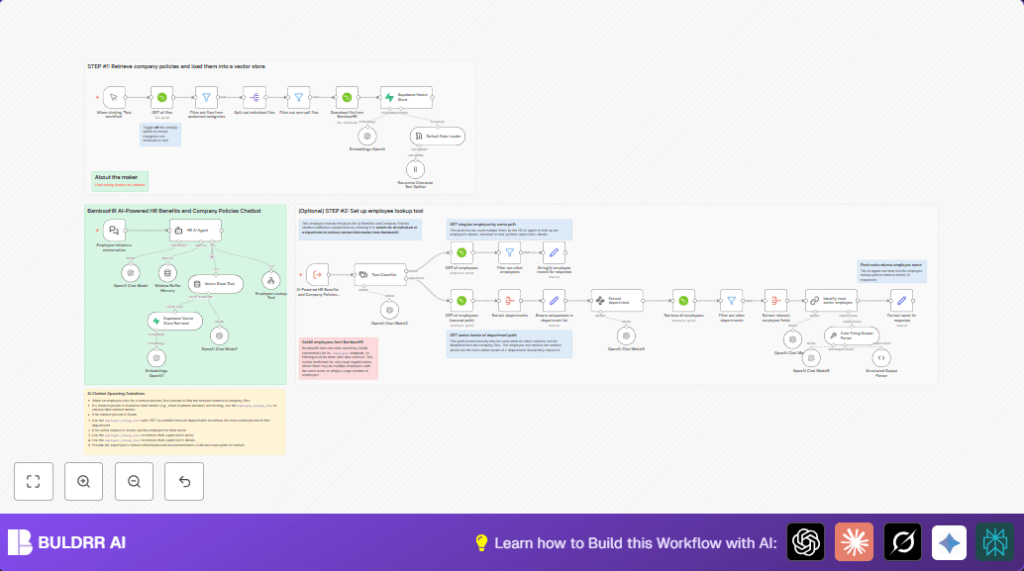
The chatbot talks with employees and finds exact info from BambooHR files and employee lists without needing HR people every time.
It uses AI to read PDF policy files, look up people, and remember chat talks.
This saves hours of HR work and gets employees answers quick and right.
Tools and Services Used
- BambooHR API: Fetches company files and employee data.
- OpenAI: Chat models, text embeddings, and text splitting.
- Supabase Vector Store: Stores vector embeddings for fast document search.
- n8n Workflow Automation: Links all nodes, triggers, and API calls.
Inputs, Processing Steps, and Output
Inputs
- Company PDF files under category “Company Files” from BambooHR.
- Employee chat questions sent through webhook trigger.
- Employee and department info from BambooHR employee lists.
Processing Steps
- The workflow fetches all files, and filters only PDFs under “Company Files” category.
- It downloads each PDF, splits text into chunks, and creates text embeddings with OpenAI.
- Embeddings insert into Supabase Vector Store for semantic search.
- When employees ask questions, the chatbot uses a text classifier to detect if the query is about a person or a department.
- Employee lookup runs if needed to get exact details from BambooHR.
- Chatbot queries Supabase to find matching company policy text.
- Conversation memory stores recent chat messages for context.
- The AI agent builds answers using all this info, or suggests best contact if info missing.
Output
- Instant, clear answers on company policies, benefits, and employee contacts.
- Reduced HR manual workload.
- Accurate employee contact info or fallback contact recommendations.
Beginner Step-by-Step: How to Use This Workflow in n8n Production
Step 1: Download and Import Workflow
- Click the Download button on this page to get the workflow file.
- Open the n8n editor where you want to run this chatbot.
- Use “Import from File” option to load the workflow into n8n.
Step 2: Configure Credentials and IDs
- Add BambooHR account credentials with API access in n8n.
- Add OpenAI API Key for chat and embeddings nodes.
- Add Supabase connection details and check that the vector store table name “company_files” matches.
- Update any BambooHR IDs, emails, or department names if needed.
Step 3: Test the Workflow
- Trigger the manual start node Test workflow to fetch and index company policy PDFs.
- Check that all files download and embeddings are inserted into Supabase.
- Send sample chat queries to the chatbot webhook URL set in Employee initiates a conversation node.
- Verify that the chatbot responds with accurate answers.
Step 4: Activate for Production
- Turn on the workflow in n8n to start listening and answering live chat queries.
- Ensure the chatbot interface calls the webhook URL correctly.
- Set up regular runs to update company file embeddings as policies change.
For users running self-host n8n, see self-host n8n to learn about hosting options.
Customizations
- Add more file categories in the filter node to include extra company policies.
- Change the text chunk size and overlap in the splitter node for bigger or smaller PDFs.
- Adjust how many top matches the vector store returns to balance speed and detail.
- Edit the fallback contact department in the AI agent prompt to direct employees differently.
- Add more employee data fields in BambooHR lookup for richer responses like phone or office details.
Troubleshooting
- No results when querying Supabase Vector Store: Check table name and re-run document indexing.
- Employee lookup gives no or wrong matches: Check name spelling and case sensitivity during filtering.
- OpenAI chat model answers are off-topic or incomplete: Review AI agent system prompt and ensure all tool connections.
Pre-Production Checklist
- Verify BambooHR API keys with read access.
- Manually run fetch and index of documents.
- Send test queries via chatbot webhook.
- Confirm OpenAI keys and rate limits.
- Ensure Supabase vector store has data.
Deployment Guide
Switch on the workflow in n8n editor.
Make chatbot interface call the webhook URL from Employee initiates a conversation node.
Look into n8n logs for problems while running.
Plan regular indexing of company files into Supabase.
Summary and Results
✓ Save about 6-8 hours of HR manual work every week.
✓ Get fast, exact answers on company policies and employee contacts.
✓ Reduce repetitive emails and questions.
✓ Help employees find info anytime without HR delays.
