
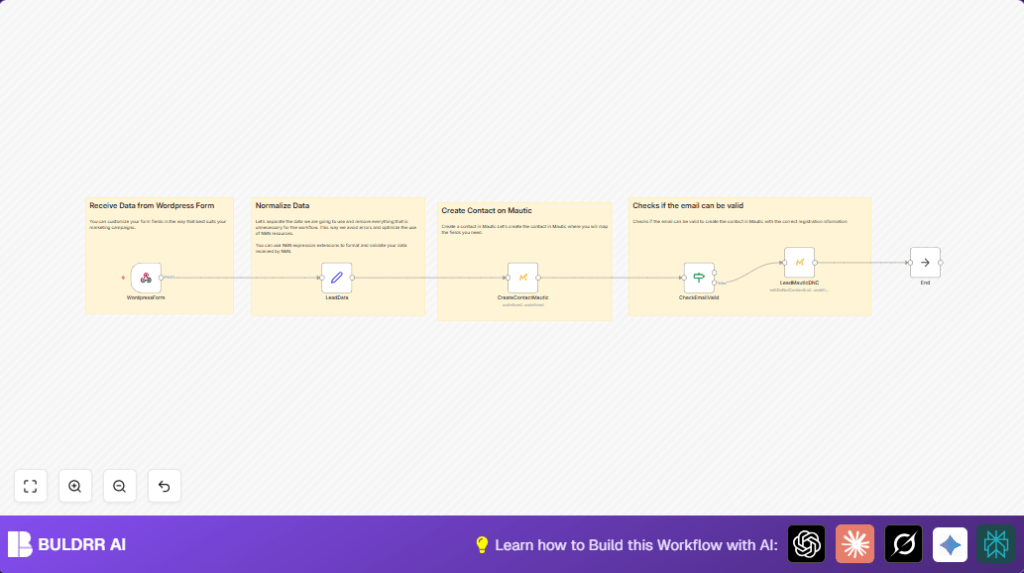

What this workflow does
This workflow gets data from a WordPress form when someone sends it.
It checks if the email is right or not.
If the email is good, the workflow adds or updates the contact in Mautic.
If the email is wrong, it adds the contact to Mautic’s Do Not Contact list.
This saves time by stopping manual work and mistakes in entering leads.
Who should use this workflow
This is for people who get leads from WordPress forms but don’t want to add them one by one in Mautic.
If manual lead entry takes too long or causes errors, this workflow helps fix that.
It is useful for marketing teams or business owners using WordPress and Mautic.
Tools and services used
- WordPress forms: To collect lead information.
- n8n Webhook node: Captures form data sent from WordPress.
- n8n Set node: Normalizes and checks email format.
- n8n Mautic node: Adds or updates contacts in Mautic and edits Do Not Contact list.
Inputs, processing steps, and output
Inputs
- Leads data coming from WordPress form submissions sent as JSON via HTTP POST.
Processing steps
- Webhook node receives form data.
- Set node extracts fields: name, email, mobile, form id, and checks if email is valid.
- Mautic node creates or updates contact if email is valid.
- If node checks email validity.
- If email is invalid, another Mautic node adds contact to Do Not Contact list with comments.
- NoOp node cleanly ends the workflow.
Output
- Contacts correctly created or updated in Mautic.
- Invalid emails flagged to avoid campaign waste.
- Reduced manual effort and fewer errors in marketing lists.
Beginner step-by-step: How to build in n8n
Import and open workflow
- Download the workflow from this page using the Download button.
- Go to the n8n editor where workflows are managed.
- Choose to “Import from File” and select the downloaded workflow file.
Configure credentials and settings
- Add Mautic API credentials in n8n Credential settings.
- Check Webhook node has a correct URL and POST method ready to receive WordPress data.
- If needed, update form field names or IDs in the Set node with matching JSON paths.
Test and activate
- Test submitting the WordPress form to make sure the workflow runs and the contact gets created in Mautic.
- Fix any errors, then switch the workflow status to “Active” to run automatically in production.
- If using self-host n8n, confirm server is up and properly configured.
Customization ideas
- Add more form fields in the Set node for company, message, or others.
- Send notification emails after contact creation using an email node.
- Use an HTTP Request node to call an external email validation service instead of simple format check.
- Log leads into Google Sheets for backups and reports.
- Add conditional branches to process leads differently by form ID.
Edge cases and troubleshooting
Invalid Mautic API credentials error
Usually means wrong or expired API keys.
Fix by re-entering credentials in n8n and testing connection again.
Webhook not receiving WordPress data
Check if the WordPress form sends data using POST to correct webhook URL.
Email validation not filtering bad emails
Simple email format check has limits.
Use external email validation APIs via an HTTP Request node for better results.
Summary of results
✓ Users save hours weekly by automating lead capture from WordPress forms.
✓ Marketing lists stay clean with only valid emails added to Mautic.
✓ Contacts with invalid emails are flagged to avoid wasting campaigns.
→ Manual errors and delays are greatly reduced.
→ Lead follow-up speed and campaign success improve.
