
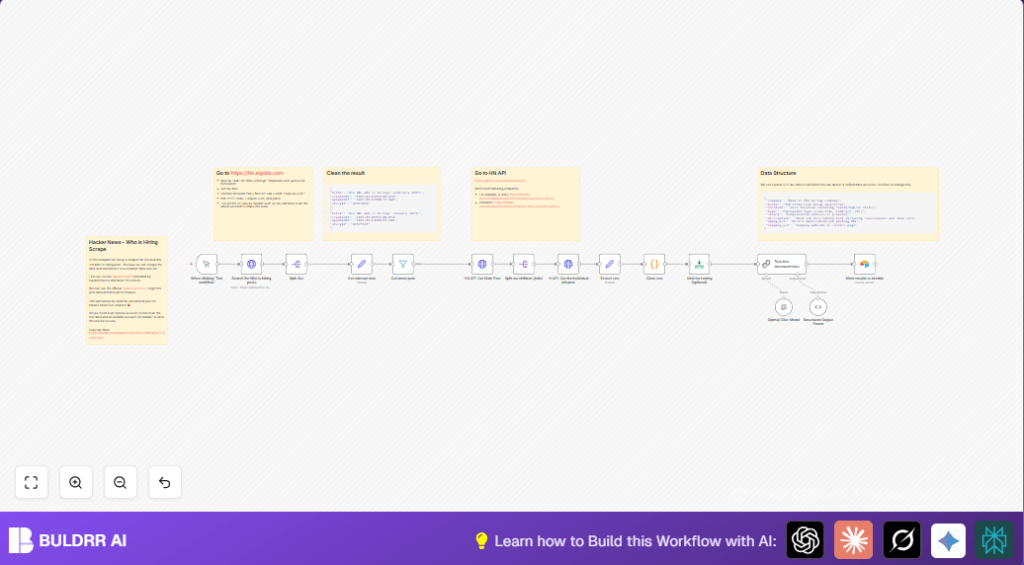

Scrape & Structure Hacker News ‘Who is Hiring’ Posts with n8n

Struggling to efficiently extract job listings from Hacker News ‘Who is Hiring’ posts? This n8n workflow automates scraping, cleans, and structures hiring data using OpenAI and stores it in Airtable, saving hours of manual work.
httpRequest
lmChatOpenAi
code
+8
Workflow Identifier: 2180
NODES in Use: Manual Trigger, Sticky Note, HTTP Request, Split Out, Set, Filter, Code, AI Chat Model, Structured Output Parser, Chain LLM, Airtable

Press CTRL+F5 if the workflow didn't load.

Learn how to Build this Workflow with AI:

Visit through Desktop for Best experience

Opening Problem Statement

Meet Emma, a proactive recruiter who scours the web monthly to discover fresh job listings posted in Hacker News’ famous “Who is Hiring?” threads. Every month, Emma spends hours manually navigating the site, copying job posts, and trying to parse inconsistent formats. She wastes more than 5 hours each cycle and often misses out on important details buried deep in discussion threads. This laborious process increases her chances of overlooking perfect candidates or key job openings.

What Emma really needs is a reliable, automated approach to scrape the latest hiring posts, extract all relevant job details, and organize them in a neat, searchable database without lifting a finger.

What This Automation Does ⚙️

This custom n8n workflow is designed specifically to tackle Emma’s problem by:

  • Automatically querying Hacker News’ Algolia powered search API filtered for “Ask HN: Who is hiring?” posts from the last 30 days.
  • Extracting the main story IDs and fetching detailed posts including all job replies using the official Hacker News API.
  • Cleaning raw text data from posts using a custom JavaScript code node to remove HTML tags, encode characters, and unify spacing.
  • Using OpenAI’s GPT-4o-mini language model to transform unstructured post text into a structured JSON format containing company, role, location, salary, job type, application URLs, and description.
  • Saving the structured job listings directly into an Airtable base for easy tracking and management.
  • Supporting incremental updates by filtering posts only from the last 30 days.

Thanks to this automation, Emma can now save over 5 hours monthly by automating tedious copy-pasting, parsing, and manual data cleaning. It ensures a consistent and enriched dataset that’s ready to use for candidate outreach or analytics.

Prerequisites ⚙️

  • n8n account (self-hosted or cloud)
  • Algolia API access for Hacker News search (https://hn.algolia.com) 🔑
  • OpenAI API account with GPT-4o-mini model enabled 🔐
  • Airtable account with a base and table ready to receive job data 📁
  • Basic familiarity with n8n to import workflow and add credentials

Step-by-Step Guide to Set Up the Hacker News Job Scraper

Step 1: Trigger Workflow Manually

Navigate to your n8n editor. Click ‘When clicking Test workflow’ node – a Manual Trigger. This allows you to run the workflow on-demand while you test or update.

You should see the manual trigger node on your canvas. Start by activating and running it to initiate the workflow.

Common mistake: Forgetting to enable credentials for subsequent HTTP requests before testing.

Step 2: Query Hacker News Search API

This node named ‘Search for Who is hiring posts’ is an HTTP Request node configured to POST a JSON query to the Algolia endpoint that powers Hacker News search. The query filters specifically for posts titled exactly “Ask HN: Who is hiring” sorted by date.

Headers include Algolia App ID and authentication keys. You must set your Algolia credentials under “HTTP Header Auth”.

After running, the node returns a paginated list of matching posts including metadata such as title, created_at, and story_id.

Common mistake: Not adding correct HTTP header auth or missing Algolia app ID headers.

Step 3: Split Out Stories from Search Results

The Split Out node extracts the array named hits from the HTTP response, so n8n treats each post as an individual item moving forward.

This is key for processing each hiring post separately in following steps.

Step 4: Extract and Format Post Metadata

Use the ‘Get relevant data’ Set node to map useful fields like title, created_at, updated_at, and story_id into standardized names.

Expected output is a cleaner JSON item per post.

Step 5: Filter Posts From Last 30 Days

The ‘Get latest post’ Filter node uses date comparison on the createdAt field to keep only posts newer than 30 days, ensuring relevance and freshness.

Step 6: Fetch Full Post Content

Use the ‘HN API: Get Main Post’ HTTP Request node with the URL dynamically built from the storyId to retrieve the full JSON data for each hiring post via the official Hacker News API.

Step 7: Split Out Child Comments (Jobs)

The ‘Split out children (jobs)’ node breaks the kids array into individual job posts within the thread for separate processing.

Step 8: Fetch Each Job Post Details

The ‘HI API: Get the individual job post’ HTTP Request node runs for each job comment to fetch detailed job info using their IDs.

Step 9: Extract Raw Text Data

The ‘Extract text’ Set node pulls the text field out of each job post JSON for the next cleaning stage.

Step 10: Clean Job Post Text

The ‘Clean text’ node is a custom Code node using JavaScript to remove HTML tags, fix character encodings like / and ‘, remove multiple whitespaces, and format URLs with newlines.

This step significantly improves data consistency for AI parsing.

// JavaScript cleaning snippet from the node
const inputData = $input.all();

function cleanAllPosts(data) {
 return data.map(item => {
 try {
 let text = '';
 if (typeof item === 'string') {
 text = item;
 } else if (item.json && item.json.text) {
 text = item.json.text;
 } else {
 text = JSON.stringify(item);
 }
 text = String(text);
 text = text.replace(///g, '/');
 text = text.replace(/'/g, "'");
 text = text.replace(/&w+;/g, ' ');
 text = text.replace(/<[^>]*>/g, '');
 text = text.replace(/|s*/g, '| ');
 text = text.replace(/s+/g, ' ');
 text = text.replace(/s*(https?://[^s]+)s*/g, 'n$1n');
 text = text.replace(/n{3,}/g, 'nn');
 text = text.trim();
 return { cleaned_text: text };
 } catch (error) {
 return { cleaned_text: '', error: error.message, original: item };
 }
 });
}

return cleanAllPosts(inputData);

Step 11: Limit Results for Testing (Optional)

The ‘Limit for testing (optional)’ node restricts the dataset to 5 job posts in testing mode, preventing excessive API calls or processing during development.

Step 12: Parse Text Into Structured Data with OpenAI GPT-4o-mini

The ‘OpenAI Chat Model’ node sends the cleaned job text to OpenAI’s GPT-4o-mini model with a prompt to extract key job fields. The response is then parsed by the ‘Structured Output Parser’ node which enforces a precise JSON schema capturing company, role, location, job type, salary, and application links.

This step converts messy human-written posts into neat records ready for Airtable.

Step 13: Write Parsed Data to Airtable

Finally, the ‘Write results to airtable’ node maps the finalized JSON fields to corresponding table columns in your Airtable base, creating new entries automatically.

This completes the end-to-end automation from web scraping to a polished job database.

Customizations ✏️

  • Change Search Query Filter: In the ‘Search for Who is hiring posts’ HTTP Request node, update the JSON query parameter to other “Ask HN” queries like “Ask HN: Who wants to collaborate?” to scrape different topics.
  • Adjust Date Range Filter: Modify the ‘Get latest post’ Filter node condition to change the days threshold from 30 to any timeframe you need, e.g. 7 or 90 days.
  • Modify Text Cleaning Logic: Edit the JavaScript code inside the ‘Clean text’ node to add custom regex rules or remove unwanted characters specific to your data sources.
  • Change Output Destination: Replace the Airtable node with another database node like Google Sheets or a SQL database to suit your preferred storage.
  • Switch Language Model: Use a different OpenAI model by updating credentials and model setting in the ‘OpenAI Chat Model’ node for different parsing accuracy or cost tradeoff.

Troubleshooting 🔧

  • Problem: “HTTP Request node returns 403 Forbidden”
    Cause: Algolia API keys might be missing, expired, or incorrectly configured.
    Solution: Verify your Algolia credentials are correctly set in the HTTP Header Auth section of the ‘Search for Who is hiring posts’ node.
  • Problem: “OpenAI request fails or times out”
    Cause: API limits reached or incorrect API key.
    Solution: Check your OpenAI API quota, refresh tokens if needed, and confirm the key is correctly linked in n8n credentials.
  • Problem: “Data parsing errors or incomplete JSON fields”
    Cause: Unstructured or malformed text being sent to OpenAI.
    Solution: Ensure the ‘Clean text’ node properly sanitizes the input text. Review the regex and string replacements carefully.

Pre-Production Checklist ✅

  • Verify Algolia search API credential and header correctness.
  • Confirm OpenAI API credentials and test prompt outputs for accuracy.
  • Check Airtable API token and base/table mapping correctness.
  • Test triggering workflow manually and check intermediate outputs after each main node (HTTP request, text cleaning, AI parsing).
  • Make sure date filter node correctly limits payload size and freshness.
  • Backup your Airtable base data before running new imports to avoid duplicates.

Deployment Guide

Once you’ve tested the workflow, activate it in n8n by switching the manual trigger node to a scheduled trigger if desired for automation (e.g., monthly or weekly).

Ensure you monitor the workflow runs initially via n8n’s execution logs for failures or unexpected outputs. Enable error notifications if possible.

You now have a fully automated scraper that enriches Hacker News hiring posts into structured job listings with minimal effort.

FAQs

  • Q: Can this workflow be adapted for other “Ask HN:” posts?
    A: Yes! By adjusting the search query JSON, you can target other topics like collaborations or product launches.
  • Q: Does this workflow consume OpenAI credits?
    A: Yes, every job post passed to the GPT model consumes API quota. Use the Limit node to manage usage.
  • Q: Is Airtable mandatory?
    A: No, replace the Airtable node with Google Sheets or a database of your choice.
  • Q: Can the workflow handle hundreds of posts?
    A: It can handle moderate loads, but consider API rate limits and possibly splitting workflows for scale.

Conclusion

You’ve just mastered building an intelligent, automated scraper and data structuring pipeline for Hacker News “Who is Hiring?” posts. This solution dramatically cuts manual effort by transforming unstructured conversations into structured, actionable job listings.

By saving over 5 hours monthly and organizing data in Airtable, your recruiting or job tracking process becomes far more efficient and reliable.

Next, consider automating outreach emails to matched candidates, integrating Slack notifications for new listings, or expanding scraping to other tech forums using the same approach. Keep refining and enjoy the power of automation!

Promoted by BULDRR AI

Related Workflows

Automate Viral UGC Video Creation Using n8n + Degaus (Beginner-Friendly Guide)

Learn how to automate viral UGC video creation using n8n, AI prompts, and Degaus. This beginner-friendly guide shows how to import, configure, and run the workflow without technical complexity.
Form Trigger
Google Sheets
Gmail
+37
Free

AI SEO Blog Writer Automation in n8n (Beginner Guide)

A complete beginner guide to building an AI-powered SEO blog writer automation using n8n.
AI Agent
Google Sheets
httpRequest
+5
Free

Automate CrowdStrike Alerts with VirusTotal, Jira & Slack

This workflow automates processing of CrowdStrike detections by enriching threat data via VirusTotal, creating Jira tickets for incident tracking, and notifying teams on Slack for quick response. Save hours daily by transforming complex threat data into actionable alerts effortlessly.
scheduleTrigger
httpRequest
jira
+5
Free

Automate Telegram Invoices to Notion with AI Summaries & Reports

Save hours on financial tracking by automating invoice extraction from Telegram photos to Notion using Google Gemini AI. This workflow extracts data, records transactions, and generates detailed spending reports with charts sent on schedule via Telegram.
lmChatGoogleGemini
telegramTrigger
notion
+9
Free

Automate Email Replies with n8n and AI-Powered Summarization

Save hours managing your inbox with this n8n workflow that uses IMAP email triggers, AI summarization, and vector search to draft concise replies requiring minimal review. Automate business email processing efficiently with AI guidance and Gmail integration.
emailReadImap
vectorStoreQdrant
emailSend
+12
Free

Automate Email Campaigns Using n8n with Gmail & Google Sheets

This n8n workflow automates personalized email outreach campaigns by integrating Gmail and Google Sheets, saving hours of manual follow-up work and reducing errors in email sequences. It ensures timely follow-ups based on previous email interactions, optimizing communication efficiency.
googleSheets
gmail
code
+5
Free