

Opening Problem Statement
Imagine Sarah, a community manager for an active Telegram group centered on image sharing and art critique. Every day, her members upload dozens of images for feedback and moderation. Managing this manually becomes a nightmare — it takes hours to review each image, leading to delayed responses, frustrated users, and missed opportunities to moderate unwanted content swiftly. Sarah knows there has to be a better way to automate image analysis while maintaining personalized communication.
This exact scenario is what our advanced n8n workflow addresses. It eliminates hours spent manually checking images by automatically analyzing every photo received via Telegram and sending back meaningful content about the image analysis without any human intervention.
What This Automation Does ⚙️
When you implement this workflow, these are the specific outcomes you get:
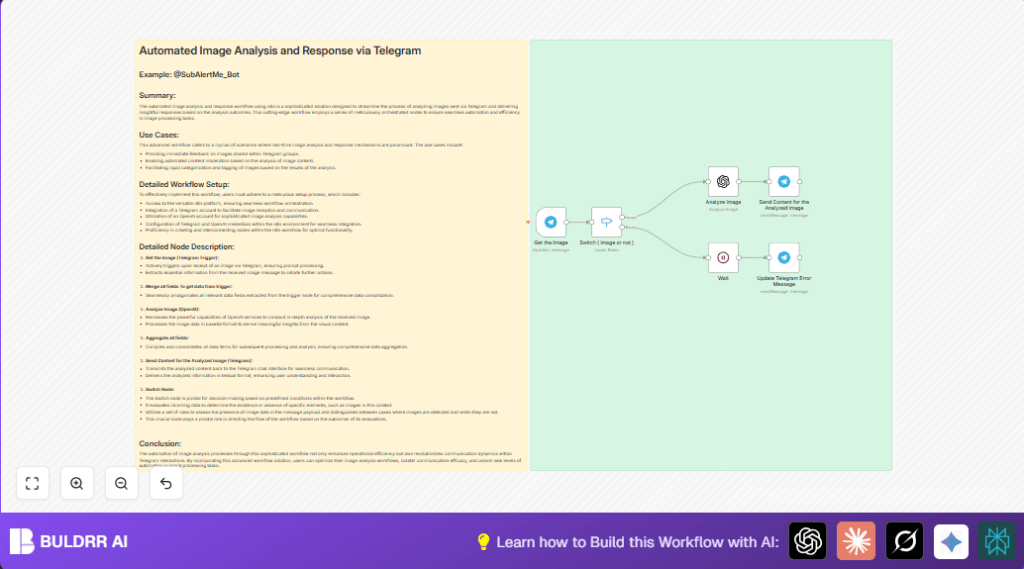
- Instant image reception: The Telegram Trigger node listens for incoming photos in real-time and downloads the images automatically.
- Smart image analysis: The workflow sends the image in base64 format to OpenAI’s image analysis model, extracting meaningful descriptions and insights.
- Error handling: If a message doesn’t contain an image, it sends a prompt back to the user asking them to upload a valid image.
- Automated communication: Analyzed content is sent back as a readable Telegram message directly to the user or group chat.
- Decision-making with Switch node: Efficiently routes messages based on whether they contain photos or not ensuring only images get analyzed.
- Minimal wait times: The workflow waits just 3 seconds before notifying users about missing images, maintaining friendly but prompt communication.
It effectively saves hours daily, reduces human error in analysis, and enables real-time interaction with Telegram community members.
Prerequisites ⚙️
- 📱 Telegram account – to receive and send messages with images.
- 🔐 OpenAI account – to perform advanced image analysis.
- ⚙️ n8n account or self-hosted instance – for workflow automation. (Consider self-hosting options like Hostinger for enhanced control.)
- 🔑 Configured Telegram and OpenAI credentials within n8n for seamless integration.
Step-by-Step Guide to Build the Workflow
Step 1: Set up Telegram Trigger node to receive images
Navigate to n8n editor, click + Add Node → Search for Telegram Trigger → Select it.
Configure it to listen for message updates. Under Additional Fields, enable Download to automatically save received images as binary data.
Use your Telegram API credentials here. The node outputs the entire Telegram message including image data.
Expected outcome: Workflow triggers as soon as someone sends an image to your bot or group.
Common mistake: Forgetting to enable the Download option, which prevents image data from being accessible downstream.
Step 2: Add a Switch node to detect presence of an image
Click + Add Node → Select Switch.
In the Switch node, configure rules to check if $json.message.photo exists:
- Rule 1 (Output “Image”): If
message.photoexists (array operation “exists” returns true). - Rule 2 (Output “Empty”): If
message.photodoes not exist.
This validation ensures only messages with images proceed to analysis while others trigger an error response.
Expected outcome: Messages containing images flow to analysis; otherwise to error handling.
Common mistake: Using wrong expression syntax or not renaming outputs properly, which breaks downstream logic.
Step 3: Configure OpenAI node to analyze the image
Add the OpenAI node (specifically the LangChain OpenAI node for image analysis).
Select Resource: image and Operation: analyze. Set input type as base64.
Pass the image data extracted from Telegram trigger in base64 format. This node sends the image to OpenAI, which returns analysis results like descriptions or relevant tags.
Expected outcome: You get a summarized textual analysis of the image content.
Common mistake: Not supplying base64 encoded image data or misconfiguring API credentials.
Step 4: Send analyzed content back via Telegram node
Add the Telegram node to send messages.
Set the Chat ID to read from the incoming message chat {{$node["Get the Image"].json.message.chat.id}}.
Type ={{ $json.content }} in the text field to send OpenAI’s analysis result.
This instantly replies with the analyzed insights back to the user or group.
Expected outcome: User sees meaningful analysis of their uploaded image as an immediate reply.
Common mistake: Incorrect chat ID expression that causes failure to send the response.
Step 5: Handle missing images with a wait and error message
Add a Wait node with a 3 second delay to prevent immediate annoying error spams.
Connect this to another Telegram node configured to send “Please Upload an Image ….” message back if no image was detected in the chat.
Expected outcome: Users receive polite prompts only if they fail to upload an image.
Common mistake: Skipping the wait node can lead to rapid error message spam.
Customizations ✏️
- Customize message content: In the “Send Content for the Analyzed image” Telegram node, change the message template to add greetings or instructions.
- Adjust wait duration: In the Wait node, increase or decrease wait time based on how quickly you want to notify users.
- Expand image analysis scope: Enhance the OpenAI image analysis node by using more complex prompts or integrating with other AI image tools.
- Add logging: Insert a Google Sheets node to log images’ analysis summary for audit or training datasets.
- Modify Switch conditions: Add extra rules if you want to detect videos or other media types besides photos.
Troubleshooting 🔧
Problem:
“No image data found in the message” error preventing analysis.
Cause: The Telegram Trigger did not have the download option enabled or the photo property wasn’t detected.
Solution: Go back to the “Get the Image” Telegram Trigger node → Under Additional Fields, ensure Download is enabled. Test by sending an image again.
Problem:
“Failed to send Telegram message” error.
Cause: Incorrect chat ID or missing Telegram API credentials.
Solution: Double-check the expression used to get chat id, e.g., {{$node["Get the Image"].json.message.chat.id}}, and ensure Telegram credential is valid and connected.
Problem:
OpenAI node returns unexpected output or errors.
Cause: Misconfiguration of OpenAI API key or input format not base64.
Solution: Verify OpenAI API key in credentials and ensure input to the node is base64 encoded image data as expected.
Pre-Production Checklist ✅
- Verify Telegram and OpenAI credentials are connected and have appropriate API access rights.
- Test Telegram bot to make sure it receives image messages and triggers the workflow.
- Validate the Switch node correctly routes messages with and without images.
- Ensure the OpenAI node returns proper analysis output for a variety of test images.
- Confirm reply messages send accurately to the correct chat IDs in Telegram.
- Backup your workflow in n8n to avoid loss when making updates.
Deployment Guide
Activate your workflow in n8n by toggling it ON after thoroughly testing with sample images.
Monitor the execution logs for any unexpected errors or delays.
For higher volumes, consider upgrading your OpenAI plan and scaling your n8n instance accordingly.
FAQs
Q: Can I use this workflow with other messaging platforms like WhatsApp?
A: This workflow specifically uses Telegram nodes. For WhatsApp or others, you’ll need to adapt the trigger and send nodes accordingly.
Q: Does analyzing many images consume a lot of OpenAI credits?
A: Yes, heavy usage could increase costs. Monitor your OpenAI plan and usage.
Q: Is my data secure in this automation?
A: n8n keeps your workflow secure if self-hosted or properly managed. Always protect your API keys.
Conclusion
With this fully automated image analysis workflow, Sarah (and you) can transform how you manage images on Telegram. No more manual review delays or errors—just instant, accurate insights delivered back to your community. You save valuable time, boost engagement, and maintain a professional, responsive environment.
Once deployed, consider adding features like automated tagging, logging summaries, or integrating with other AI tools for further enhancements. Start automating your Telegram image workflow today and experience newfound productivity!