
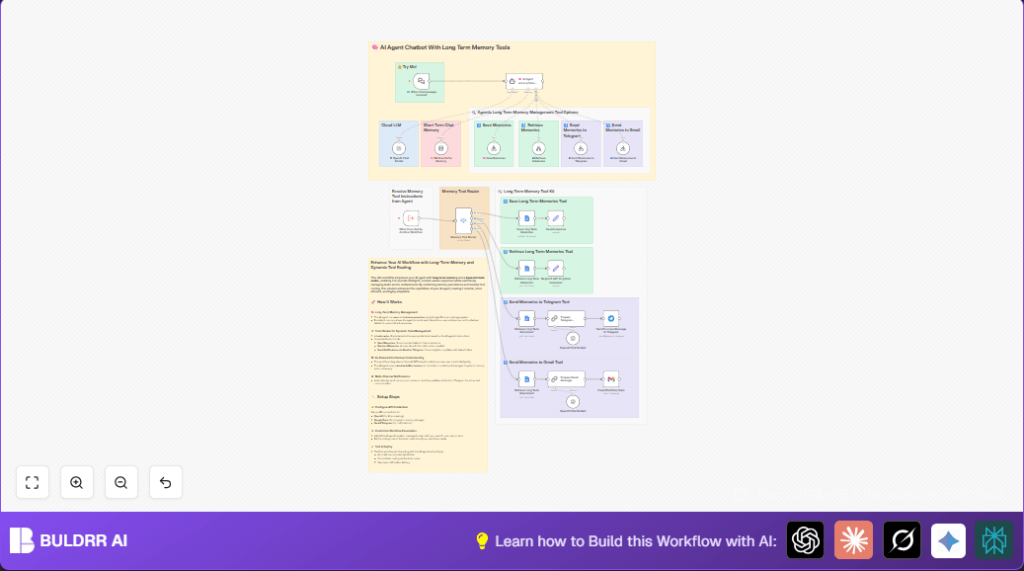

Enable AI Chatbot Long-Term Memory with n8n Tools Router

This n8n workflow equips AI chatbots with long-term memory capabilities using Google Docs, routing tools dynamically for saving, retrieving, and sending memories via Telegram or Gmail. Automate memory management to reduce repetitive queries and deliver personalized responses effortlessly.
ExecuteWorkflowTrigger
GoogleDocs
Set
+9
Workflow Identifier: 1314
NODES in Use: ExecuteWorkflowTrigger, GoogleDocs, Set, Telegram, Gmail, Switch, lmChatOpenAi, toolWorkflow, memoryBufferWindow, agent, chatTrigger, chainLlm

Press CTRL+F5 if the workflow didn't load.

Learn how to Build this Workflow with AI:

Visit through Desktop for Best experience

Opening Problem Statement

Meet Joe, a tech startup founder who recently launched an AI-powered chatbot to assist his customer support team. Initially, the chatbot handled queries well, but Joe soon realized it was “forgetful.” It couldn’t remember important user details or past conversations, forcing customers to repeat themselves frequently. This led to frustration, longer resolution times, and lost customer trust.

Joe also struggled to keep track of interactions for follow-up and analysis. Manually logging chatbot memories or sending updates across different platforms wasted him hours every week. If only his AI assistant could save and recall important memories automatically while notifying the right people efficiently. That’s exactly what this n8n workflow enables: a smart AI agent with long-term memory tools and an intelligent routing system.

What This Automation Does

This workflow integrates an AI agent with dynamic tools designed to handle long-term memory management and multi-channel notifications. When you run this automation, here’s what happens:

  • 🧠 The AI agent receives chat inputs, processes them with OpenAI’s GPT-based model, and stores relevant memories in Google Docs for persistence.
  • 🔄 It can retrieve past memories from Google Docs to provide context-aware, personalized responses.
  • 📤 The workflow sends summarized memories or updates automatically to Telegram chats or via Gmail emails for stakeholder communication.
  • 🔀 A tools router node intelligently directs tasks to the right tool—whether saving new memories, retrieving memories, or sending notifications.
  • 💡 Short-term context is maintained via a window buffer memory node to enhance conversation continuity.
  • 🛠️ Modular tool workflows make it easy to add or adjust capabilities without disrupting the main flow.

Overall, this automation saves crucial time by eliminating manual memory management, improves chatbot intelligence with long-term context, and boosts team communication via multiple channels.

Prerequisites ⚙️

  • 🧠 n8n account (cloud or self-hosted; for self-hosting options see Hostinger integration guide)
  • 🔐 OpenAI account with API key (for the GPT model)
  • 📁 Google Docs account set up with OAuth2 credentials (to save and retrieve memories)
  • 📧 Gmail account configured with OAuth2 (to send email notifications)
  • 💬 Telegram account with bot token and chat ID (for sending Telegram messages)

Step-by-Step Guide

1. Trigger the Workflow from Another Workflow

Go to your n8n editor. Create or open a workflow that will call this memory management workflow. Add the Execute Workflow Trigger node named When Executed by Another Workflow.

  • Configure it with passthrough mode so all incoming data can be processed.
  • This node listens for execution calls from other workflows, allowing seamless integration.

Expected outcome: The workflow activates whenever another workflow triggers it.

Common mistake: Forgetting to set inputSource to passthrough, which blocks input data.

2. Route Tool Instructions Dynamically

Add a Switch node called Memory Tool Router. This routes incoming tasks based on the $json.route property that the AI agent sets.

  • Set condition rules to match four routes: save_memory, retrieve_memory, send_memories_to_telegram, and send_memories_to_gmail.
  • Each output corresponds to a dedicated tool workflow or operation.

Visual check: You should see exactly four outputs aligned with these routes.

Common mistake: Incorrect route spelling causing routing failure.

3. Save Long Term Memories in Google Docs

Connect the save_memory output to a Google Docs node named Save Long Term Memories.

  • Operation: update
  • Document URL: your long-term memory Google Doc URL
  • Insert text formatted as JSON containing the current timestamp and memory data, e.g., { "date": "{{ $now }}", "memory": "{{ $json.query }}" }
  • Ensure your Google Docs OAuth2 credentials are linked.

Outcome: Each significant chatbot memory is appended to your Google Doc lasting storage.

Common mistake: Using incorrect JSON formatting or wrong document URL.

4. Send Confirmation Response

After saving, link to a Set node named Saved response that assigns a confirmation string Memory saved to the response field.

This confirms to upstream processes that the save operation succeeded.

5. Retrieve Long Term Memories

Use the retrieve_memory output to connect to Google Docs nodes configured with the get operation and the same Document URL.

  • This workflow has three Google Docs nodes labeled Retrieve Long Term Memories, Retrieve Long Term Memories2, and Retrieve Long Term Memories3 to feed different outputs or formats.

Outcome: Past memories are fetched from Google Docs for use in AI response generation.

Common mistake: Not updating or misconfiguring the Google Docs OAuth2 credentials.

6. Prepare Messages for Telegram and Gmail

Feed outputs from historical memory nodes to Chain LLM nodes named Prepare Telegram Message and Prepare Gmail Message respectively.

  • Telegram messages are formatted as simple unformatted lists suitable for chat apps.
  • Gmail messages are formatted as modern HTML tables for professional email presentation.

Expected: Clean, concise messages ready for multi-channel notifications.

7. Send Notifications via Telegram

Connect the prepared Telegram message node to a Telegram node named Send Success Message to Telegram.

  • Ensure Telegram API credentials are configured.
  • Set the target chat ID via environment variable {{ $env.TELEGRAM_CHAT_ID }}.
  • Message supports HTML mode but sends simple text lists.

Result: Memories or updates are sent as Telegram notifications automatically.

8. Send Notifications via Gmail

Similarly, connect the prepared Gmail message node to a Gmail node named Email Workflow Stats.

  • Configure Gmail OAuth2 credentials.
  • Send to your email address via environment variable {{ $env.EMAIL_ADDRESS_JOE }}.
  • Email subject is personalized as n8n User Memories.

Outcome: Email notifications deliver formatted memory updates to your inbox.

9. Integrate AI Agent with Long Term Memory Tools

The core intelligence resides in the LangChain Agent node named 🧠 AI Agent w/Long Term Memory.

  • This agent uses a system message to instruct itself to use four tool workflows for saving and retrieving memories, and sending notifications.
  • The agent accesses a window buffer memory node to maintain short-term chat context.
  • Integrate OpenAI GPT-4o-mini model nodes to process chat input and generate responses.

Outcome: You have a highly intelligent AI assistant that can remember, recall, and notify based on user chats.

10. Use Chat Trigger to Receive User Messages

Set up the Chat Trigger node named Ⓜ️ When chat message received with a webhook ID to accept incoming chat messages via HTTP.

Connect this to the AI agent node to start the conversation flow.

Expected: Your AI chatbot is live and listening for messages.

Customizations ✏️

  • Switch Memory Storage Provider: Replace Google Docs nodes with other storage options like Google Sheets or a database by changing the node type and mapping fields accordingly in the Save and Retrieve nodes.
  • Change AI Model: Swap GPT-4o-mini with another OpenAI model for different response quality or cost, by editing the model field in the LangChain nodes.
  • Customize Notification Content: Modify the Chain LLM nodes’ prompts for Telegram or Gmail message formatting to match your brand voice or add extra information.
  • Add or Remove Tools in Router: Edit the Switch node’s routing rules to add new memory management tools or channels like Slack or SMS.
  • Adjust Buffer Window Size: Change the window buffer memory node’s contextWindowLength to retain more or less message history for context.

Troubleshooting 🔧

  • Problem: “Google Docs node fails with 403 permission error”
    • Cause: OAuth2 credentials misconfigured or lacking document permissions.
    • Solution: Reauthorize Google Docs OAuth2 credentials, ensure document sharing settings allow access, and verify token scopes.
  • Problem: “AI agent does not trigger memory save or retrieve functions”
    • Cause: Incorrect or missing $json.route property used for routing.
    • Solution: Check the AI agent’s system message rules and ensure the workflow emits the correct routing keys.
  • Problem: “Telegram notifications not received”
    • Cause: Incorrect bot token or chat ID.
    • Solution: Validate Telegram credentials, verify chat ID environment variable is correct, and test sending messages manually.

Pre-Production Checklist ✅

  • Verify all API credentials are active and have correct scopes.
  • Test triggering the workflow from a sample workflow to simulate actual message flow.
  • Check Google Docs document is shared with your OAuth2 service account and accepts updates.
  • Confirm Telegram chat ID and Gmail email address environment variables are properly set.
  • Run test chats to ensure the AI agent responses are contextually relevant and that memories are properly saved and retrieved.

Deployment Guide

Once tested successfully, activate the workflow in n8n by flipping the toggle on the workflow editor’s top right corner. Ensure your environment variables for OpenAI, Telegram, Gmail, and Google Docs API credentials remain confidential.

Monitor execution logs under the Executions tab for each run to catch any errors or warnings early. Use native retry options in nodes if API calls fail due to rate limits or network issues.

This setup is production-ready for small to medium scale chatbot solutions requiring persistent memory and multi-channel notifications.

Conclusion

By implementing this n8n workflow, Joe empowered his AI chatbot to have long-term memory capabilities, resulting in fewer repeated user questions and more personalized, context-aware responses. He also automated notifications to his team via Telegram and email, saving hours of manual reporting weekly.

This powerful combination of AI agent, long-term memory management using Google Docs, and dynamic tooling routing in n8n showcases the potential to build smarter, more capable virtual assistants with minimal coding.

Next, consider extending this workflow by integrating other storage providers like Airtable or databases, adding sentiment analysis for memory tagging, or including voice interfaces to make your AI agent even more interactive.

Happy automating your AI memory workflows!

Promoted by BULDRR AI

Related Workflows

Automate Viral UGC Video Creation Using n8n + Degaus (Beginner-Friendly Guide)

Learn how to automate viral UGC video creation using n8n, AI prompts, and Degaus. This beginner-friendly guide shows how to import, configure, and run the workflow without technical complexity.
Form Trigger
Google Sheets
Gmail
+37
Free

AI SEO Blog Writer Automation in n8n

A complete beginner guide to building an AI-powered SEO blog writer automation using n8n.
AI Agent
Google Sheets
httpRequest
+5
Free

Automate CrowdStrike Alerts with VirusTotal, Jira & Slack

This workflow automates processing of CrowdStrike detections by enriching threat data via VirusTotal, creating Jira tickets for incident tracking, and notifying teams on Slack for quick response. Save hours daily by transforming complex threat data into actionable alerts effortlessly.
scheduleTrigger
httpRequest
jira
+5
Free

Automate Telegram Invoices to Notion with AI Summaries & Reports

Save hours on financial tracking by automating invoice extraction from Telegram photos to Notion using Google Gemini AI. This workflow extracts data, records transactions, and generates detailed spending reports with charts sent on schedule via Telegram.
lmChatGoogleGemini
telegramTrigger
notion
+9
Free

Automate Email Replies with n8n and AI-Powered Summarization

Save hours managing your inbox with this n8n workflow that uses IMAP email triggers, AI summarization, and vector search to draft concise replies requiring minimal review. Automate business email processing efficiently with AI guidance and Gmail integration.
emailReadImap
vectorStoreQdrant
emailSend
+12
Free

Automate Email Campaigns Using n8n with Gmail & Google Sheets

This n8n workflow automates personalized email outreach campaigns by integrating Gmail and Google Sheets, saving hours of manual follow-up work and reducing errors in email sequences. It ensures timely follow-ups based on previous email interactions, optimizing communication efficiency.
googleSheets
gmail
code
+5
Free