
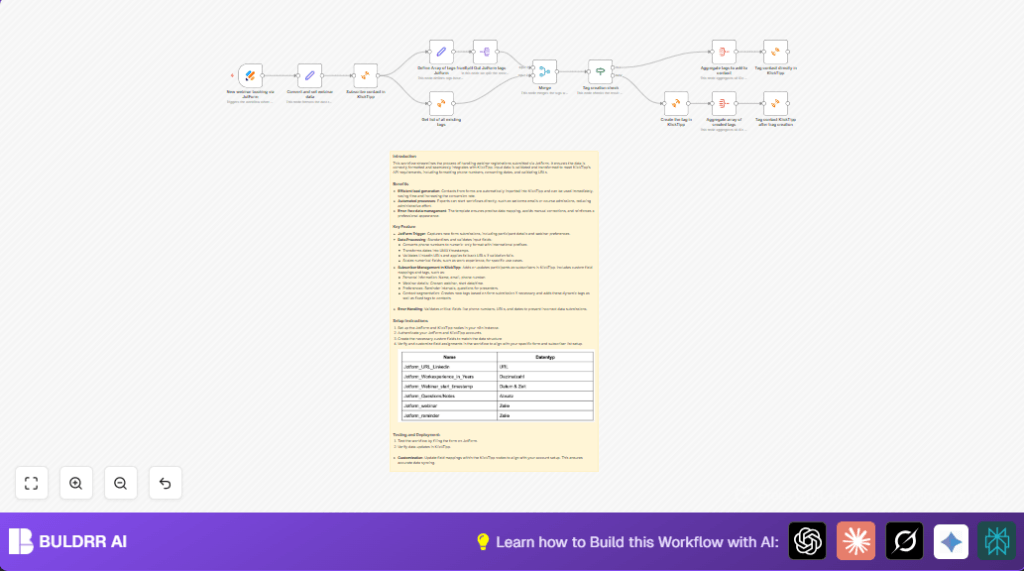

What This Workflow Does
This workflow automatically moves webinar signup data from JotForm to KlickTipp.
It fixes data like phone numbers and dates before sending.
It adds new contacts to KlickTipp with all details and tags from the form.
It also checks for missing tags and creates them if needed.
This stops manual typing mistakes and saves a lot of time.
Tools and Services Used
- JotForm Trigger node: Gets new form submissions automatically.
- Set node: Changes raw data formats like phone number and dates.
- KlickTipp nodes: Add contacts, fetch tags, create tags, and tag contacts in KlickTipp.
- SplitOut node: Breaks an array of tags into one tag per item.
- Merge node: Combines form tags with existing KlickTipp tags for comparison.
- If node: Checks if tags already exist to decide if new tags need creating.
- Aggregate node: Groups created tags before assigning them to subscribers.
Workflow Inputs, Processing, and Outputs
Inputs
- Webinar registration data submitted via JotForm.
- Fields include name, email, phone, birthday, LinkedIn URL, work experience, webinar date/time, and questions.
Processing Steps
- Trigger activates when a new form is submitted.
- Set node formats phone numbers to start with “00”, converts birthdays and webinar dates to UNIX timestamps, checks LinkedIn URLs with regex, and adjusts work experience values.
- KlickTipp subscribe node adds the contact with all custom fields filled.
- Set node builds an array of tags based on webinar choices and reminders.
- SplitOut node breaks the tag array into single tags for individual checking.
- KlickTipp node fetches all current tags from KlickTipp.
- Merge node joins form tags and existing tags to see if tags exist.
- If node decides if tag needs creation or can be used directly.
- KlickTipp create tag node makes any missing tags.
- Aggregate node combines new tags.
- KlickTipp tag contact node assigns all applicable tags to the subscriber.
Outputs
- New KlickTipp subscriber with all custom fields accurately stored.
- Subscriber tagged with existing and newly created webinar-related tags.
Who Should Use This Workflow
This workflow fits marketers who get many webinar signups.
Especially useful if data entry takes lots of hours or causes errors.
Works well for teams wanting correct tags and fields in KlickTipp fast.
Users with JotForm forms and KlickTipp accounts will benefit most.
Beginner Step-by-Step: How to Use This Workflow in n8n
1. Import Workflow
- Click the Download button on this page to save the workflow file.
- Open the n8n editor where you want to run this automation.
- Choose “Import from File” and upload the saved workflow
2. Configure Credentials and IDs
- Enter your JotForm API Key in the JotForm Trigger node.
- Add your KlickTipp API Key and secret in all KlickTipp nodes.
- Verify the form ID in the JotForm Trigger matches your form ID.
- Update any email fields, tag names, or custom field IDs to match your KlickTipp setup.
3. Test and Activate
- Run a test form submission from your JotForm to check data passes through correctly.
- Look for correct subscriber creation and tagging in KlickTipp.
- After confirming no errors, activate the workflow by turning it on.
Once active, every new webinar registration will be handled automatically.
You can also monitor logs for errors or success messages.
Consider self-host n8n if running the workflow on your own server is needed for stability or privacy.
Customization Ideas
- Change tags in the “Define Array of tags from Jotform” Set node to fit different webinar types.
- Adjust the JavaScript date conversion to handle local time zones.
- Add more custom form fields like company name or job title in the subscribe node.
- Update LinkedIn URL fallback to point to another default page.
- Edit phone number formatting to support other country codes.
Common Problems and Fixes
- Webhook not firing: Check if form ID is correct and JotForm credentials are valid.
- Wrong phone format: Ensure phone numbers start with ‘+’ in the form and review conversion script.
- Tags missing: Confirm tag names match between form data and KlickTipp; check merge outputs.
- API errors: Review KlickTipp API limits or permissions and look at node execution errors.
Pre-Production Checks
- Confirm JotForm Trigger captures submissions by checking recent executions.
- Validate data formatting in the “Convert and set webinar data” Set node output.
- Test authentication for KlickTipp API nodes.
- Verify new tags create properly if missing.
- Perform a test registration and verify subscriber appears in KlickTipp with tags and fields.
Summary of Results
✓ Saves time by stopping manual data entry.
✓ Prevents mistakes in subscriber details.
✓ Ensures all webinar signups get proper tags.
✓ Keeps email marketing lists accurate and up to date.
→ Automates data flow from registration to email campaigns.
→ Helps manage thousands of signups with ease.
Math.floor(
  new Date(
    $json.Geburtstag.year + '-' +
    $json.Geburtstag.month + '-' +
    $json.Geburtstag.day + 'T00:00:00'
  ).getTime() / 1000
)
The code above converts birthday fields into UNIX timestamp seconds.
This can be copied into the “Convert and set webinar data” node’s JavaScript expressions.
