
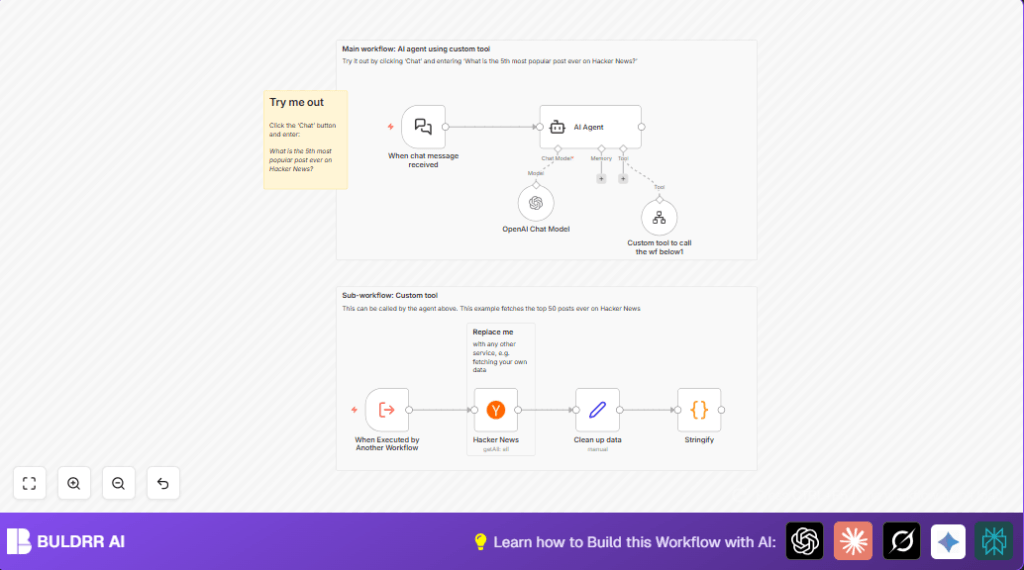

What This Automation Does
This workflow answers questions about Hacker News posts fast. It solves the problem of spending too much time copying and cleaning data from Hacker News. You send a chat question, and the workflow gives a clear answer using live data from Hacker News.Top 50 posts are fetched, cleaned, and shown in the chat automatically.
It reads your question, grabs post info, cleans it, turns it into JSON, sends it to an AI model, and then shares a short, clear reply. This saves hours spent on manual work and makes faster, smarter decisions possible.
Who Should Use This Workflow
Anyone who wants quick insights from Hacker News without coding. Good for people tracking tech trends, content creators, or data analysts who need fast answers.
Also helpful for those wanting to automate data fetching and AI answers inside n8n, especially if tired of manual scraping and slow reports.
Tools and Services Used
- LangChain chat trigger node: Listens for chat messages.
- Custom tool workflow node: Calls a sub-workflow to get Hacker News data.
- Hacker News node (n8n built-in): Fetches top 50 posts.
- Set node: Cleans and reforms data fields.
- Code node: Turns cleaned data into JSON string.
- OpenAI Chat Model node: Uses GPT-4o-mini to understand queries.
- AI Agent node: Runs the AI conversation and calls tools.
How This Workflow Works (Inputs → Process → Output)
Inputs
The main input is a chat message. You type a question like, “What is the 5th most popular post ever on Hacker News?” The When chat message received node gets this.
Processing Steps
- The AI Agent node reads the question and knows a tool to fetch post data.
- The Custom tool workflow calls the sub-workflow named “hn_tool”.
- Inside “hn_tool”: the Hacker News node gets top 50 posts.
- The Set node cleans each post, keeping title, points, URL, author, and date.
- The Code node converts the cleaned list into one JSON string.
- The JSON string returns to the AI Agent, which uses the OpenAI Chat Model with GPT-4o-mini to answer the question.
Output
The workflow sends back a clear answer in your chat. It combines the fresh Hacker News data with AI analysis to give you quick, accurate info.
Beginner Step-by-Step: How to Use This Workflow in Production
Download and Import
- Click the Download button on this page to get the workflow file.
- Go to your n8n editor where workflows are created.
- Use the “Import from File” option to load the downloaded workflow.
Configure Credentials
- Add your OpenAI API Key in the credential manager.
- Make sure the Hacker News node is ready (usually no key needed).
- Check the Custom tool workflow node has the correct workflow ID for the sub-workflow.
Update IDs and Settings
- If the workflow uses any IDs like emails, channels, or folders, update them to match your environment.
Test
- Send a test chat message to the webhook URL from the When chat message received node.
- Watch the workflow run and check for errors.
Activate for Production
- Turn on the active switch for the workflow.
- Make sure your chat client accesses the webhook URL properly.
If hosting or running n8n on own server, check self-host n8n for hosting tips.
Inputs and Outputs
Input: One chat question about Hacker News posts.
Output: One AI-generated answer showing the info from Hacker News data.
Edge Cases and Failures
- If the webhook URL is wrong, the workflow won’t start.
- If Hacker News API is down or slow, the data fetch step fails.
- If JSON paths in the clean data step are wrong, AI won’t get correct info.
- If OpenAI API key is missing or limited, AI responses won’t work.
- Add error nodes after key steps to handle problems nicely.
Customization Ideas
- Change the number of Hacker News posts fetched by updating the “limit” field.
- Add new data fields, like comments count, to the cleaning node.
- Switch the AI model inside the OpenAI Chat Model to GPT-4 for richer answers.
- Modify the sub-workflow to filter posts by date or tags.
- Add error handling nodes to manage API limits or connection problems.
Summary of Benefits and Results
✓ Saves hours by automating data fetch and cleanup.
✓ Answers Hacker News post questions instantly with AI insight.
✓ Easy integration into chat interfaces using n8n.
✓ Minimizes manual errors and delays.
→ Provides reliable and updated data combined with GPT-4o-mini AI.
→ Frees user time for strategy instead of data work.
